5 | Operating the machine Brielmaier Motormäher GmbH
64 BA Motor mower S250 (Version 2021/09)
5.8.4 Adjusting the speed
To adjust the speed:
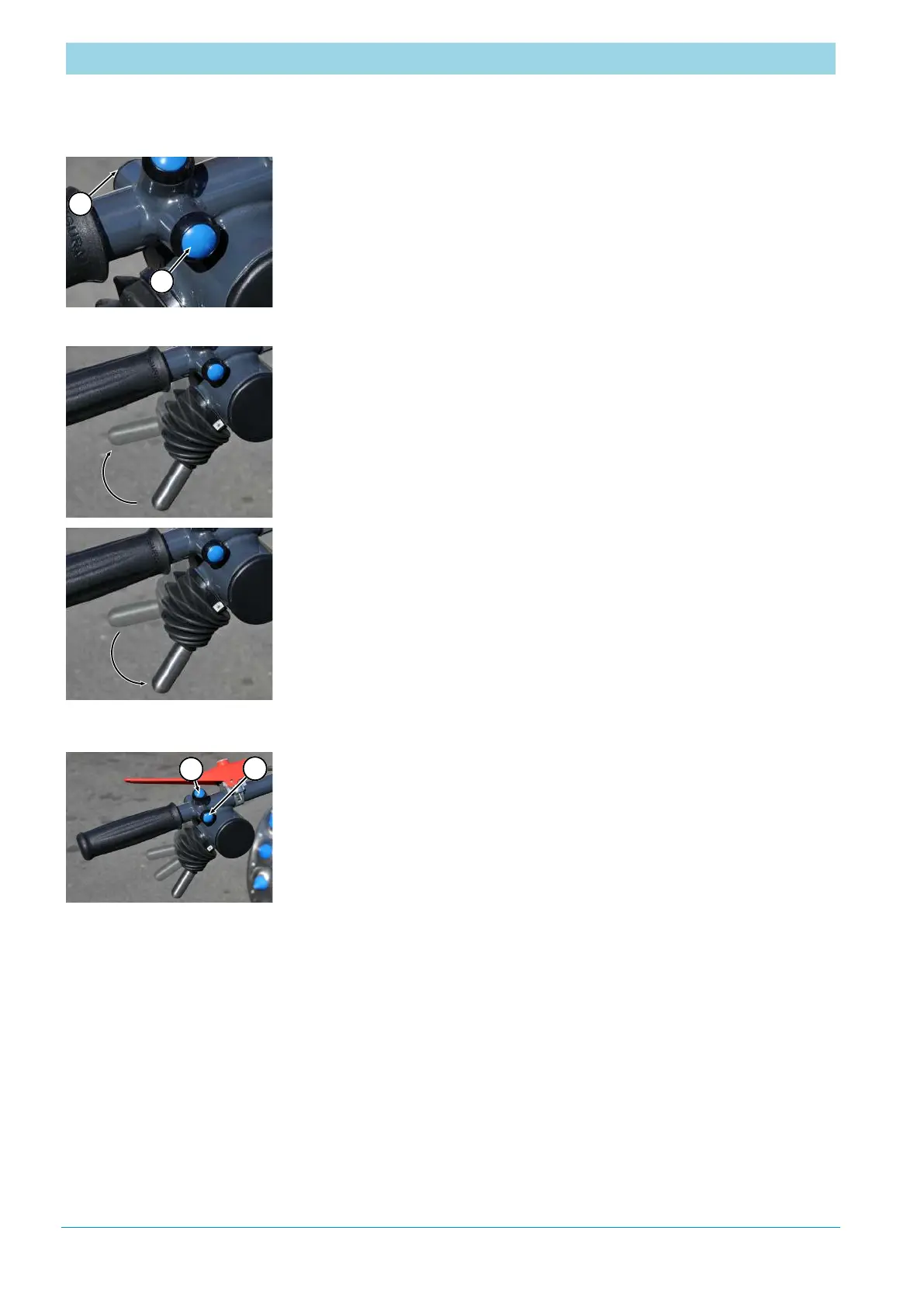
a) Press the "Speed level +" (2) or "Speed level -" (1) button to select the
speed level (1 to 3).
b) Adjust speed within the selected speed level (1 to 3) using
- Fine adjustment or
- Clutch/brake lever.
To select the fine adjustment:
a) Press and hold the "Speed level +" button (2) or "Speed level -" button
(1).
To reduce the speed (continuously for a short time):
a) Slowly pull the clutch/brake lever up (not up to the stop).
ð
The machine slows down, if necessary to a standstill, depending on the
lever position.
To increase the speed (continuously for a short time):
a) Let the clutch/brake lever to slowly return.
5.8.5 Loading the fine adjustment
To reload the last adjusted fine adjustment values of the driving speed
after switching on the machine again:
a) Press the "Change direction of travel" button (1) and
the "Speed level+" button (2) at the same time.
ð
The "Fault display / km/h" menu lamp flashes briefly.
ð
The last adjusted values are active.


 To Next Page