6. Service Procedures PreciseFlex 100 Robot
Calibrating the Robot: Setting the Encoder Zero Pos-
itions
Part Number: 603988 Rev. A
Step Action
3.
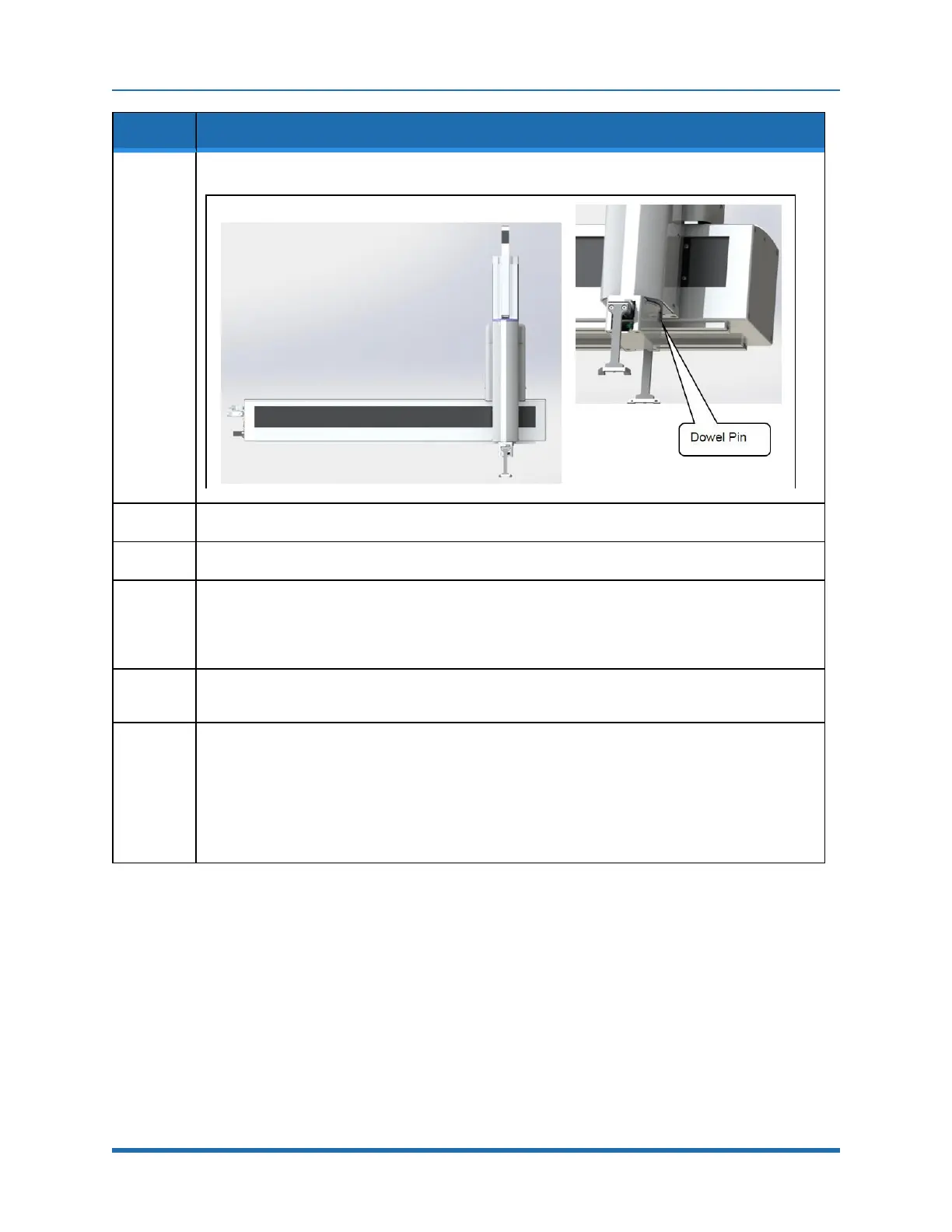
Manually move the robot into the following configuration. (XZTheta robot shown)
4.
Ensure that the X-axis is against the hard stop opposite the connector end cap.
5.
If a Y-axis is present, ensure that the Y-axis is pressed against the stop nearest the X-axis.
6.
Ensure that the Z-axis is at the hard stop at the top of the range of travel. To do this, first release the
Z-axis brake by pushing on the Brake Release button at the back of the Z -axis cover. Make sure to
support the robot arm by hand and raise the robot arm gently until it rests against the upper hard
stop.
7.
Remove the 3 mm tapered calibration pin from the plastic bag under the Z-axis cover, under the Z-
axis motor.
8.
Rotate the Theta axis all the way to the negative hard stop (counter-clockwise looking down at
Theta), then rotate it back about 20 degrees and insert the tapered dowel pin in the 3 mm hole in the
bottom of the Theta axis.
Rotate the Theta axis back in the negative direction until the gripper housing presses against the
dowel pin.
If the axis springs away from the pin due to the wire harness clock spring wind up, use masking tape
to hold the gripper housing against the pin.
88
Copyright © 2023 Brooks Automation, Inc.



 To Next Page