Board Mode
SMART MATRIX - 2-21 -
Board Mode
This function allows you to set the STOP output activation modes by the Board:
STANDARD mode: if an error occurs, the system generates the alarm and stops the process until the fault is
corrected.
MONITOR mode: if an error occurs, the system generates the alarm without stopping the process; if the
cause that generated the alarm is cleared, the signaling disappears without the operator intervention; during
the continuation of the process, other possible faults are normally signaled (option typically used for
extrusion applications)
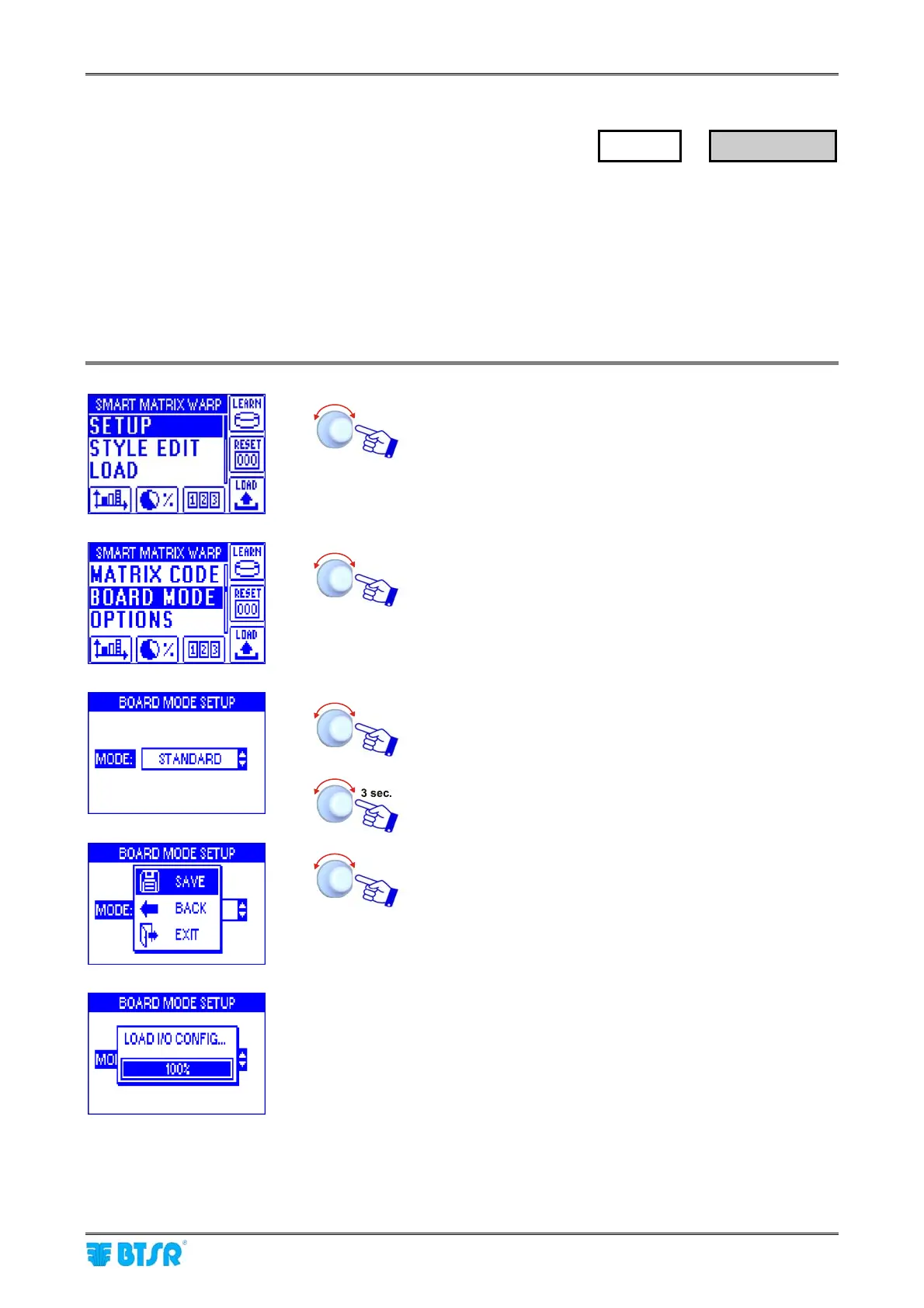
Enter the SETUP menu.
Select BOARD MODE.
Set the desired mode: STANDARD or MONITOR*.
* The SYNC option refers to a special configuration that
cannot be used in a general way
To confirm the selection.
SAVE to save the settings, BACK to go back to previous
screen without saving, EXIT to go back to the menu.
The LOAD I/O CONFIG wording will appear for a few
seconds, then the display will show the main menu.
SETUP
→
BOARD MODE










 To Next Page