Style Parameters Programming (IS3F)
SMART MATRIX - 2-42 -
Style Parameters Programming (IS3F)
This function allows you to program the detection parameters of IS3 sensors.
For detailed information about the individual parameters, please refer to Section 3: System
Components and Configuration – IS3 Sensors.
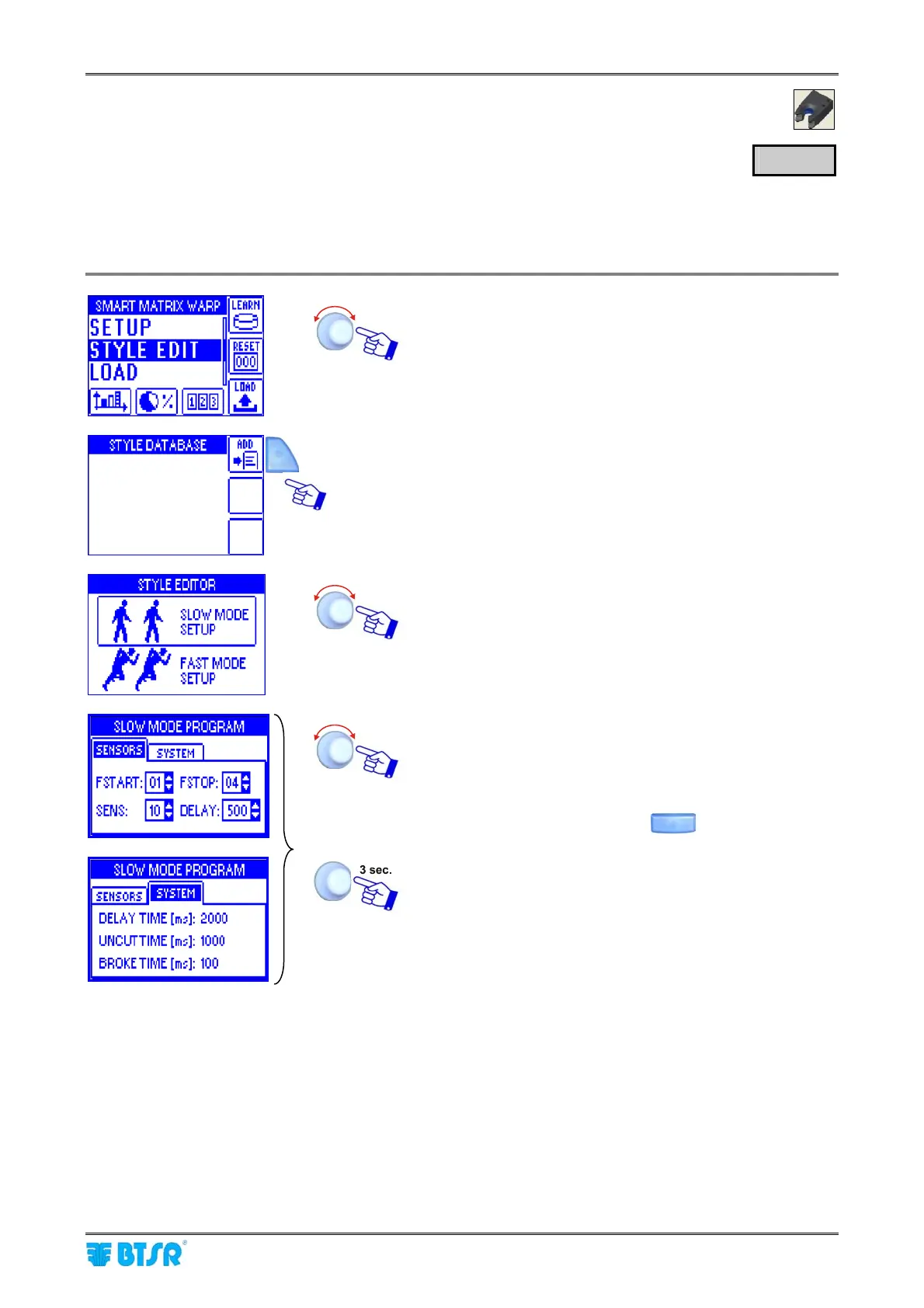
Select the STYLE EDIT menu item.
To create a new style and add it to the database.
Select SLOW MODE SETUP. (*)
Set the desired SLOW parameters.
To speed-up the value increasing/decreasing, turn the
selector, holding down the button
To activate the style saving function.
(*)If on the OPTIONS menu, SINGLE has been set for STYLE EDITOR MODE, then the SLOW MODE
SETUP or FAST MODE SETUP selection screen will not appear, and the header of parameter setting
screen will be PARAMETERS PROGRAM, instead of SLOW(FAST) MODE PROGRAM
STYLE










 To Next Page