Lamps (ACT/D) Configuration and Numbering
SMART MATRIX - 2-17 -
Lamps (ACT/D) Configuration and Numbering
This function allows you to identify the ACT/D modules used to drive the lamps that signal the error
conditions on the machine.
You may assign a lamp to each Row, Column or Bar (according to the priority defined with the IDENTIFY
function), with the possibility to add a lamp for each Creel.
In case of failure detected by a sensor, the lamp associated to sensor Column or Row or Bar and (if
configured) the lamp associated with the Creel, will light.
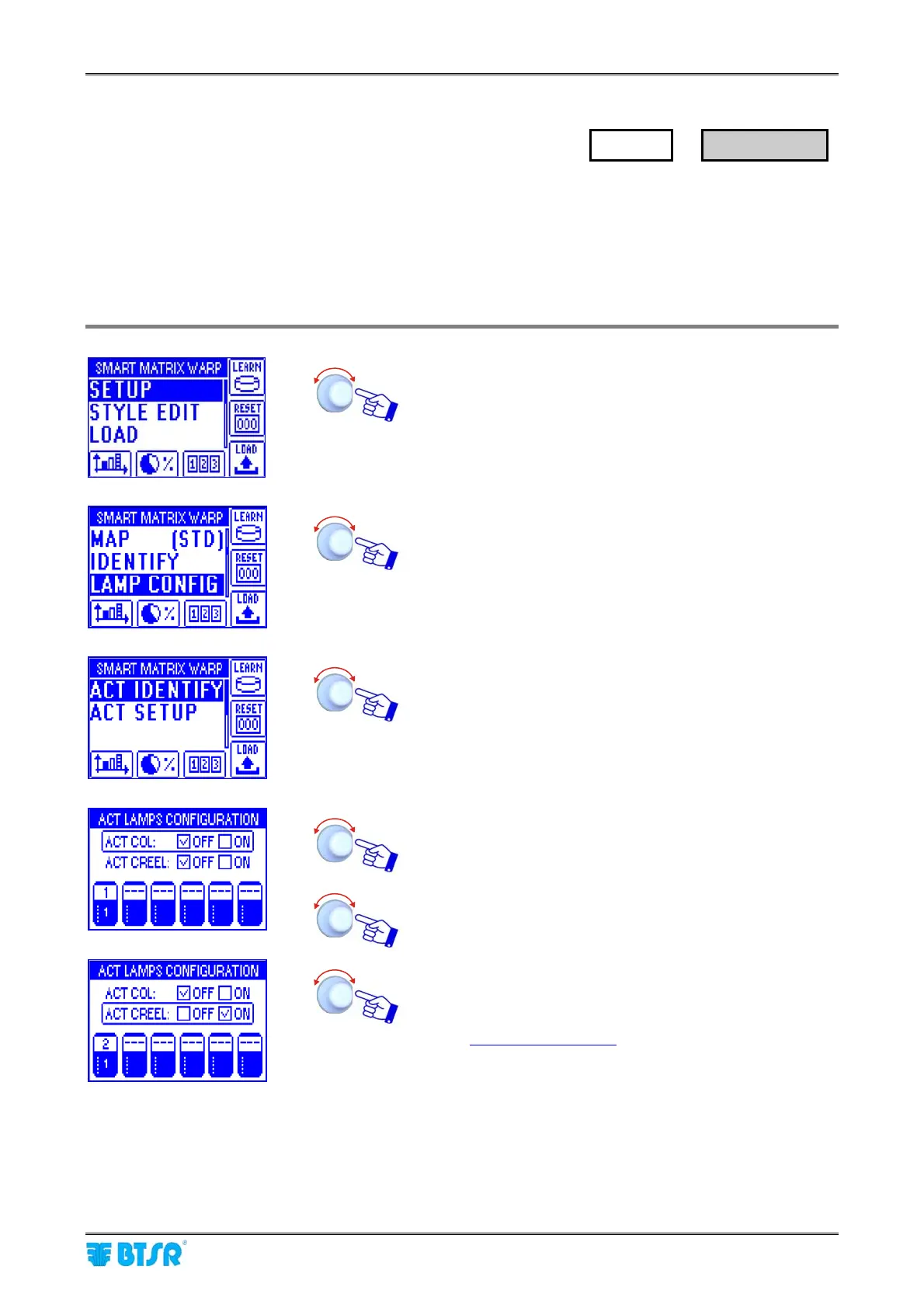
Enter the SETUP menu.
Select LAMP CONFIG.
Select ACT IDENTIFY.
Point and select ACT COL (*)
Choose whether you use (ON) or do not use (OFF) the
lamps (ACT/D) associated with the Columns and confim,
then point ACT CREEL.
Choose whether you use (ON) or do not use (OFF) the
lamps (ACT/D) associated with the Creels and confirm,
then point the symbol of 1
st
Board.
(*) If in SETUP → IDENTIFY
the Row or Bar priority was
selected, then ACT ROW or ACT BAR will appear.
SETUP
→
LAMP CONFIG










 To Next Page