Sensor Configuration and Numbering
SMART MATRIX - 2-12 -
Sensor Configuration and Numbering
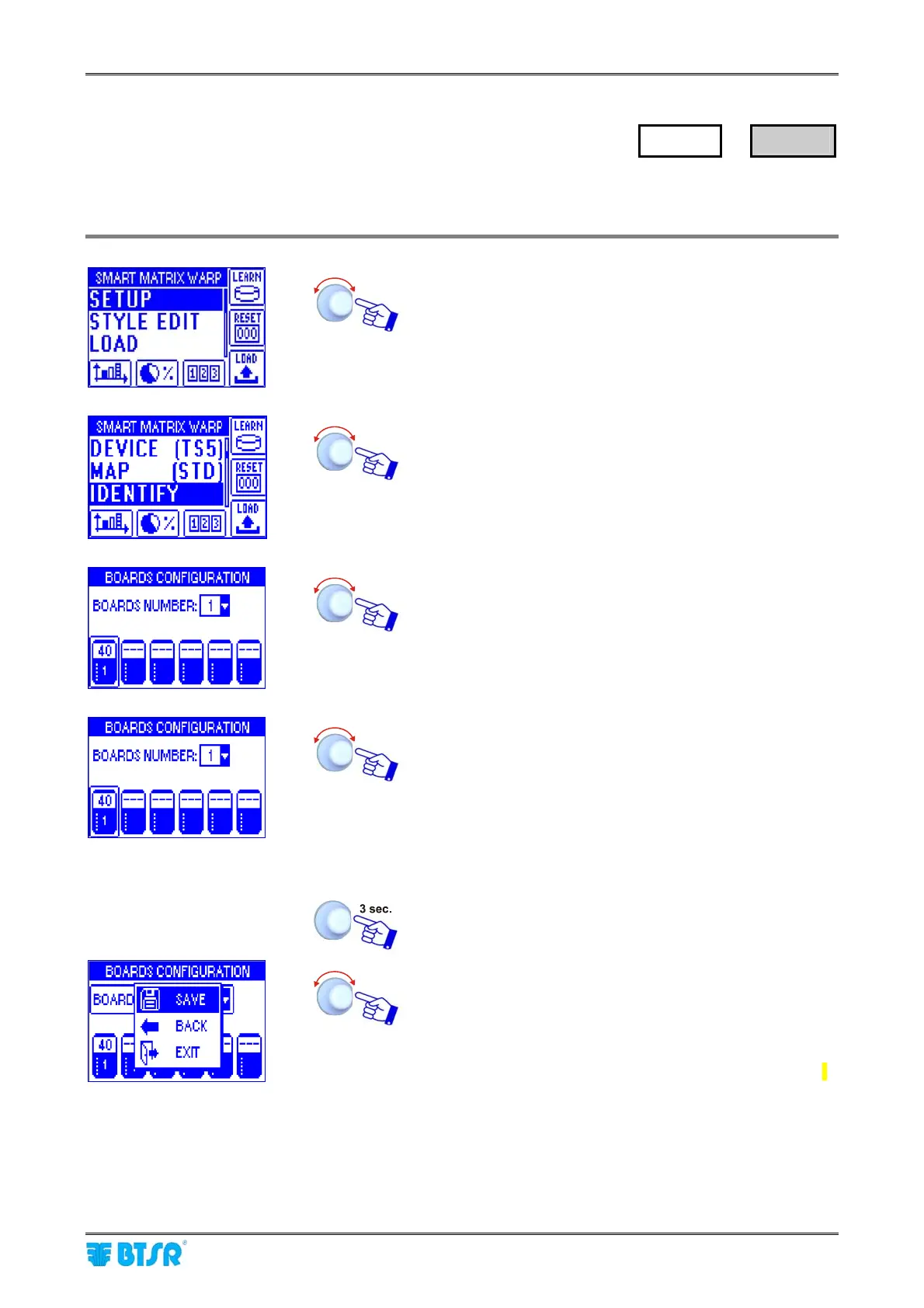
This function allows you to univocally identify each IS3/TS5/TS7 device connected to SM-DIN WARP
Boards; moreover it allows to define the creel structure (level number, priority, etc.)
Enter the SETUP menu.
Select IDENTIFY.
• Point and select BOARDS NUMBER:
• Set the number of SM-DIN WARP Boards used [1..100]
• Point the symbol of 1
st
Board.
• Select the field indicating the number of sensors
connected to Board 1 (default 100).
• Set the number of sensors actually connected to Board
1 (e.g. 40) and confirm.
• Point the symbol of 2
nd
Board and so on for all the
Boards used.
Once you have configured all the Boards.
SAVE to save the settings.
Now it will be necessary to define the creel
configuration. For more details, please refer to
Section 3: System Components and Configuration.
SETUP
→
IDENTIFY










 To Next Page