Options
SMART MATRIX - 2-22 -
Options
This function allows you to choose the desired operation modes for sensor numbering and for style
parameter settings.
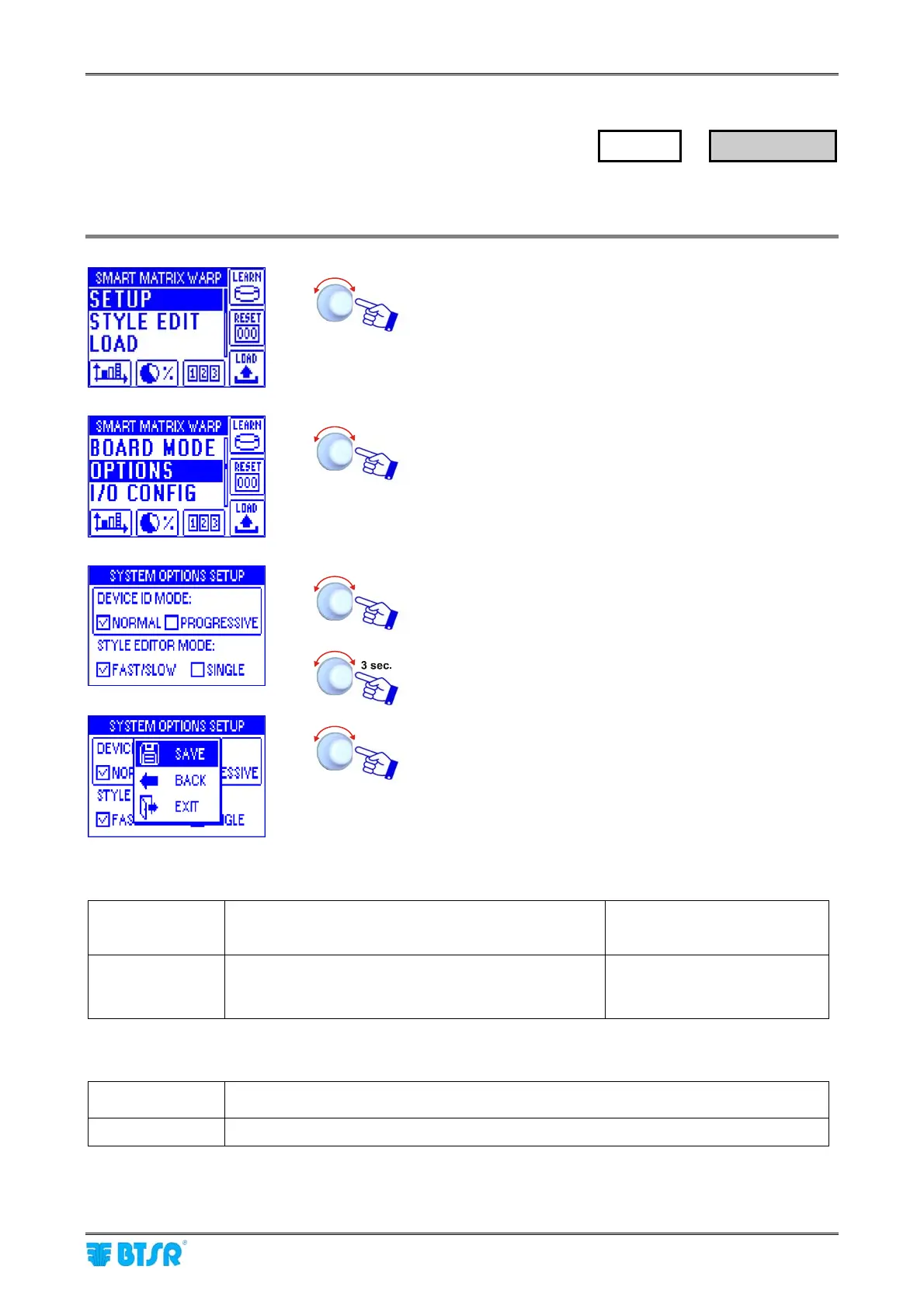
Enter the SETUP menu.
Select OPTIONS.
Set DEVICE ID MODE as NORMAL or PROGRESSIVE
and STYLE EDITOR MODE as FAST/SLOW or SINGLE
(see the comment below)
To confirm the settings.
SAVE to save the settings, BACK to go back to previous
screen without saving, EXIT to go back to the menu
DEVICE ID MODE: (example with 3 creels and 120 total sensors)
NORMAL Sensor numbering within each creel Creel A: ID 1 ÷ 40
Creel B: ID 1 ÷ 40
Creel C: ID 1 ÷ 40
PROGRESSIVE Progressive sensor numbering Creel A: ID 1 ÷ 40
Creel B: ID 41 ÷ 80
Creel C: ID 81 ÷ 120
STYLE EDITOR MODE:
FAST/SLOW Possibility of using 2 different parameter sets, selectable with the FAST/SLOW
external signals
SINGLE Single parameter set utilization
For more details about FAST/SLOW signal synchronization, please refer to section 3 – System
Components and Configuration.
SETUP
→
OPTIONS










 To Next Page