38 - 8630
FIRST COMMISSIONING
After selection of the basic settings and return to the AUTOMATIC mode, the TOP
Control Continuous
works as a positioner.
Enter the position setpoint via the signal.
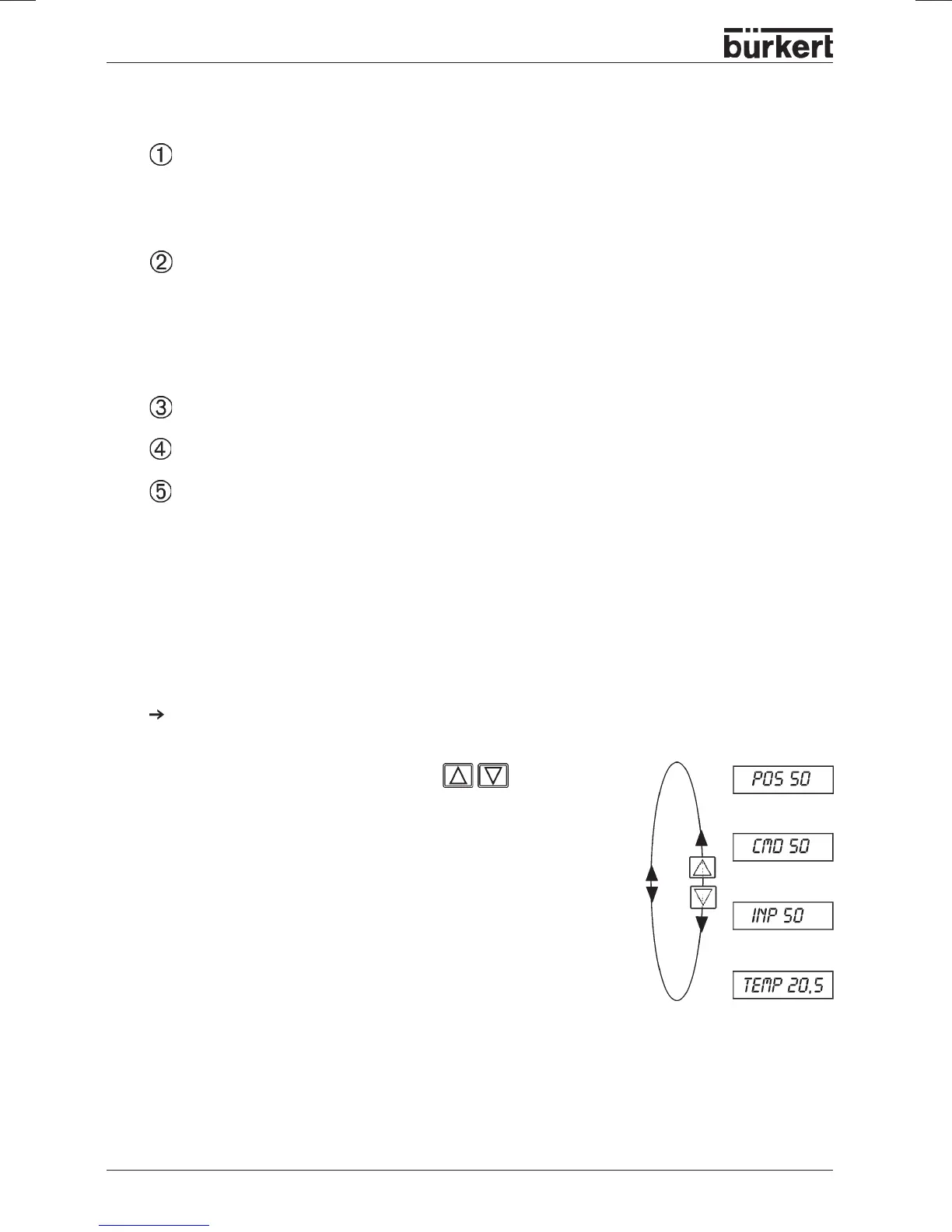
Switching between the
display options:
Display:
• Actual position of valve actuator
POS__XXX
(0 ... 100 %)
• Setpoint position of valve actuator
CMD__XXX
(0 ... 100 %)
• Input signal for setpoint position
INP__XXX
(here identical to setpoint position) (0 ... 5/10 V or 0/4 ... 20 mA)
• Temperature inside
TOP Control Continuous housing
TEMP_XX.X
(in °C)
Settings in the menu items
ACTFUNC
Actuator function
FUNC SNGL
- single-acting
FUNC DOUB
- double-acting
INPUT
Standard signal
INP 4’20A
- Current 4 ... 20 mA
INP 0’20A
- Current 0 ... 20 mA
INP 0’10V
- Voltage 0 ... 10 V
INP 0’5V
- Voltage 0 ... 5 V
ADDFUNCT
Jump over
X.TUNE
Initiate self-parametrization
END XX
Return to AUTOMATIC
mode
;
the display
EEPROM
appears until the settings have been in the
memory.
Entering the position setpoint in the AUTOMATIC
mode



 To Next Page