335
3
Shooting Video Snapshots
8
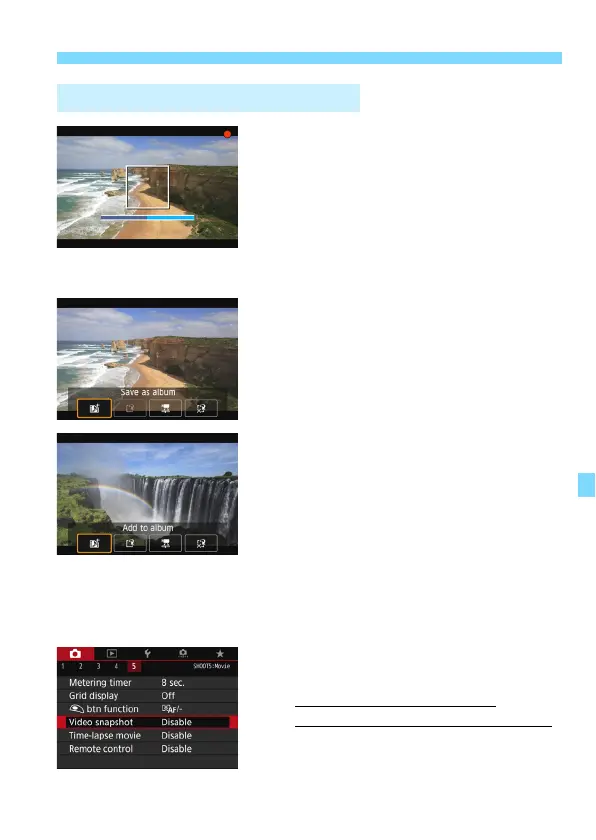
Shoot the first video snapshot.
Press the <
0
> button, then shoot.
The blue bar indicating the shooting
duration will gradually decrease. After
the set shooting duration elapses, the
shooting stops automatically.
The confirmation screen will appear
(p.336-337).
9
Save as a video snapshot album.
Select [
J
Save as album
], then
press <
0
>.
The movie clip will be saved as the
video snapshot album’s first video
snapshot.
10
Continue to shoot more video
snapshots.
Repeat step 8 to shoot the next video
snapshot.
Select [
J
Add to album
], then press
<
0
>.
To create another video snapshot
album, select [
W
Save as a new
album
].
Repeat step 10 as necessary.
11
Exit the video snapshot shooting.
Set [
Video snapshot
] to [
Disable
].
To return to normal movie
shooting, be sure to set [Disable].
Press the <
M
> button to exit the
menu, and return to the normal movie
shooting.
Creating a Video Snapshot Album



 To Next Page