1.
Loading and Checking the Battery
~
0
(
~,.
@
g
0"",,,,.<
r--
....
'----
~
0
~
10
~,.
0
"
""
,.
<
:::n:
Al
l buttons used for changing camera func-
tions are equipped with a six-second timer.
After pressing and releasing the button, the
operation mode activated by the button re-
mains acti
ve
for six seconds. During this time
period, necessary information for the selected
mode
is
displayed
in
the viewfinder and
LCD
panel.
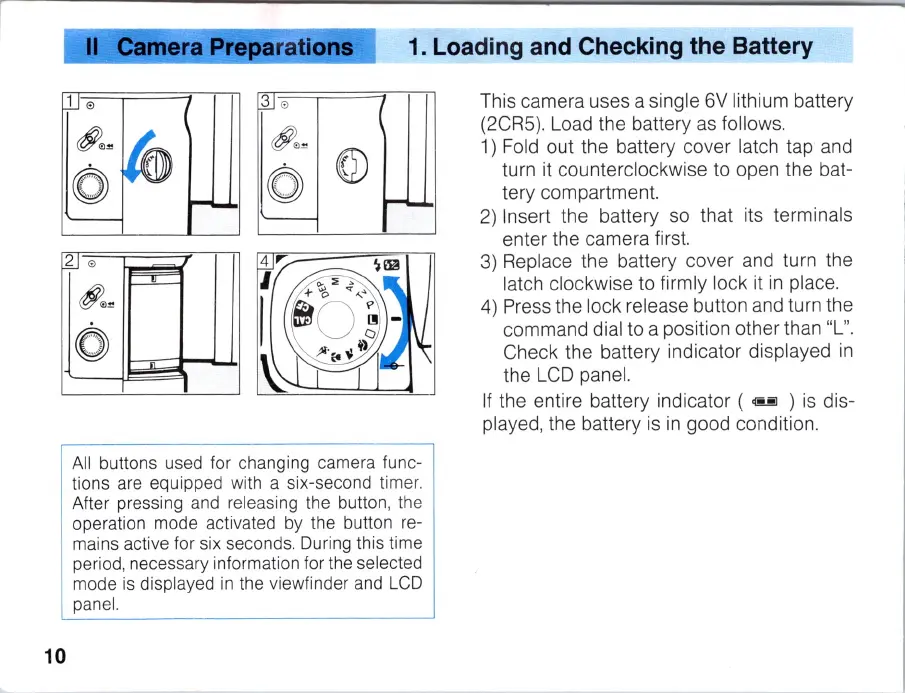
This camera uses a single
6V
lithium battery
(2CR5). Load the battery
as
follows.
1)
Fold
out the battery cover latch tap and
turn it counterclockwise to open the bat-
tery compartment.
2)
Insert the battery so that its terminals
enter the camera first.
3)
Replace the battery cover and turn the
latch clockwise to firm ly lock it
in
place.
4) Press the lock release button and turn the
command dial to a position other than "L
".
Check the battery indicator displayed
in
the
LCD
panel.
If
the entire battery indicator (
@!!l
)
is
dis-
played, the battery
is
in
good condition.



 To Next Page