58
V Custom Function Control
3
COE'
DO
Th
e number
in
the
LCD
panel alternates be-
tween 0 and 1 each
ti
me
the custom function
set button
is
pressed.
1:
Sets the custom function to the custom set-
ting.
0: Resets the custom function to the standard
setting.
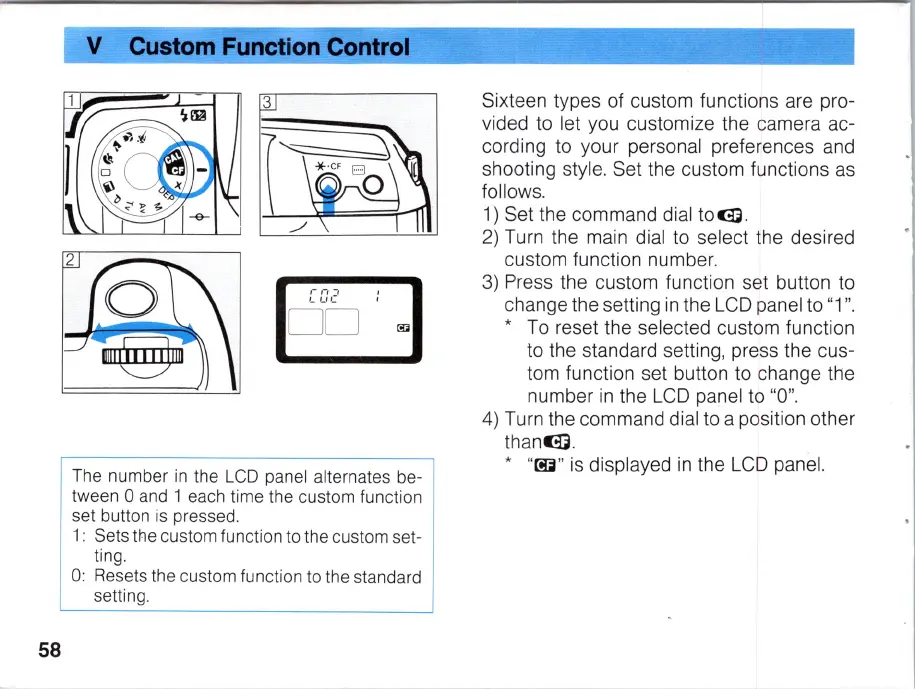
Sixteen types of custom functions are pro-
vided to let you customize the camera ac-
cording to your personal preferences and
shooting style. Set the custom functions
as
follows.
1)
Set the command dial
to~.
2)
Turn the main dial to select the desired
custom function number.
3)
Press the custom function set button to
change the setting
in
the
LCD
panel to "1
".
*
To
reset the selected custom function
to the standard setting, press the cus-
tom function set button to change the
number
in
the
LCD
panel to
"0
".
4)
Turn the command dial to a position other
thanGi
.
*
"
~
"
is
displayed
in
the
LCD
panel.



 To Next Page