EasyManua.ls Logo

Canon EOS A2E - Canon EOS A2 E IB_0059

Canon EOS A2E
80 pages
Print Icon
To Next Page IconTo Next Page
To Previous Page IconTo Previous Page
Loading...
VI
Reference
1.
Exposure
Warnings
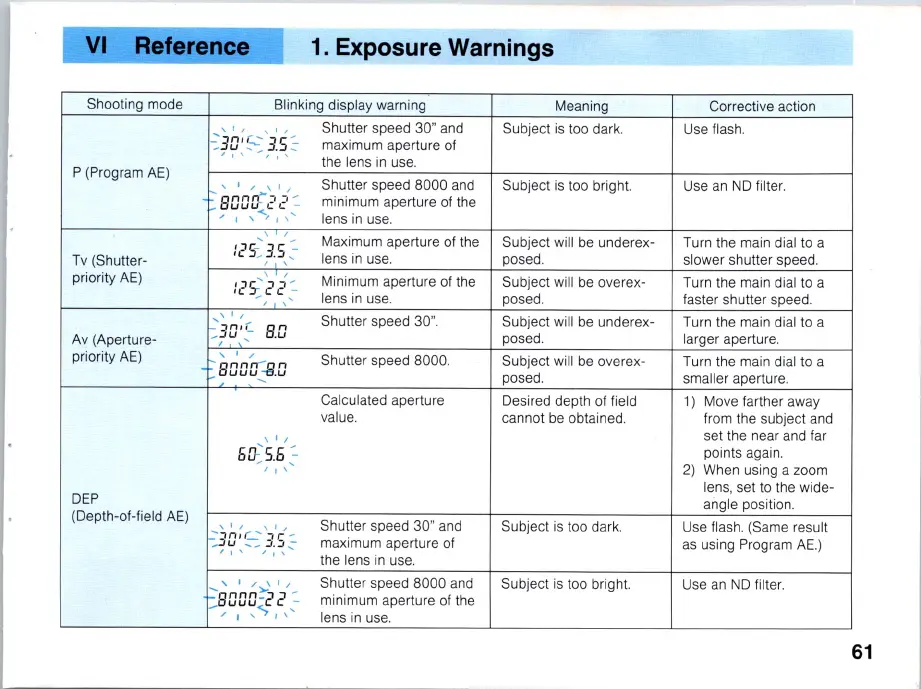
Shooting mode
P (
Pr
ogram
AE)
Tv
(Sh
utter-
priority
AE)
Av
(A
perture-
priority
AE)
DEP
(Depth-of-fie
ld
AE)
Blinking display warni
ng
, " ' " S
hu
tter speed 30" a
nd
-:
30
'
s:
3.5
::-
maximum aperture of
, I ' , I "
the
lens
in
use.
, ' /
800
[(
-8
.0
Ei
o:S
.E{
~
'I'
Shutter speed 8000 and
minimum aperture of the
lens in use.
Maximum aperture of the
lens
in
use.
Minimum aperture of the
lens in use.
Shutter speed 30
".
Shutter speed 8000.
Calculated apertu
re
va
lue.
Shutter speed 30" a
nd
maximum aperture
of
the lens in use.
Shutter speed 8000 and
minimum aperture
of
the
lens in use.
Meaning
Subject is too da
rk
.
Subject is too brigh
t.
Subject
wi
ll
be underex-
posed.
Subject will be overex-
posed.
Subject will be underex-
posed.
Subject will
be
overex-
posed.
De
sired depth
of
field
cannot be obtained.
Subject
is
too dark.
Subject
is
too brig
ht.
Corrective
ac
tion
Use flash.
Use an
ND
filter.
Turn the main dial to a
slower shutter speed.
Turn the main dial to a
faster shutter speed.
Turn the main dial to a
larger apertur
e.
Turn the main dial to a
smaller aper
tu
re
.
1) Move farther away
from the subject and
set the near and far
pOints again.
2)
When using a zoom
lens, set
to
the w
id
e-
angle position.
Use flash. (Same result
as
using Program
AE.)
Use
an
ND
filter.
61

Table of Contents

Related product manuals