28
4. Selecting the AF M
ode
a
ISO
-A
EB-(§)
Lre_·
'I
)J
When
the subject
is
focused
in
One-shot
AF
mode, the corresponding AFframe lights
red
in
the viewfinder,
and
the in-focus indicator lights
up
. At the same time, the shutter speed
and
aperture value are displayed
in
the viewfinder
and
LCD
panel.
If
you remove your finger after pressing the
shutter button
to
the halfway position, the in-
focus indicator will disappear, but the camera
timer will keep the viewfinder
and
LCD
panel
displays lit for six seconds.
Three
types
of
autofocusing
are available:
One-shot
AF,
AI
Servo
AF and AI Focus AF. AI
Focus AF is active
only
in Full
Auto
( 0 )
mode. Manual
focusing
is also available.
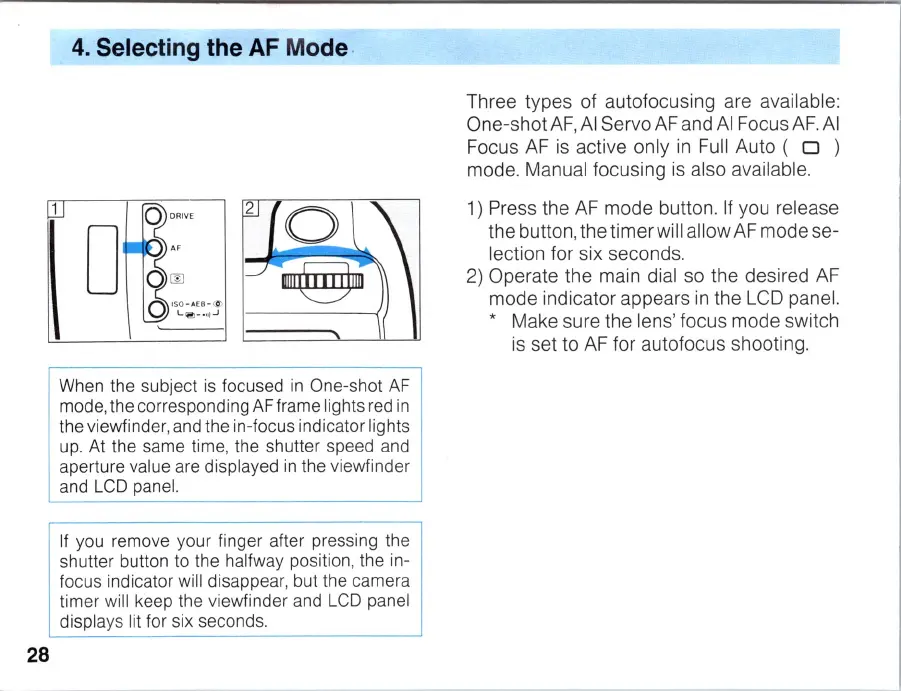
1) Press
the
AF
mode
button. If you release
the
button,
the
timer
will
allow
AF
mode
se-
lection for six seconds.
2)
Operate
the
main dial
so
the
desired AF
mode
indicator
appears
in
the
LCD panel.
* Make sure
the
lens'
focus
mode
switch
is
set
to
AF for
autofocus
shooting.



 To Next Page