o -0 :p "0" 0
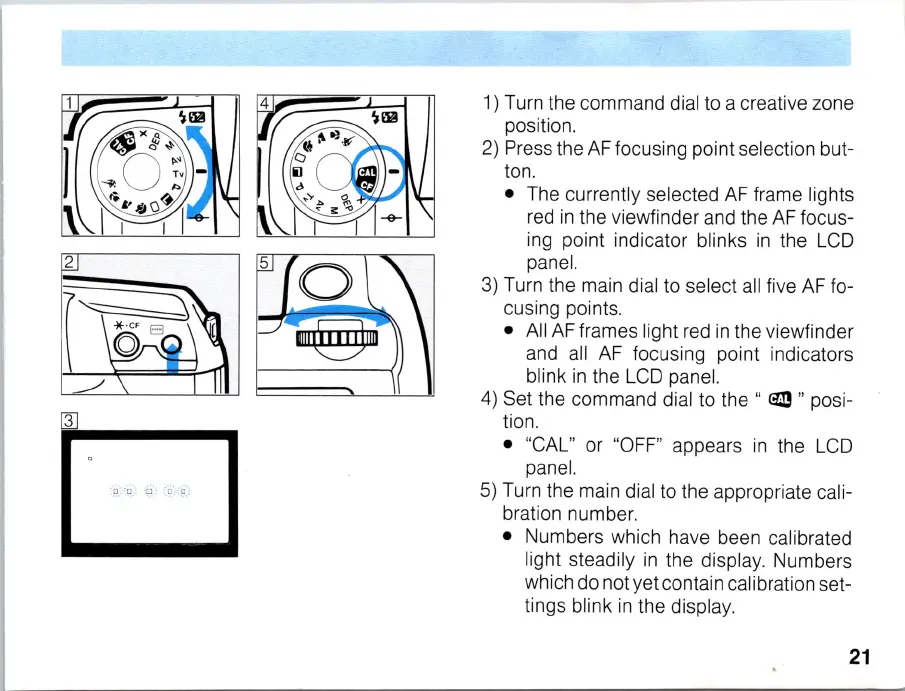
1)
Turn the command dial to a creative zone
position.
2)
Press the
AF
focusing point selection but-
ton.
• The currently selected
AF
frame lights
red
in
the viewfinder and the
AF
focus-
ing point indicator blinks
in
the
LCD
panel.
3)
Turn the main dial to select
all
five
AF
fo-
cusing points.
• All
AF
frames light red
in
the viewfinder
and
all
AF
focusing point indicators
blink
in
the
LCD
panel.
4)
Set the command dial to the "
em
" posi-
tion.
• "CAL" or "
OFF
" appears
in
the
LCD
panel.
5)
Turn the main dial to the appropriate cali-
bration number.
• Numbers which have been calibrated
light steadily
in
the display. Numbers
which do not yet contain calibration set-
tings blink
in
the display.
21



 To Next Page