40
• After setting the desired compensation
amount, it
is
a good idea to set the quick
control dial switch to 0 to prevent ac-
cident
al
alteration of the setting.
• To check the flash exposure compen-
sation amount, pop up the flash and
press the flash button.
• Flash exposure compensation remains
set until manually canceled. To cancel,
repeat steps 2 and 3 to reset the flash
exposure compensation amount to 0,
then set the quick control dial switch to
o .
• Flash exposure compensation and
AE
exposure compensation can be set in-
dependently and used together.
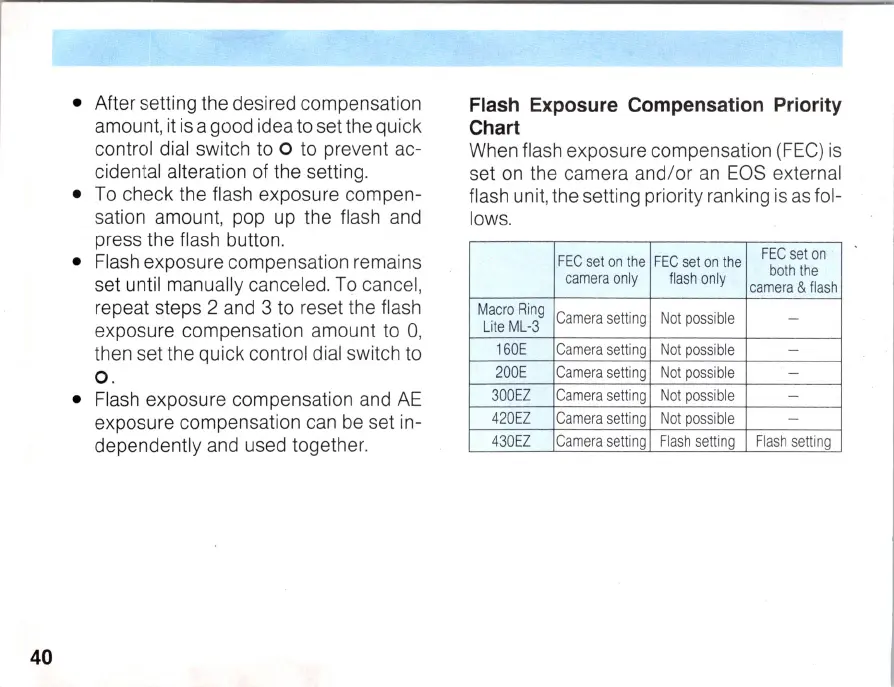
Flash Exposure Compensation Priority
Chart
When flash exposure compensation (FEe) is
set on the camera and/or
an
EOS external
flash unit, the setting priority ranking is as fol-
lows.
FE
C
set
on
the
FE
C
set
on
the
FE
C
set
on
camera
only
fl
as
h o
nl
y
both
t
he
camera
&
flash
Ma
cro
Ring
Camera
setting
Not
possible
-
Lite M
L-
3
160
E
Camera
setting
Not
possible
-
200
E
Camera
setting
Not
possible
-
300
EZ
Camera
setting
Not
possible
-
420
EZ
Camera
setting
Not
possible
-
430
EZ
Camera
setting
Flash
setting
F
lash
setting



 To Next Page