3-CONTROLS/INSTRUMENTS
NOTE:Iftheyarestillselectedwhentheengineis
stopped,theywillremainactivewhentheengineis
restarted.
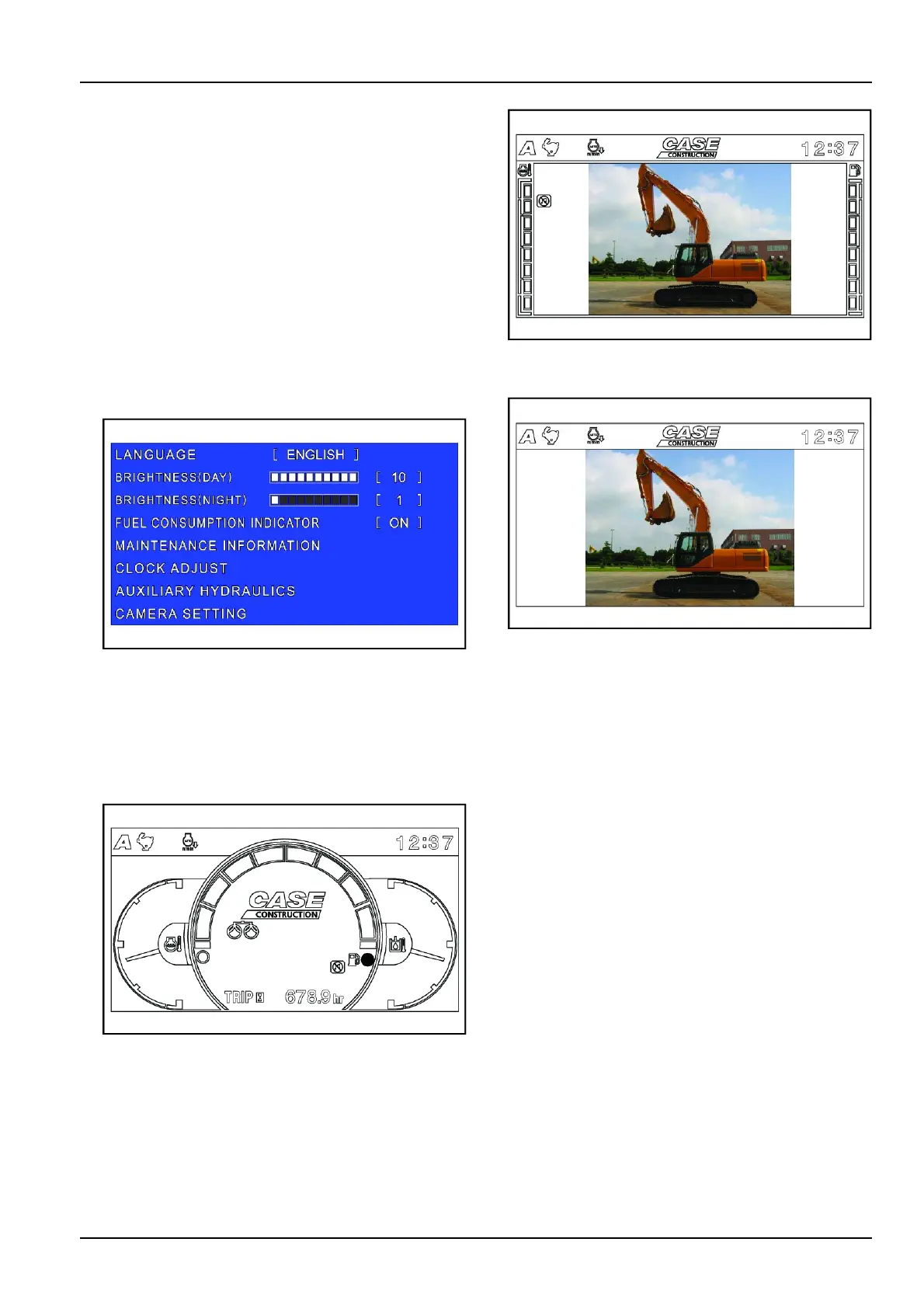
7.Menuscreendisplayswitch
Pressthisswitchtodisplaythemenuscreen.
Themenucontainsthefollowingitems.
Language
Brightness(day)
Brightness(night)
Fuelconsumptionindicator
Maintenanceinformation
Clockadjust
Auxiliaryhydraulics
Camerasetting
Usetheswitchshowninthediagramtoselectora
changeamenuitem.
SMIL13CEX2601AA2
Refertopage3-20.
8.Cameradisplayswitch
Pressthisbuttontoswitchbetweenthemachine
informationscreen,machineinformation+camera
jointdisplay,andcameraimageindependentdisplay
(mode,travelmode,clockandwarningonly).
•Mode1:Normalscreen
SMIL13CEX2602AA3
Machineinformationscreen
•Mode2:Camerascreen
SMIL13CEX2603AA4
Machineinformationpluscamerajointdisplay
•Mode3:Camerascreenwithoutindicators
SMIL13CEX2604AA5
Cameraimageindependentdisplay(mode,travel
mode,clockandwarningonly)
The3typesaboveareavailableforselection.
9.Hourmeterselect/backmonitorselectswitch
Intheinformationscreen,hourmeterselectisen-
abled.
"Trip"control(partialhourmeter)
Usedtocalculateaspecicoperationtime.
Pressthecontroltosetthehourmeterdisplayto0and
displaythe"Trip"message.
Releasethecontrol.
Afterabout1min.,the"Trip"displaydisappearsand
thenormalhourmeterdisplayreturns.
Toviewthespecicoperationtime,pressthecontrol
andreleaseitimmediately.
Tocancelthespecicoperationtime,pressandhold
thecontrolforabout2sec.
Thespecictimedisplayreturnsto0.
NOTE:Ifthekeyisswitched“Off”,thehourmeter
goesout.Ifthehourmeterbuttonispressedafter
thekeyisswitched“Off”,onlythehourmeterwillbe
displayedfor20s.
NOTE:Whenacameraimageisdisplayed,thecam-
eraimageisswitchedeachtimethecameraselect
switchispressed.
3-19













 To Next Page