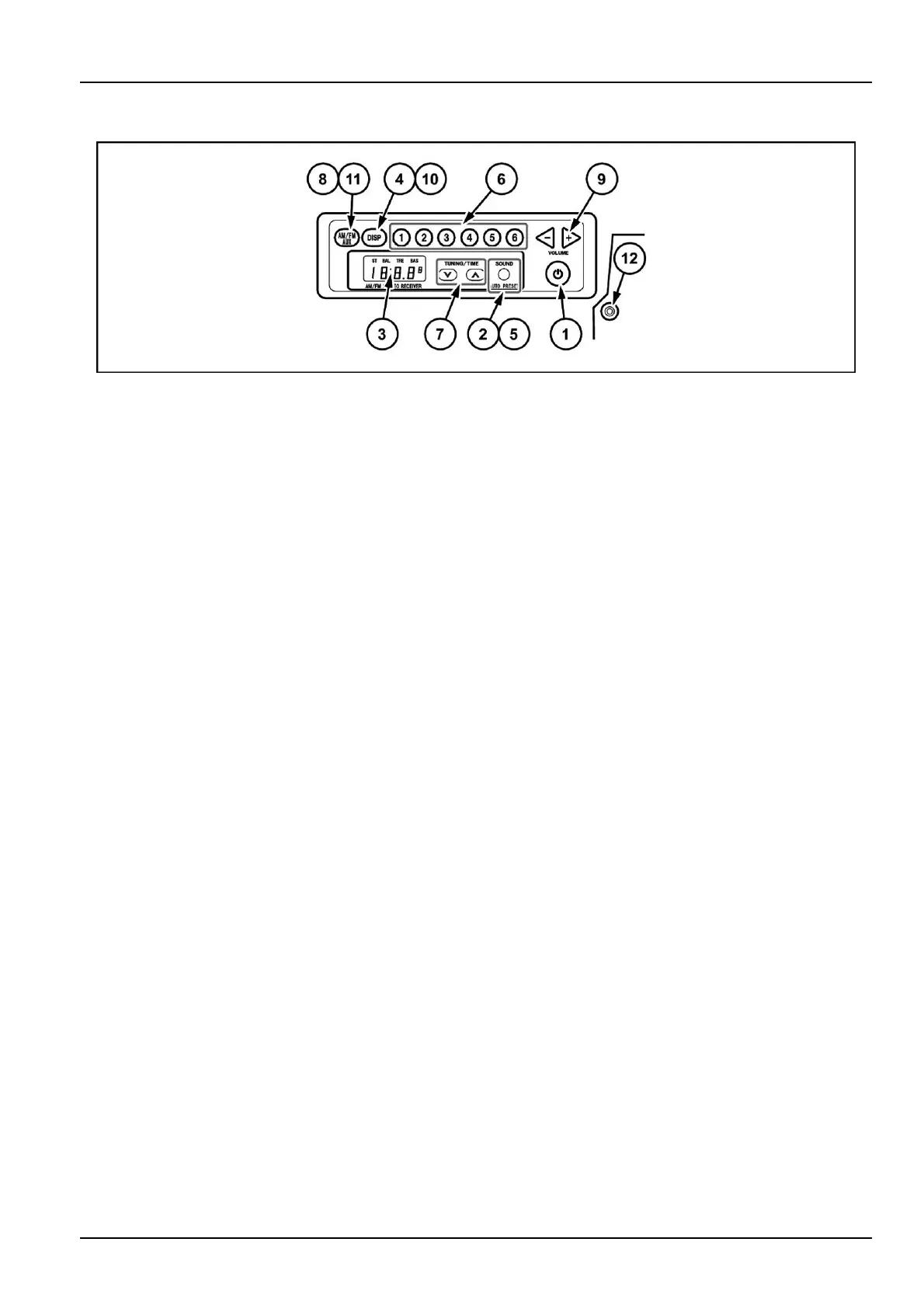
3-CONTROLS/INSTRUMENTS
Cabradio
L7XJ42-001A1
1.Powerbutton(Power)
PressingPowerbuttonturnsONthepower.Theband
nameisdisplayedfollowedbythefrequency.Pressing
itagainturnsOFFthepower.Clockisdisplayed.
2.Soundadjustment(SOUND)
PressingthisbuttonswitchesbetweenBALandTRE
andBAS.
PressingthebuttonwithBASselectedcancelsthe
soundadjustment.
•
PressingthetuningbuttonswithBAL(balance)se-
lectedallowsyoutomakeadjustments.Pressingthe
upbutton(7)raisestheoutputleveloftherightspeaker.
Pressingthedownbutton(7)lowertheoutputlevelof
theleftspeaker.(Outputlevelsofbothspeakersgoup
to7).
•
PressingthetuningbuttonswithTRE(treble)selected
allowsyoutomakeadjustments.Pressingtheupbut-
ton(7)raisesthelevelbyonestep.Pressingdown
button(7)lowersthelevelbyonestep.(Thelevelsgo
upanddownupto7).
•
PressingthetuningbuttonswithBAS(bass)selected
allowsyoutomakeadjustments.Pressingtheup(7)
buttonraisesthelevelbyonestep.Pressingdownbut-
ton(7)lowersthelevelbyonestep.
3.Displayunit
Theclock,radiofrequency,andoperationmodeare
displayed.
4.Clock/Frequencybutton(DISP)
Pressingthisbuttonswitchesthedisplaytotheclock.
Pressingitagaindisplaystheband.
Ifyouleavethedisplayalone,itreturnstothefre-
quencydisplayafter1.5seconds.
5.Autostore(SOUND/AUTOPRESET)
Whenthisbuttonishelddownforatleast2seconds,
receivablebroadcaststationscanbememorizedfor
presetbuttons1through6.
6.Presetbuttons1through6(Presetstation)
OneFM1,oneFM2,andoneAMstationcanbe
presetforeachbutton.
Ifyoulongpushthedesirednumberofthepresetkeys
(1to6)withtheradioON,thereceivingfrequencyis
registeredwiththenumberselected.
Thepresetdisplayashes3timesandthenthefre-
quencydisplaylightsup.
7.Tuningbutton(TUNE)
WhenTUNEbuttonishelddownforatleastonesec-
ond,theradiobeginstosearchautomaticallyforare-
ceivablestationandstopswhenitndsastation.T o
stopthissearchmidway,pressthisbuttonagain.
Pressingtheupbuttonincreasesthefrequency.
Pressingthedownbuttonlowersthefrequency.
Holdingdowneitherbuttonchangesthefrequency
continuously.
8.Bandbutton(AM/FM,AUX)
PressingthisbuttonswitchesthebandbetweenFM1,
FM2andAM.Thereceptionbandisdisplayedonthe
display.
9.Volumeadjustmentbuttons(VOLUME-,VOLUME+)
PressingVOLUME-buttonlowerthevolume.Press-
ingtheVOLUME+buttonraisesthevolume.
Holdingdowneitherbuttonchangesthevolumecon-
tinuously.
10.Clockadjustment(DISP)
PressingDISPbuttonforatleastonesecondwith
theclockdisplayselectedallowsyoutoadjustthe
clock.PressingtheDISPbuttonswitchesbetween
hoursandminutesadjustments.
Pressingthisbuttonagaincancelstheclockadjust-
ment.
•
Hoursadjustment
Pressingthetuningbuttonswhilehourssectionisash-
ingallowsyoutomakeadjustments.
Pressingtheupbutton(7)movesthetimeforwards.
Pressingdownbutton(7)movesthetimebackwards.
•
Minutesadjustment
Pressingthetuningbuttonswhileminutessectionis
ashingallowsyoutomakeadjustments.
Pressingtheupbutton(7)movesthetimeforwards.
Pressingdownbutton(7)movesthetimebackwards.
3-37













 To Next Page