Configuring the WAP2000 Access Point
Configuring Wireless Settings
Cisco WAP2000 Wireless-G Access Point with Power Over Ethernet Administration Guide 23
6
Configuring Basic Settings
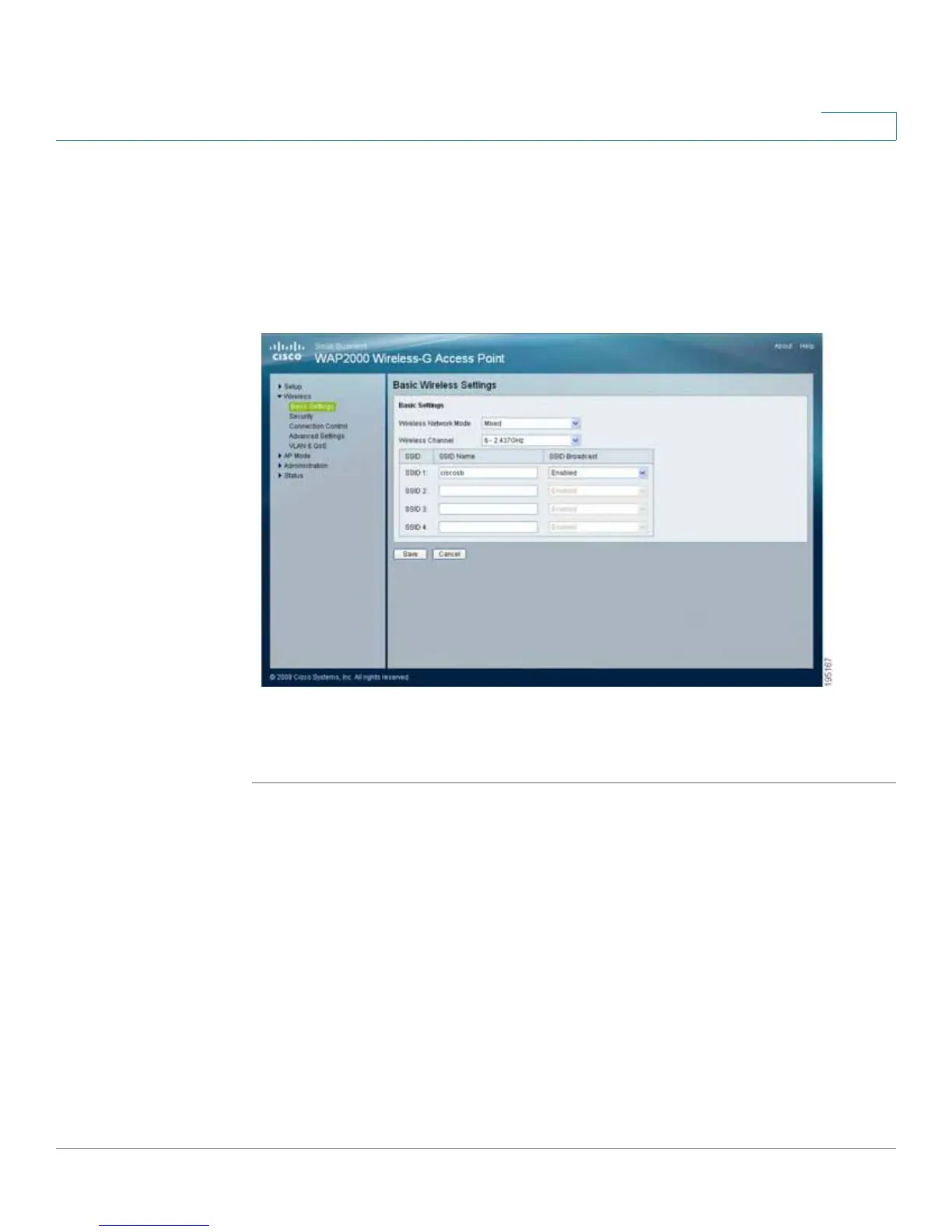
The Wireless > Basic Settings window displays the basic wireless network
settings of the access point. The access point can connect to up to four wireless
networks (SSIDs) at the same time, so this window offers settings for up to four
different SSIDs. Each SSID has its own MAC address on this access point.
To configure the Wireless Network basic attributes for the entire system and for
each SSID, follow these steps:
STEP 1 Click Wireless > Basic Settings.
STEP 2 From the Wireless Network Mode drop-down menu, select one of the following
modes. The default is Mixed.
• Disable—Disables wireless connectivity completely. This mode can be
useful during system maintenance.
• B-Only—Connects all the wireless client devices to the access point at
Wireless-B data rates with maximum speed at 11 Mbps.




 To Next Page