Configuring the WAP2000 Access Point
Configuring Wireless Settings
Cisco WAP2000 Wireless-G Access Point with Power Over Ethernet Administration Guide 37
6
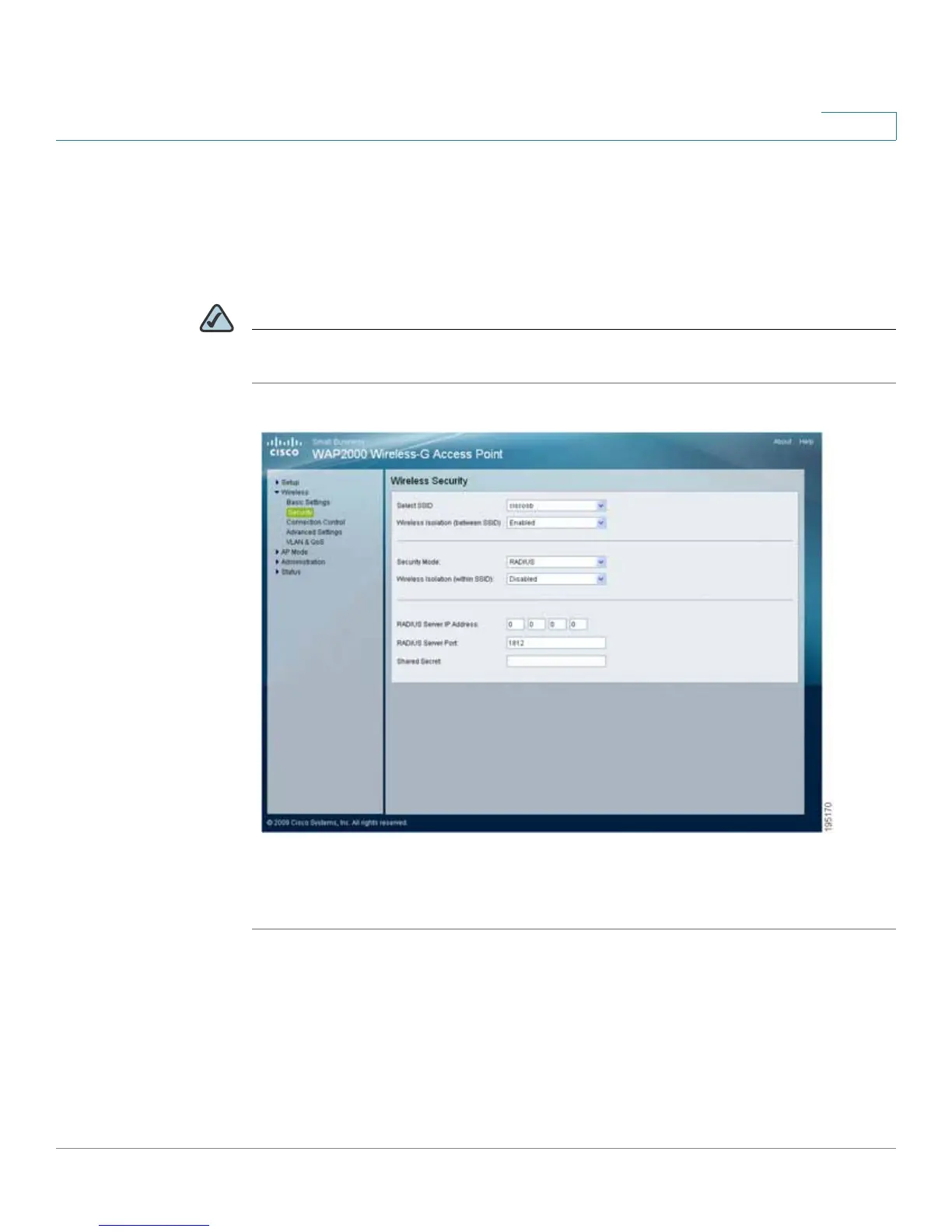
Configuring RADIUS
This security mode is also known as Dynamic WEP with IEEE 802.1X. A RADIUS
server is used for client authentication and WEP is used for data encryption.
The WEP key is automatically generated by the RADIUS server.
NOTE Manual WEP key is no longer supported to ensure compatibility with Microsoft’s
Windows implementation.
To configure the RADIUS wireless security settings for the access point, follow
these steps:
STEP 1 Click Wireless > Security.
STEP 2 From the Security Mode drop-down menu, select RADIUS.
STEP 3 To enable wireless isolation across SSIDs, select Enabled from the drop-down
menu. Otherwise, select Disabled.
STEP 4 To enable wireless isolation within SSID, select Enabled from the drop-down
menu. Otherwise, select Disabled.




 To Next Page