Group 13, Wiring, Switches, and Instruments
SM 765, Sep ’06 Instrument Panel • 13-5-3
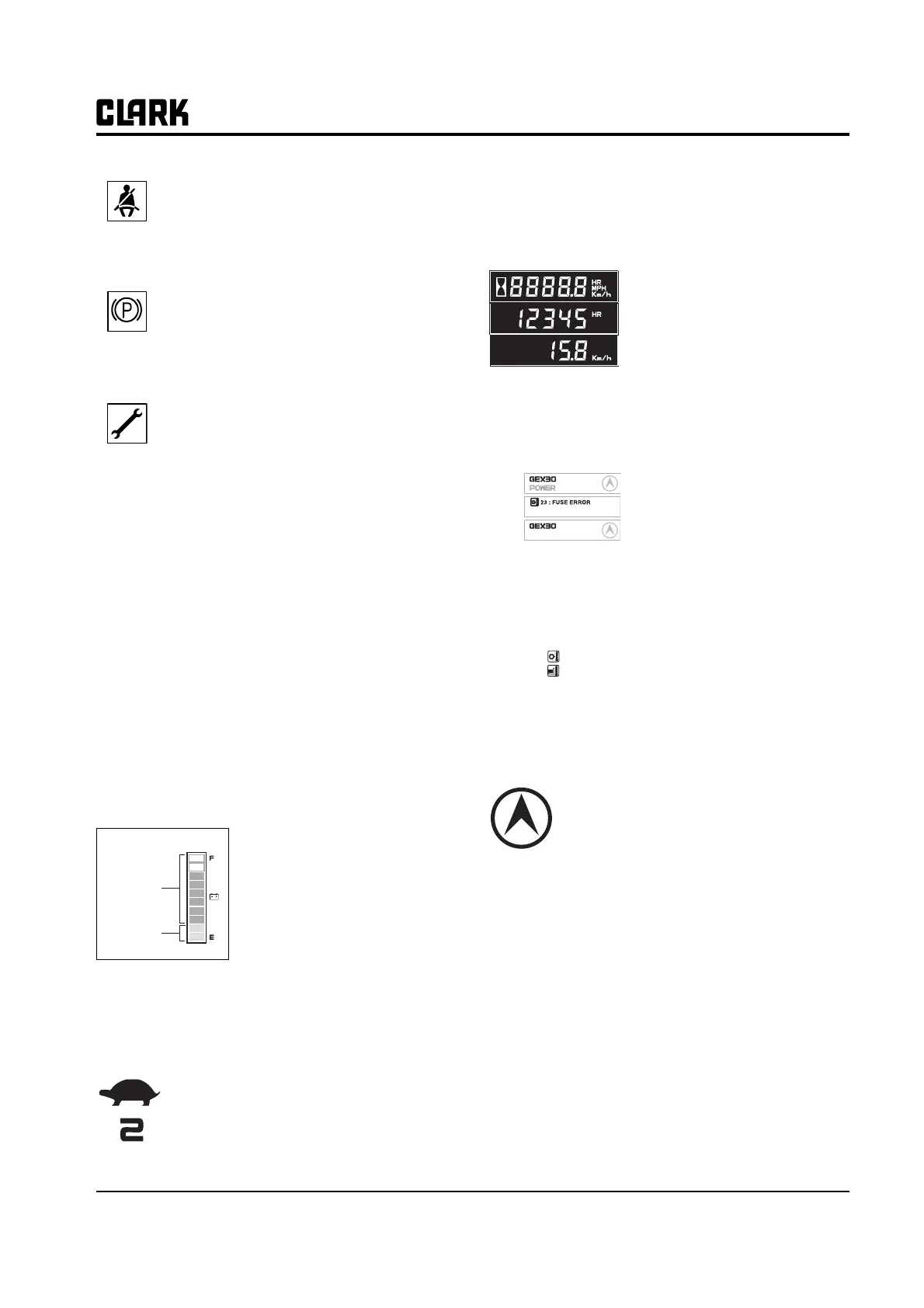
Seat Belt: At start up this symbol displays
along with an audio alarm for 4 seconds. This
display reminds you to fasten your seat belt.
Parking Brake: The symbol is displayed and "-
255" status code appears on the numeric dis-
play when parking brake is applied. Release
parking brake to operate truck.
Service Status: The following 5 codes are usu-
ally operator fault codes, and can be corrected
by as explained in "Section 5, Operating Proce-
dures." If you see any other codes displayed,
the truck needs to be serviced.
• -01 Seat Switch Open
•-061, -065 ,-140, -203, -207 Overheat of
motor and controller (Restart after
cooling down)
• -66 Low Battery (truck will go into lift lock-
out when the dash display shows less
than 15%)
• -77 Maintenance Hours (preset hour meter
reading indicating that it is time to have
the truck serviced. Truck will reduce the
top speed if desired)
• -79 Incorrect Start Up Sequence (SRO)
• -217, -245 Wrong set battery
• -255 Parking Brake Switch Open
Battery discharge indicator
It displays the battery discharge
condition of forklift truck.
The one bar indicates 10%
charging condition.
If the battery is charged more
than 20% (8 bars or more), blue
LED is displayed, but it is less
than 20% (2 bars or less), red
LED is displayed. If it is less than 10% (1 bar), it will
flicker and buzzer sound.
Slow-speed indicator (Turtle shaped)
The traveling speed of truck is limited to
set speed.
The upper mark is slow speed operating
icon, and the figure shows the limited
max. speed. (In upper example, the limited max.
speed is 2km/h)
Hourmeter & Speed
• It displays the accumulated oper-
ating hour and traveling speed of
truck.
• When the traveling speed is less
than 0.5km/h, it displays the accu-
mulated operating hour.
• When the traveling speed is more
than 0.5km/h, it displays the traveling speed.
Message display
The model name, POWER
selection, travel direction, warn-
ing and error message are dis-
played.
• In normal operating condition:
Model name/POWER/Travel direction
• When several messages are simultaneously dis-
played, it will be displayed in the order of Error,
Warning and Normal condition.
• If many error conditions
are simultaneously
occurred, the priority 2
Errors will be displayed.
(The priority means Error number)
Travel direction icon
• It displays the traveling direction or angle of
steering wheel..
• The direction icon rotates in 10 degrees.
(Total 36 icon)
Error icon
When error occurs this icon is displayed to dis-
tinguish the condition easily. When the error
message is displayed, this icon is simulta-
neously displayed.
Blue color
Red color
BATTERY LOW
Normal
Error
Warning
56 : FET SHORT
23 : FUSE ERROR



 To Next Page