Group 19, Motor Controls
SM 765, Sep ’06 Control Programming • 19-2-13
PUMP CONTROL
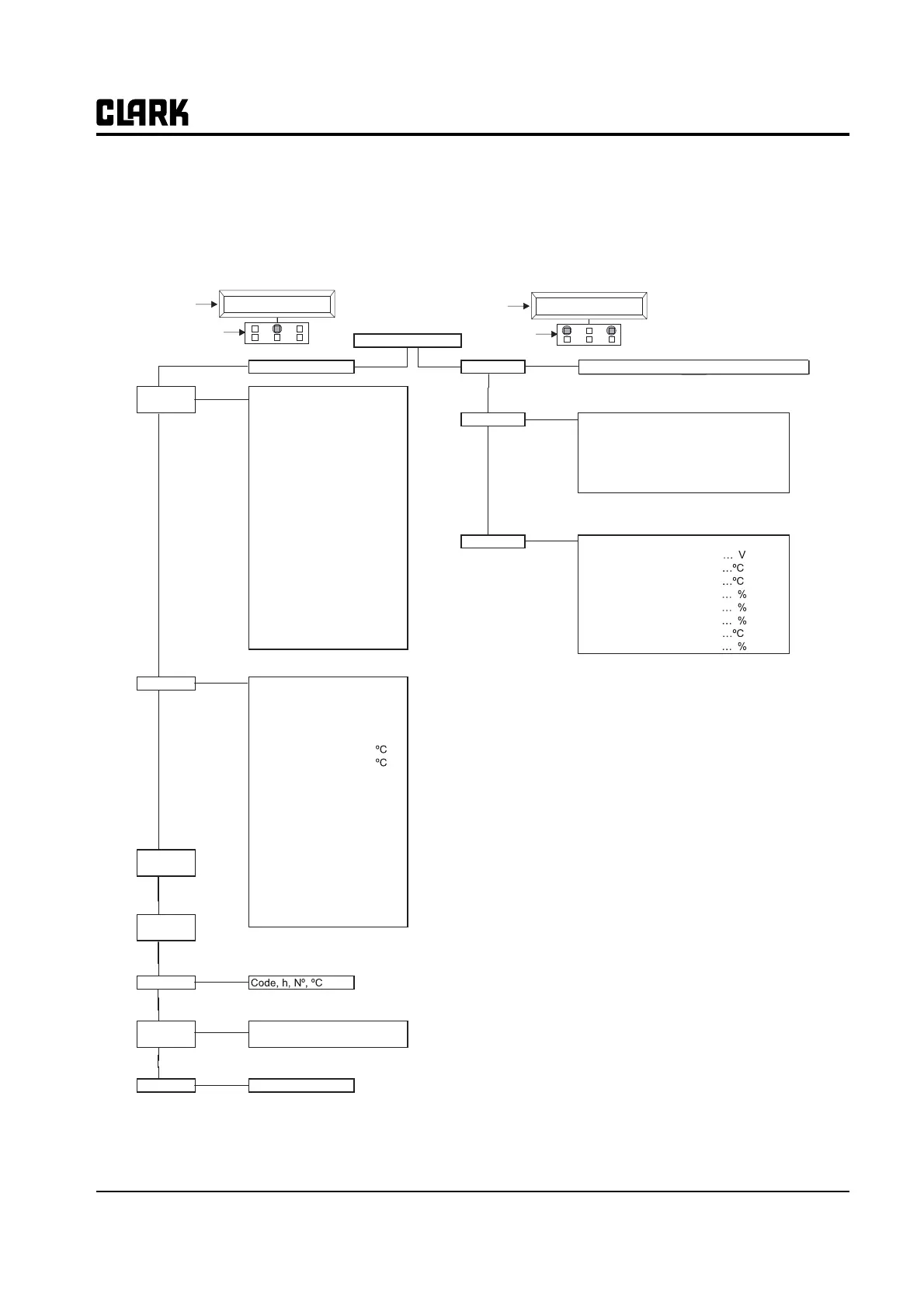
Using the configuration menu of the programming console, the user can configure the following functions.
GEX Handset
Pump Control Configuration
Main Menu Set Model
Parameter Acceleration Delay 0-9
Set Options Hour Meter Running / Key On
Change Decelleration Delay 0-9
Pressure Funct On/Off
Max Speed Up Hz
Digital lift On/Off
Therm Protection On/Off
Hour Meter Truck On/Off
Set Temperature Analog / Digital / None
Min Speed Up Hz
1st Speed Hz
Cutback speed %
Aux1 Dec delay 0-9
Aux2 Acc delay 0-9
Aux2 Dec delay 0-9
Acc delay Tilt 0-9
Dec delay Tilt 0-9
Aux1 Acc delay 0-9
2nd Speed Hz
3rd Speed Hz
4th Speed Hz
Hydro Speed Hz
Maximum Current 0-9
Auxilary Time Sec
Idle Speed Hz
Idle Time Sec
HEADING
DISPLAY
KEYBOARD
AC3P2BIG CK0.09
80V 450A 00000
DISPLAY
KEYBOARD
AC3P2BIG CK0.09
80V 450A 00000
Enter
Enter
Enter
Roll
Up
Roll
Up
Roll
Up
Connected to 5 (Pump) (3 = Master, 4 = Slave)
Adjustments Set Battery Type 48/72/80/96
Adjust Battery
Adjustment #04
Adjustment #03
Throttle 0 Zone
Throttle Y Zone
Throttle X Zone
Motor Shutdown
IMAX Protection
Enter
Tester Motor Voltage %
Frequency Hz
Encoder Hz
Slip Value Hz
Current RMS A
Temperature
Motor Temperature
Accelerator V
Lift Switch On/Off
1st Speed Switch On/Off
2nd Speed Switch On/Off
3rd Speed Switch On/Off
4th Speed Switch On/Off
Hydro Speed Req On/Off
Voltage Booster V
Battery Voltage V
COS FI
Battery Current A
Battery Charge %
Enter
Roll
Up
Save
Parameter
Restore
Parameter
Alarms
Program
VACC VACC Settings Min/Max
Motor Data Not Available
Roll
Up
Roll
Up
Roll
Up
Roll
Up
Enter
Enter
Enter



 To Next Page