Group 13, Wiring, Switches, and Instruments
13-4-6 • Switches and Sensors SM 765, Sep ’06
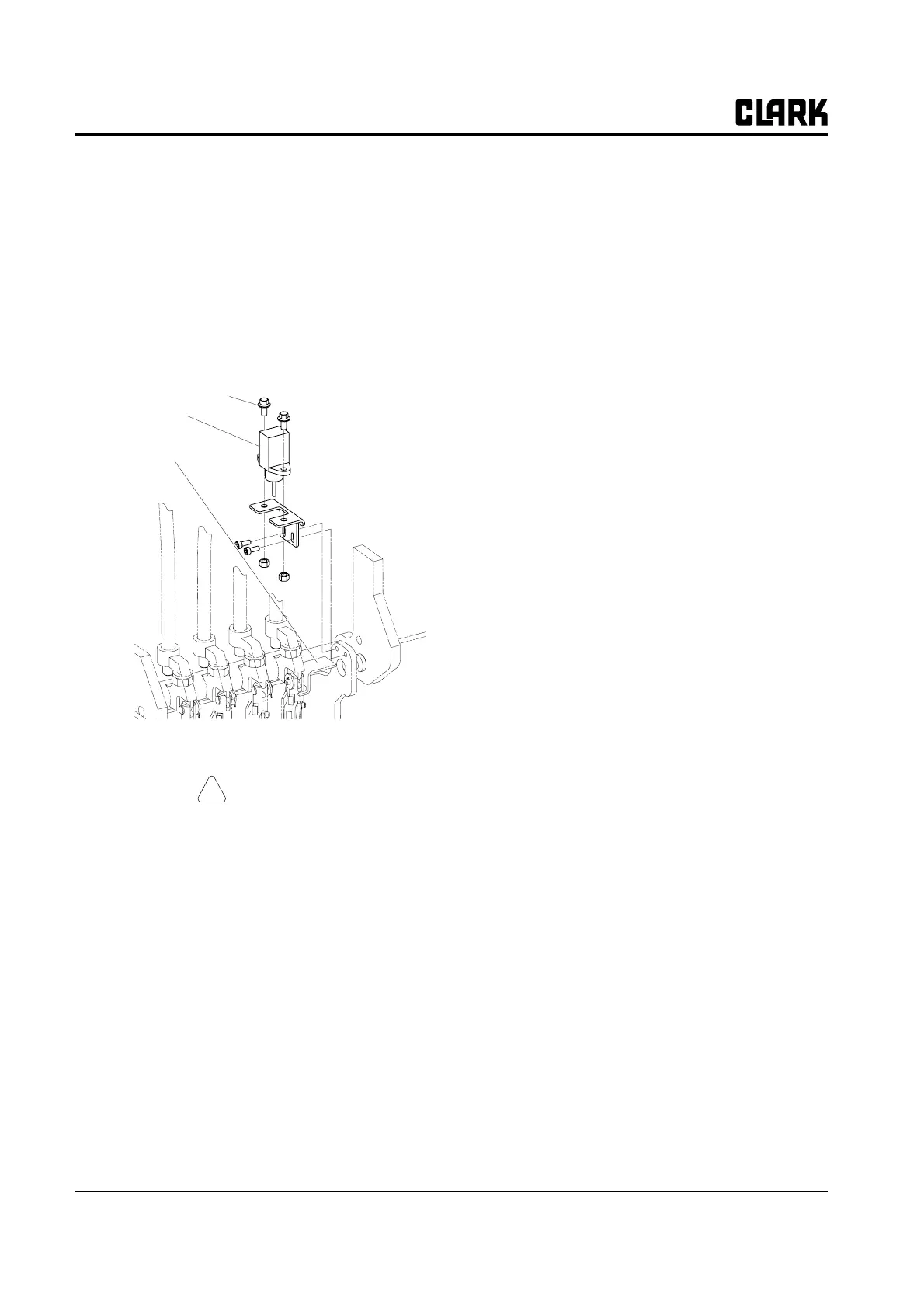
Lift Pot Adjustment
1. Insure that the flag of the actuator is properly posi-
tioned on the flat of the large nut.
2. Tighten the lock nut against the bottom of the actua-
tor.
3. Loosen the capscrews on the switch mounting
bracket and adjust the Pot to the point that it just
touches the actuator plate. Insure that the Pot is paral-
lel with the lift linkage.
Program Adjustment
CAUTION
!
Before any adjustments are done, safely jack
up the truck, block the drive wheels off the
floor and disconnect the battery.
Use the following method to program the Lift Potentiome-
ter to the control panel with the handset:
(Detailed handset operation instructions are in Group 19.)
• Disconnect the dash display harness from the con-
trol panel
• Plug handset into plug "B" of the control
• Plug in the battery
• Turn the key switch On
• Handset will go through startup and display soft-
ware version
• Press both the "ROLL UP" and "PARAM SET UP"
buttons (top outside buttons) simultaneously.
• Display will read "CONFIG MENU' "SET
MODEL"
• Press "ENTER" button
• Display will read "CONNECTED TO 3"
• Press "PARAM SET UP" button two (2) times
• Display will read "CONNECTED TO 5"
• Press "OUT" button
• Display will read "ARE YOU SURE"
"YES=ENTER" "NO=OUT"
• Press "ENTER" button (this stores the connected
to value)
• Display will read "CONFIG MENU" “CON-
NECTED TO”
• Press "OUT" button
• Display will read Software Version for Pump Con-
trol
• Press the “ENTER” button
• Display will read "MAIN MENU' "PARAMETER
CHANGE".
• Press the “ROLL UP” button five times
• Display will read "MAIN MENU" “PROGRAM
VA C C ”
• Press the "ENTER" button
• Display will read "VACC SETTINGS"
• Press the "ENTER” button
• Display will read "MIN VACC MAX"
• Move the lift lever to full raised position
• Release the lift lever to the neutral position
• Press the “OUT” button
• Display will read "ARE YOU SURE"
"YES=ENTER" "NO=OUT"
• Press "ENTER" button (this stores the value for
MIN and MAX lift potentiometer voltage)
• Display will show new settings
• Press the “OUT” button
• Display will read "MAIN MENU" “PROGRAM
VA C C ”
• Press "OUT button
• Display will show software version
• Turn the key switch Off and remove the tester cord
from the control
• Plug the dash display harness into the "B" plug of
the control
• Lower truck to the ground and test drive truck
Pot mounting screw
Lift sensor
Actuator



 To Next Page