36 Commonwealth Bank Albert User Guide
4. Cashout transactions.
Allow your customers to withdraw cash in just a few taps – on its
own or with a purchase.
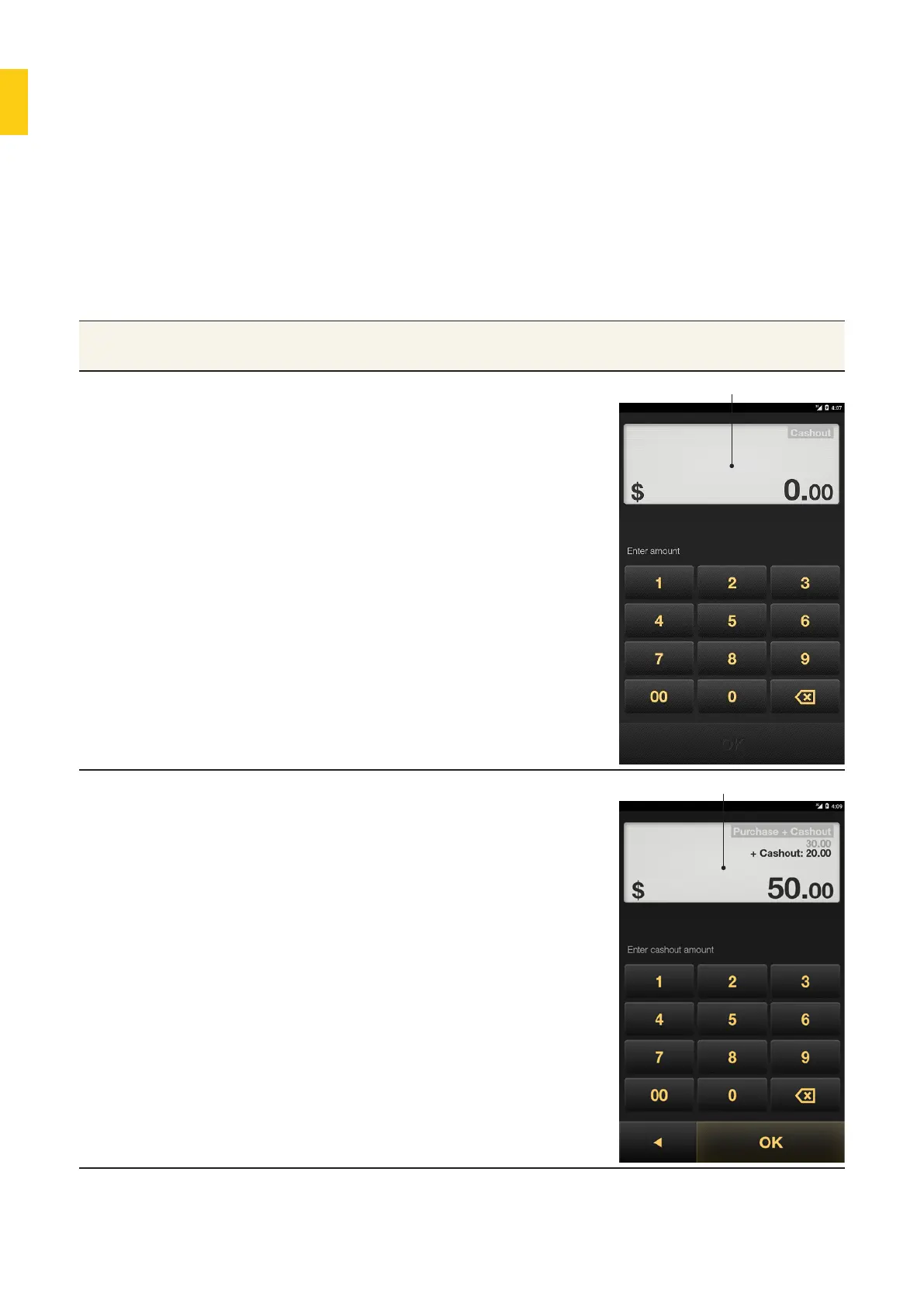
Entering the cashout amount.
Purpose To provide cash to a customer as a standalone payment or as part of
another purchase.
Cashout only 1. Press the Merchant Context
buon or swipe down on the screen
to open the Merchant Context
Menu.
2. Tap Cashout Only.
3. Use the keypad to enter the
cashout amount, then tap OK.
4. The Card Present screen will be
displayed. You can now process the
cashout payment from a card.
Cashout Screen
Purchase and
cashout
1. Press the Merchant Context
buon or swipe down the screen
to open the Merchant Context
Menu.
• If the payment has already been
entered, tap Add Cashout.
• If the payment has not been
entered, tap Purchase and
Cashout. Enter the payment
amount first, then tap OK.
2. Using the keypad, enter the
cashout amount, then tap OK.
3. The Card Present screen will
display. You can now process the
cashout payment.
Purchase and Cashout screen



 To Next Page