Commonwealth Bank Albert User Guide 55
Completion.
Card-present
completion
1. The Card Presentation screen will appear (the customer’s card
must permit credit transactions):
• Enter or swipe the card. (Contactless payment is not available
for Completion transactions).
• MOTO and manual entry are also available for Completion, if
enabled. MOTO will not be permied if the card has already
been presented. Go to the Merchant Context Menu and tap
MOTO to access this option.
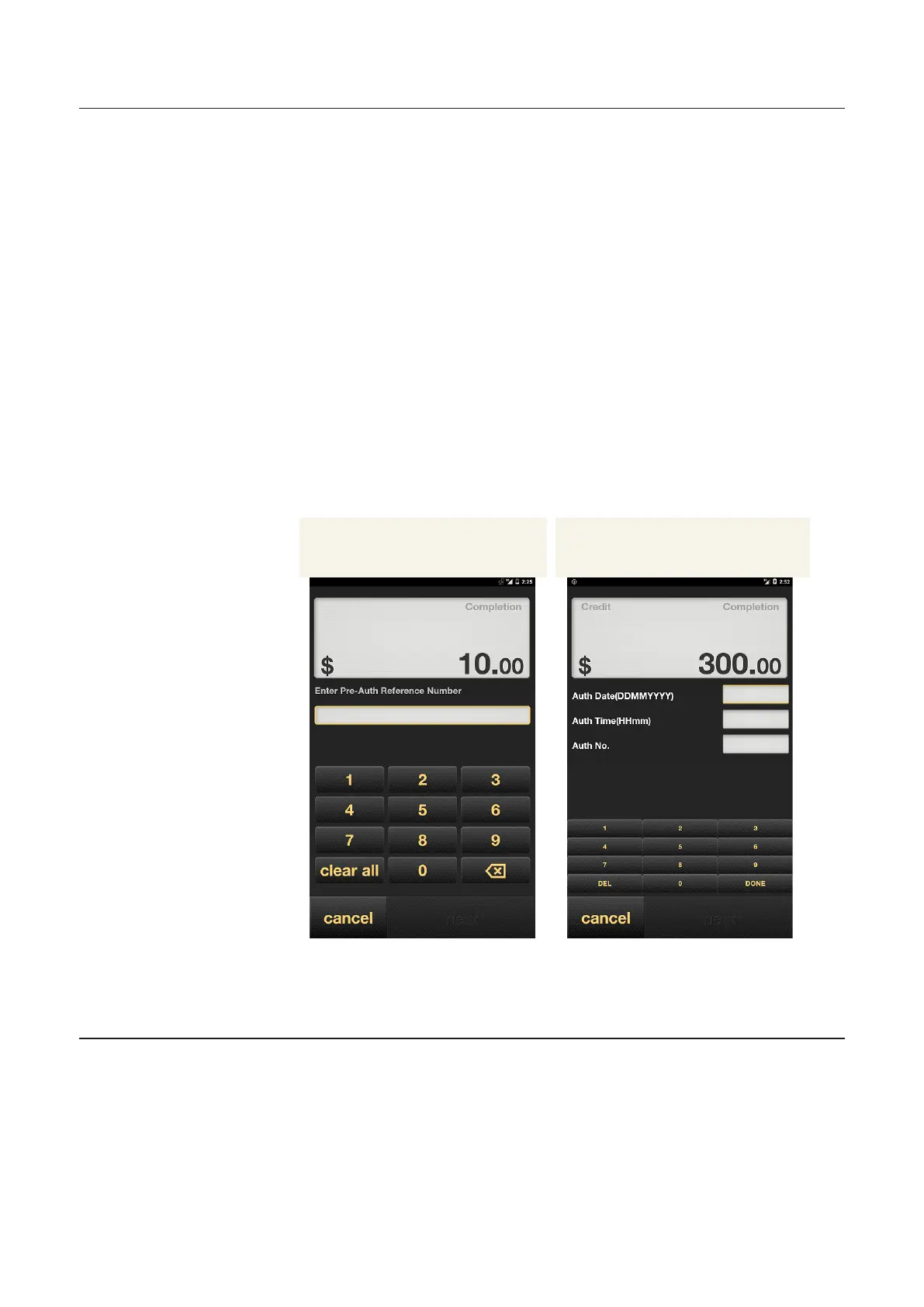
2. If the terminal has found more than one matching pre-
authorisation transaction for the card number, you will be
prompted to enter the six-digit reference number (STAN) from
the pre-authorisation transaction receipt.
3. If the terminal has not found a matching pre-authorisation
transaction for the card number, you will be further prompted to
enter the authorisation date, time and number from the pre-
authorisation transaction receipt.
No matching pre-authorisation
transaction found
More than one matching pre-
authorisation transaction
4. On the Confirmation screen, review the details and tap OK.
5. Albert will print a merchant receipt for the customer to sign.
6. Verify the signature and tap OK if it matched or NO if it doesn’t.



 To Next Page