GEN1000 Operator Manual
48 July 22, 2019 | 287960-ENG | R00
5. Secure the tube in place by rotating it one quarter turn.
6. Dispose of the used tube(s) following local requirements, or contact the local
authorities for proper disposal procedures.
6.4 Perform Maintenance in the Machine Compartment
The machine compartment is located on top of the chamber and should only be accessed by
qualified service technicians.
To perform maintenance in the machine compartment:
1. Turn the power to the chamber OFF. Refer to Section 6.1 Disconnect the Power
Before Maintaining or Servicing the Chamber on page 46 for instructions to turn off
the power.
2. Use a ladder to access to the top of the chamber. Do not stand on the chamber.
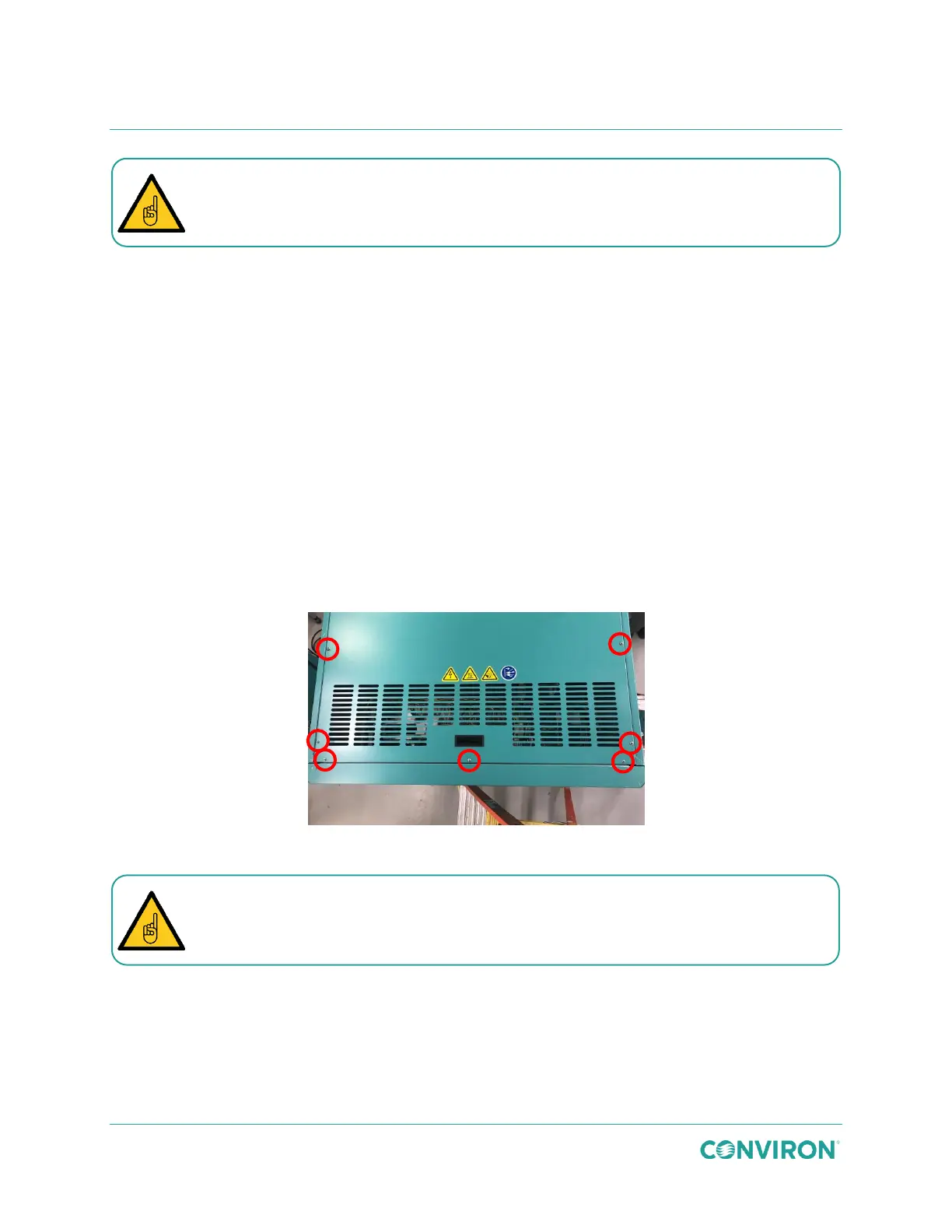
3. Remove the 12 screws, three on each of the four sides, from the perimeter of the top
compartment cover (Figure 6-2).
Figure 6-2 Remove the Screws from the Top Cover
4. Lift the front edge of the cover, using the handle provided.
5. Slide the cover off and carefully lower the cover down to the floor.
6. Perform the required maintenance.
7. Reposition the machine compartment cover.
8. Re-install the cover screws to secure the cover to the chamber.
Polarized LED tubes will not light up if installed incorrectly.
Take care when removing and re-installing the top cover screws to avoid stripping
the screw threads. Do not use a high torque setting on an electric driver.



 To Next Page