GEN1000 Operator Manual
50 July 22, 2019 | 287960-ENG | R00
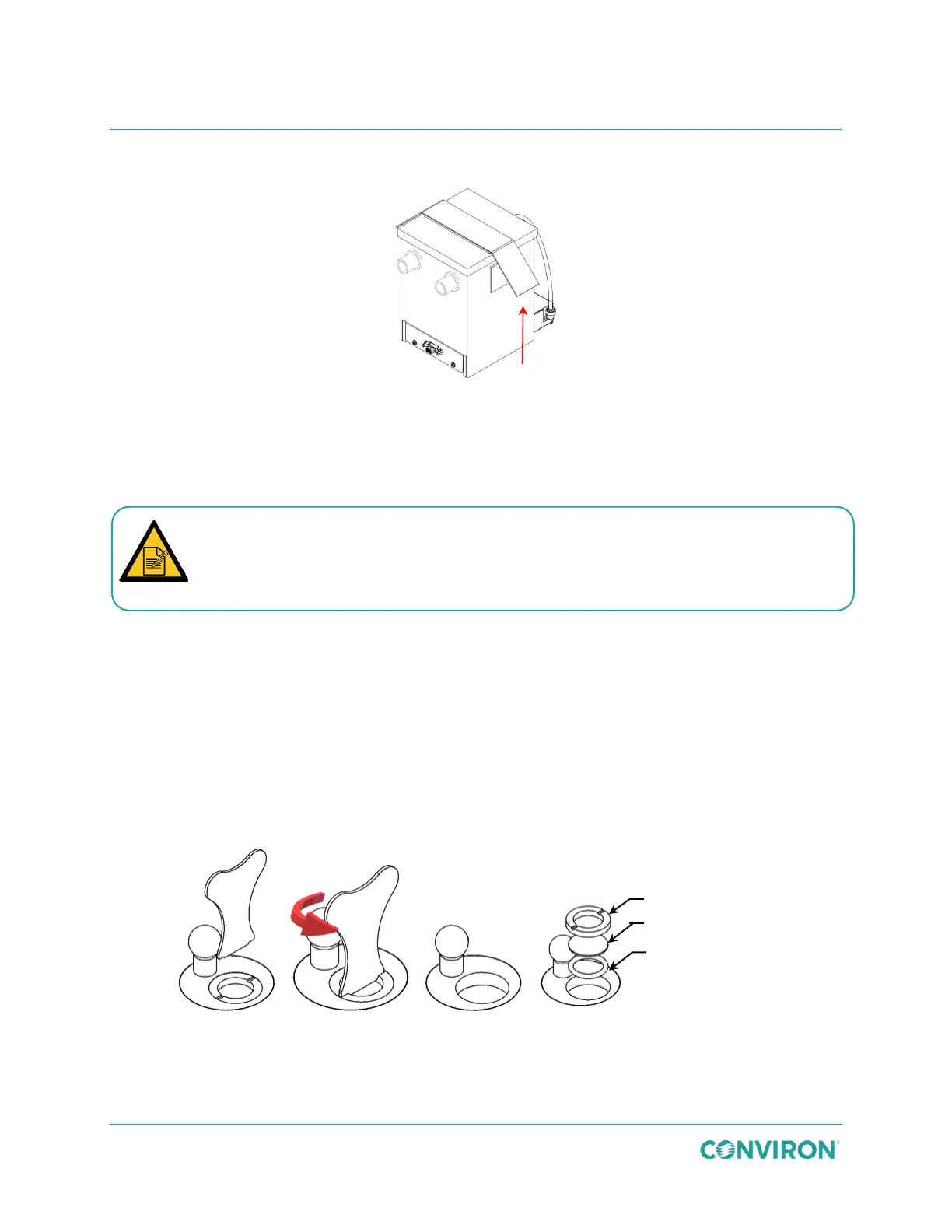
4. Detach the hook and loop side straps and remove the USH box lid (Figure 6-4).
Figure 6-4 Remove the USH Box Lid
5. Pour the water out of the box and wipe the interior surfaces of the USH box with a
damp cloth to remove biological residue and particulate matter.
6. Ensure there is no water residue on the ceramic discs.
7. Dry the interior surfaces.
To replace the ceramic discs:
1. Contact Conviron to order the USH dics replacement kit (PN 236411).
2. Place USH puck key into the corresponding slots of the disc ring (Figure 6-5) and turn
the puck key counterclockwise to unscrew the disc ring.
3. Remove the disc ring, ceramic disc, and silicone seal.
4. Install the silicone seal ring followed by the new ceramic disc, and screw the disc ring
back into place.
Figure 6-5 Ceramic Disc Replacement
Pay particular attention to the surface of the ceramic dics, which must be free of
deposits in order to function properly. Stubborn buildup may be removed with a
cleaner capable of removing mineral deposits, such as a diluted vinegar solution.



 To Next Page