Artiglio Master Code User Manual 51
UK
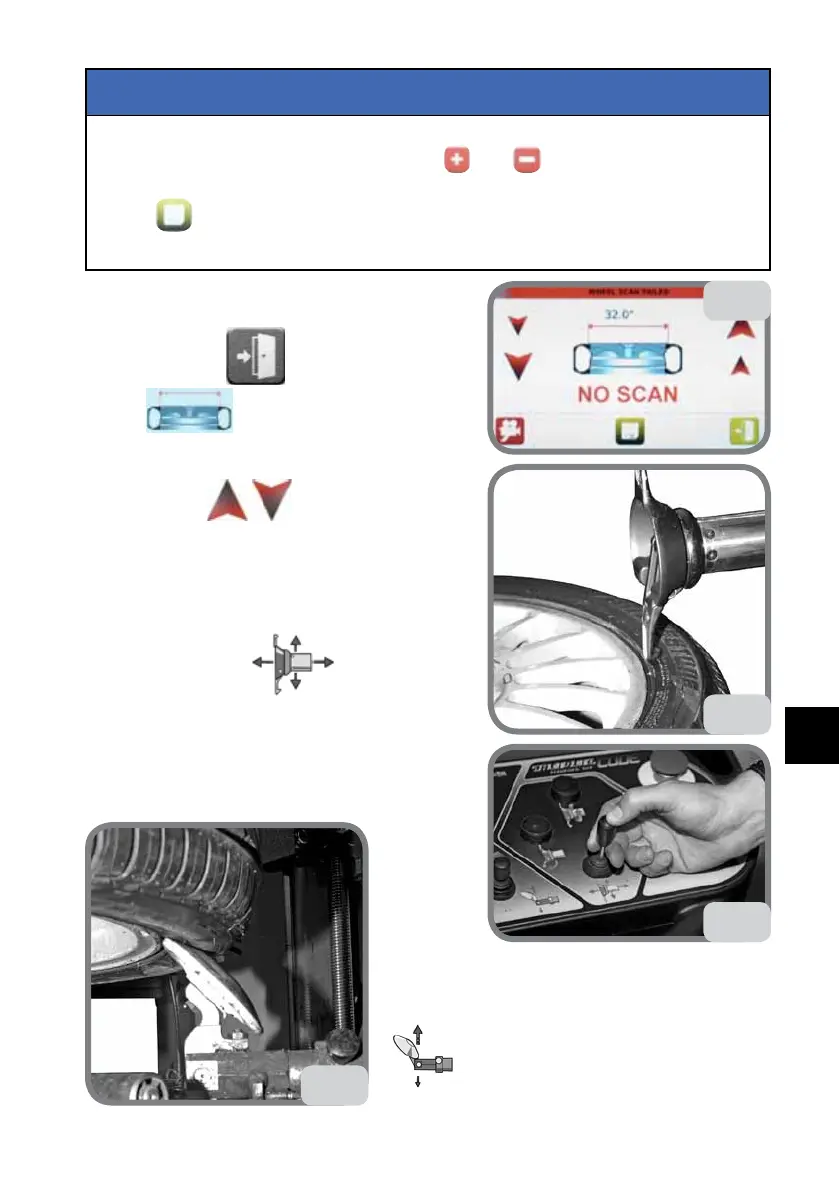
If, following automatic detection of the wheel/rim, the detected diameter needs to
be corrected, you must act on the buttons
and (Fig. 34a). To maintain the
correction in the next wheel recalls, the new diameter must be stored using the
button
(Fig. 34a). This command stores only the diameter variations and not
the tool position variations.
NOTICE
If the wheel dimensions are not identified (Fig. 34b), the
operator may proceed in one of the two following ways:
a. press the button
(Fig. 34b) and then press
the icon (Fig. 34a) again and repeat auto-
matic wheel data acquisition.
b. manually store wheel data:
- Use the arrows (Fig. 34b) to set the rim
diameter.
N.B.: The large arrows increase or decrease the size
by one inch, at each pressure step: The small arrows
increase or decrease the size by one tenth of an inch
each time they are pressed.
- Operate the control
on the push-but-
ton panel to position the tool on the wheel as shown
in Fig. 34c.
N.B.: To obtain more precise positioning
press the button located on the top part of the com-
mand (see Fig. 34d).-
-
- Act on the bottom bead breaker command
to position it as illustrated in Fig. 34e.
34c
34d
34e
34b



 To Next Page