EasyManua.ls Logo

Dell D30M - User Manual

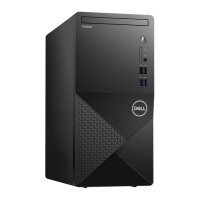
Dell D30M
133 pages
Print Icon
To Next Page IconTo Next Page
Loading...
Precision 3680 Tower
Owner's Manual
Regulatory Model: D30M
Regulatory Type: D30M001
March 2024
Rev. A00

Table of Contents

Other manuals for Dell D30M

Questions and Answers

  • M
    Morgan LewisAug 16, 2025
    What to do if my Dell D30M Desktop has a system board failure?
    • J
      juliapearsonAug 16, 2025
      If your Dell Desktop is experiencing a system board, chipset, clock, Gate A20, Super I/O, or keyboard controller failure, the suggested solution is to contact Dell with the error code and validation number for assistance.
  • J
    Julia FigueroaAug 19, 2025
    What to do if there is a CPU failure on my Dell D30M Desktop?
    • O
      owilliamsAug 19, 2025
      If your Dell Desktop is showing a CPU failure, it is recommended to contact Dell with the error code and validation number.
  • N
    Nathan BurnsAug 22, 2025
    What to do if Dell D30M has memory/RAM failure?
    • E
      egreenAug 22, 2025
      If your Dell Desktop has a memory/RAM failure, the suggested solution is to contact Dell with the error code and validation number.
  • K
    Kellie MartinezAug 25, 2025
    What to do if my Dell Desktop has PCI or Video card/chip failure?
    • K
      Kimberly VaughanAug 26, 2025
      If your Dell Desktop has a PCI or video card/chip failure, it is recommended to contact Dell with the error code and validation number.
  • G
    gregoryrussellAug 27, 2025
    What to do if BIOS recovery image is not found on Dell D30M Desktop?
    • S
      Scott BoyerAug 27, 2025
      If the BIOS recovery image is not found on your Dell Desktop, contact Dell with the error code and validation number.
  • S
    sharon60Aug 30, 2025
    What to do if Dell D30M has invalid memory installed?
    • D
      David GomezAug 31, 2025
      If your Dell Desktop has invalid memory installed, it is recommended to contact Dell with the error code and validation number.
  • C
    Christina SchneiderSep 2, 2025
    What to do if BIOS recovery image found but invalid on Dell D30M Desktop?
    • J
      Jeffrey HammondSep 3, 2025
      If the BIOS recovery image found on your Dell Desktop is invalid, contact Dell with the error code and validation number.
  • M
    Maria FoxSep 6, 2025
    What to do for system board failure on Dell Desktop?
    • R
      Robert OlsonSep 6, 2025
      If your Dell Desktop is experiencing a system board failure, including BIOS corruption or a ROM error, contact Dell with the error code and validation number.
  • A
    amanda50Sep 9, 2025
    What to do if Intel ME (Management Engine) error appears on Dell D30M Desktop?
    • C
      Clinton NguyenSep 9, 2025
      If your Dell Desktop is showing an Intel ME (Management Engine) error, contact Dell with the error code and validation number.
  • C
    Courtney RomeroSep 12, 2025
    What to do if there is CPU Power Cable Connection Issue on Dell Desktop?
    • J
      James GarciaSep 12, 2025
      If there is a CPU power cable connection issue with your Dell Desktop, contact Dell with the error code and validation number.

Summary

Views of Precision 3680 Tower

Front

Details the front panel components and ports of the computer.

Back

Details the rear panel ports and connectors of the computer.

Set up your Precision 3680 Tower

Specifications of Precision 3680 Tower

Processor

Lists supported processor types, wattage, core count, speed, and cache.

Memory

Details memory slots, type, speed, capacity, and supported configurations.

External ports

Lists and describes all external ports available on the computer.

Power ratings

Specifies power supply unit types and their electrical ratings.

GPU-Discrete

Lists the discrete graphics processing units supported by the system.

Working inside your computer

Safety instructions

General guidelines for safe operation and handling of the computer.

Electrostatic discharge-ESD protection

Explains ESD and precautions to prevent component damage.

Screw list

Provides a list of screws used for component removal and installation.

Removing and installing Customer Replaceable Units (CRUs)

Side cover

Instructions for removing and installing the computer's side panel.

3.5-inch hard-drive assembly

Procedures for removing and installing 3.5-inch hard drive assemblies.

Solid state drive

Steps for removing and installing M.2 PCIe solid state drives.

Memory module

Procedures for removing and installing memory modules.

Power-supply unit

Procedures for removing and installing the power supply unit.

Removing and installing Field Replaceable Units (FRUs)

Processor fan and heat-sink assembly

Steps to remove and install the CPU fan and heat sink.

Processor

Detailed procedure for removing and installing the CPU processor.

System board

Instructions for removing and installing the computer's system board.

Software

Operating system

Lists the operating systems supported by the computer.

Drivers and downloads

Guidance on obtaining and installing drivers and software.

BIOS Setup

Entering BIOS setup program

How to access the system's BIOS setup utility.

System setup options

Details various configuration settings available in the BIOS.

Troubleshooting

Real Time Clock-RTC reset

Procedure to reset the system's Real Time Clock.

Getting help and contacting Dell

Self-help resources

Information on how to find help and support for Dell products.

Dell D30M Specifications

General IconGeneral
BrandDell
ModelD30M
CategoryDesktop
LanguageEnglish

Related product manuals