Next steps
1. Connect the cables to the front PERC module.
2. Follow the procedure listed in After working inside your system.
Drives
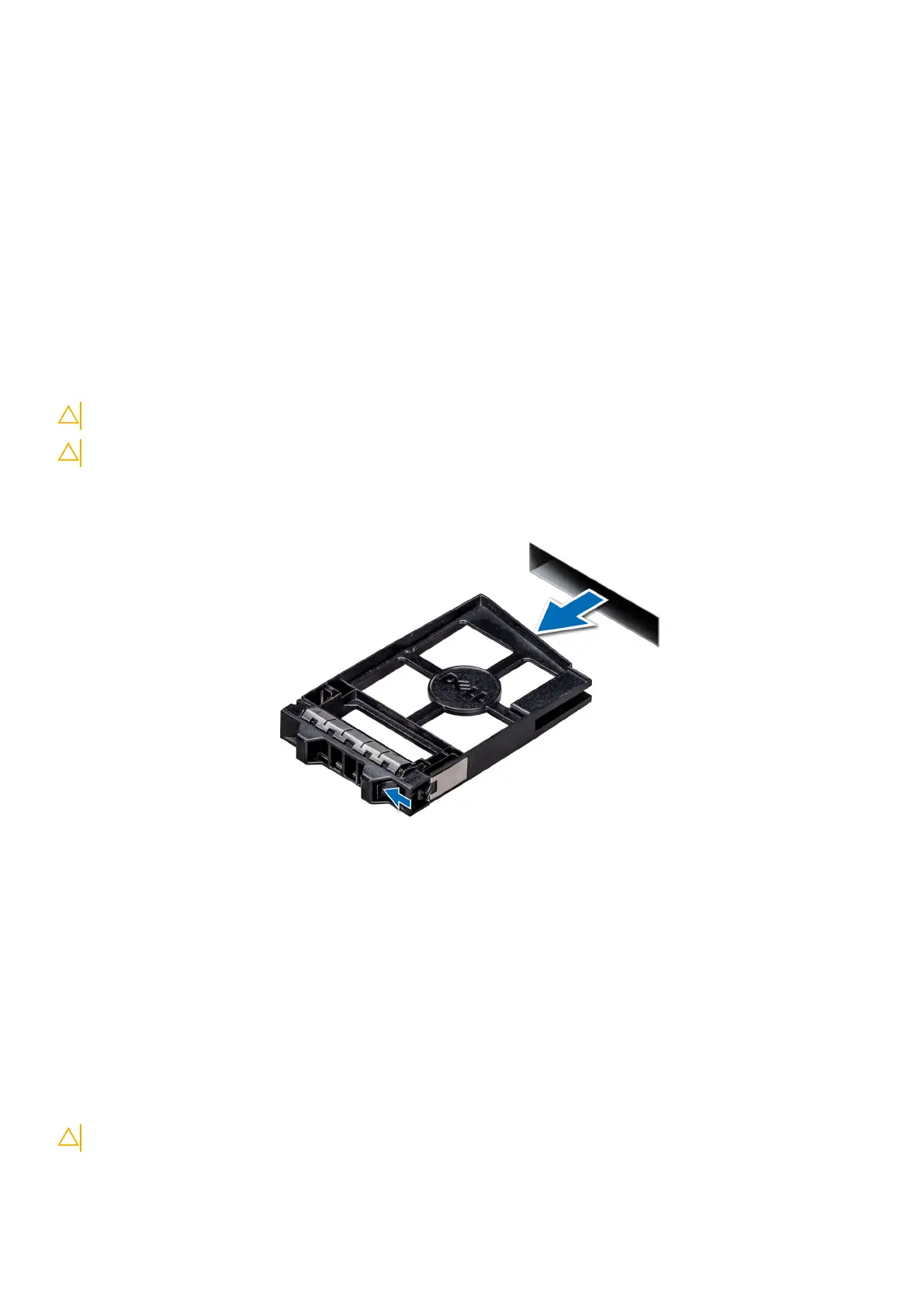
Removing a drive blank
The procedure for removing 2.5 inch and 3.5-inch drive blanks is identical.
Prerequisites
1. Follow the safety guidelines listed in Safety instructions.
2. If installed, remove the front bezel.
CAUTION: To maintain proper system cooling, drive blanks must be installed in all empty drive slots.
CAUTION: Mixing drive blanks from previous generations of PowerEdge servers is not supported.
Steps
Press the release button, and slide the drive blank out of the drive slot.
Figure 46. Removing a drive blank
Next steps
Install a drive or drive blank.
Installing a drive blank
The procedure for installing 2.5 inch and 3.5-inch drive blanks is identical.
Prerequisites
1. Follow the safety guidelines listed in Safety instructions.
2. If installed, remove the front bezel.
CAUTION: Mixing drive blanks from previous generations of PowerEdge servers is not supported.
Installing and removing system components 55














 To Next Page