232 Ultra Small Form Factor Computer
Removing the Computer Cover
CAUTION: Before you begin any of the procedures in this section, follow the safety instructions in the
Product
Information Guide
.
NOTICE: To prevent static damage to components inside your computer, discharge static electricity from your
body before you touch any of your computer’s electronic components. You can do so by touching an unpainted
metal surface on the computer chassis.
1
Follow the procedures in "Before You Begin" on page 21.
2
Remove the computer cover (see "Removing the Computer Cover" on page 232).
NOTICE: Before touching anything inside your computer, ground yourself by touching an unpainted metal surface.
While you work, periodically touch an unpainted metal surface to dissipate any static electricity that could harm
internal components.
3
If applicable, remove the cable cover, (see "Cable Cover (Optional)" on page 237).
4
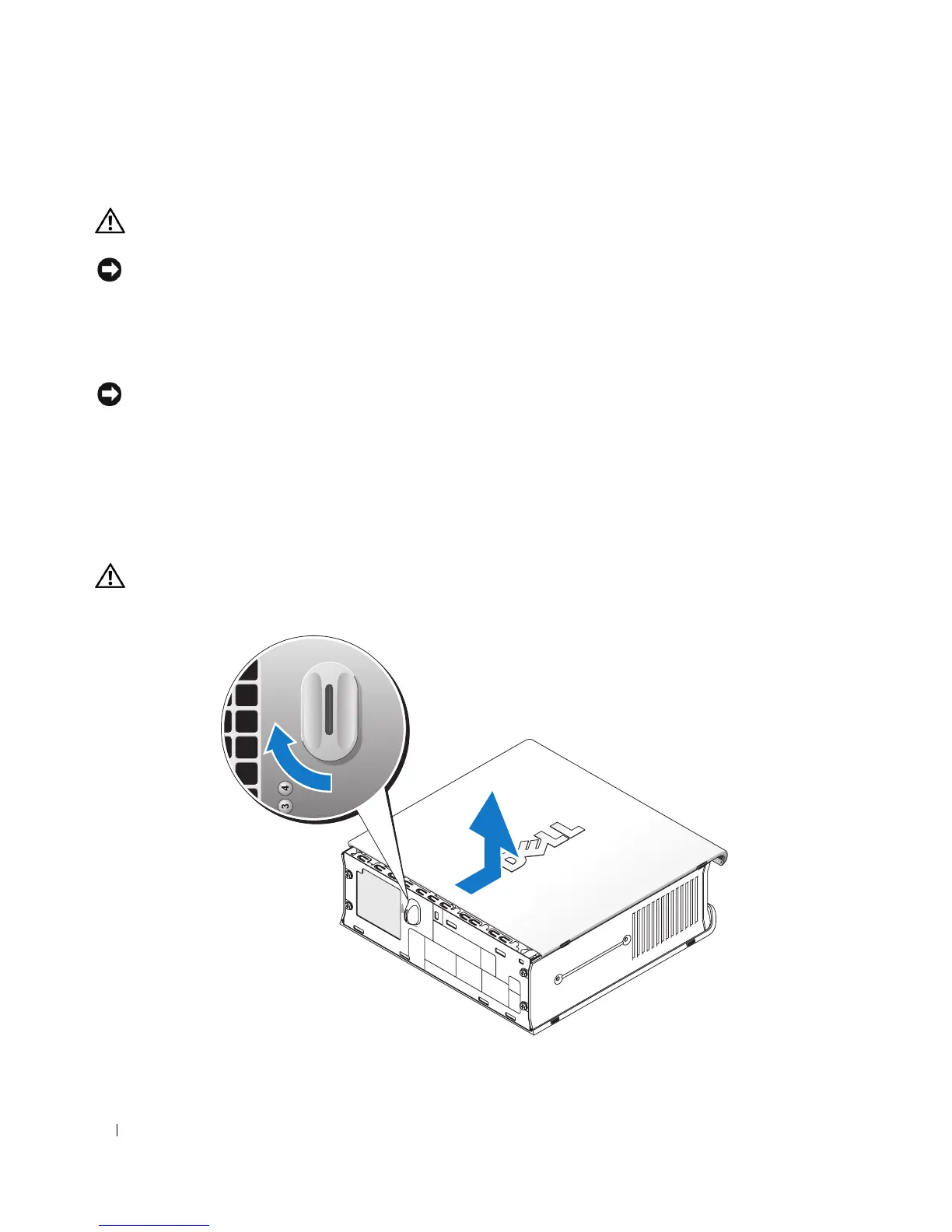
Remove the computer cover:
a
Rotate the cover release knob in a clockwise direction, as shown in the illustration.
b
Slide the computer cover forward by 1 cm (½ inch), or until it stops, and then raise the cover.
CAUTION: Graphics card heat sinks can become very hot during normal operation. Ensure that a graphics card
heat sink has had sufficient time to cool before you touch it.
1 release knob











 To Next Page