1. Follow the safety guidelines listed in the Safety instructions.
2. Follow the procedure listed in Before working inside your system
3. If you are replacing the system board, remove all the components that are listed in the Remove the system board section.
Steps
1. Unpack the new system board assembly.
CAUTION: Do not lift the system board by holding a memory module, processor, or other components.
CAUTION: Take care not to damage the system identification button while placing the system board into the
chassis.
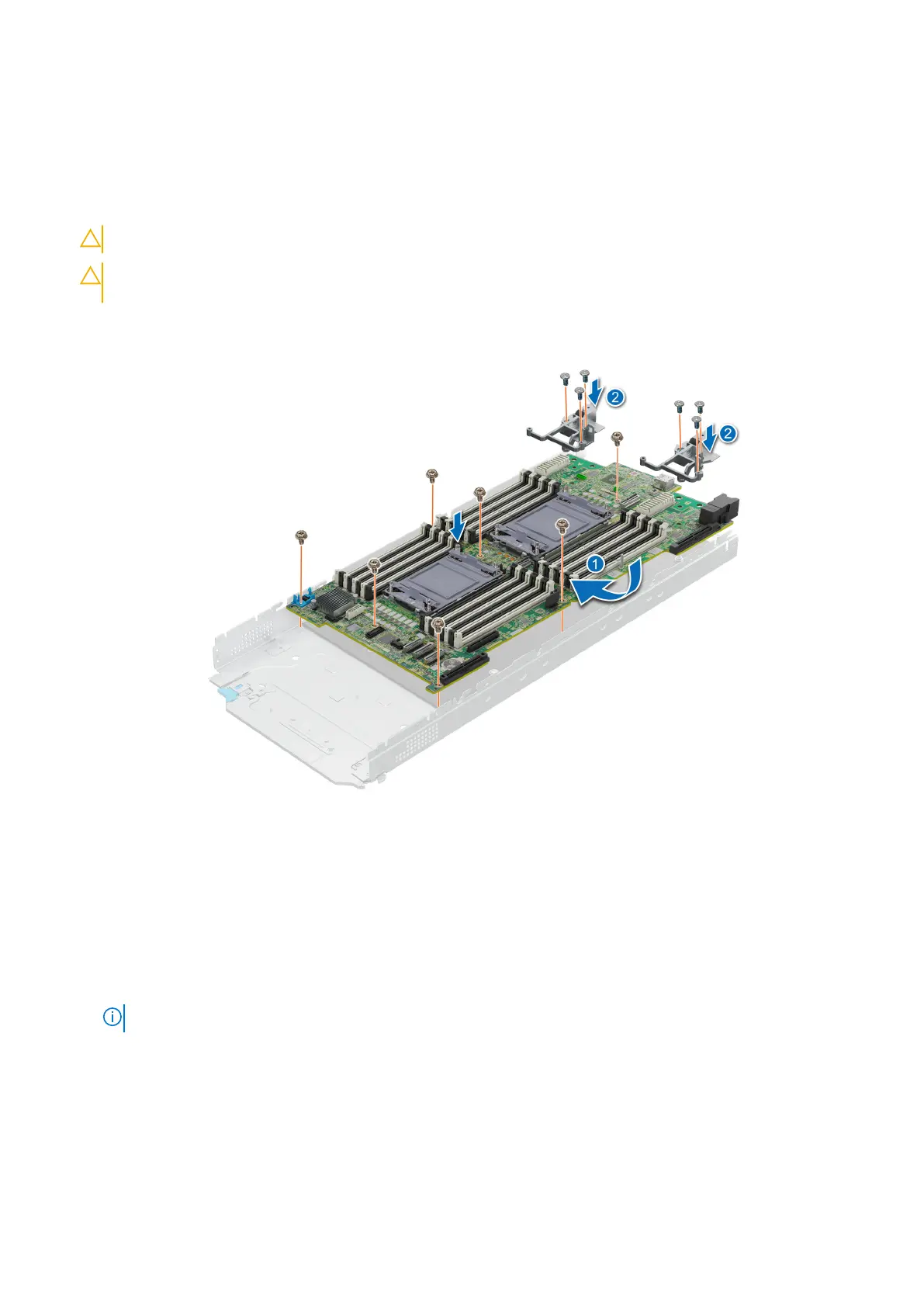
2. Holding the system board by its edges, lower the system board into the chassis.
Figure 118. Installing the system board
3. Holding the Mezz card brackets by its edges, lower the brackets into the system board.
4. Using the Phillips #2 screwdriver, tighten the screws that secure the system board to the chassis.
5. Using the Phillips #2 screwdriver, tighten the screws that secure the Mezz card brackets to the system board.
Next steps
1. Replace the following components:
a. Trusted Platform Module(TPM)
NOTE: The TPM Module must be replaced only while installing new system board.
b. Internal USB key
c. M.2 BOSS module
d. Mini Mezzanine
e. Mezzanine cards
f. PERC card
g. Drive cage
h. Drive backplane
i. Drives
Installing and removing system components
137












 To Next Page