System battery
This is a service technician replaceable part only.
Replacing the system battery
Prerequisites
WARNING: There is a danger of a new battery exploding if it is incorrectly installed. Replace the battery only
with the same or equivalent type that is recommended by the manufacturer. Discard used batteries according to
the manufacturer's instructions. See the Safety instructions that came with your system for more information.
1. Follow the safety guidelines listed in the Safety instructions.
2. Follow the procedure listed in Before working inside your system
Steps
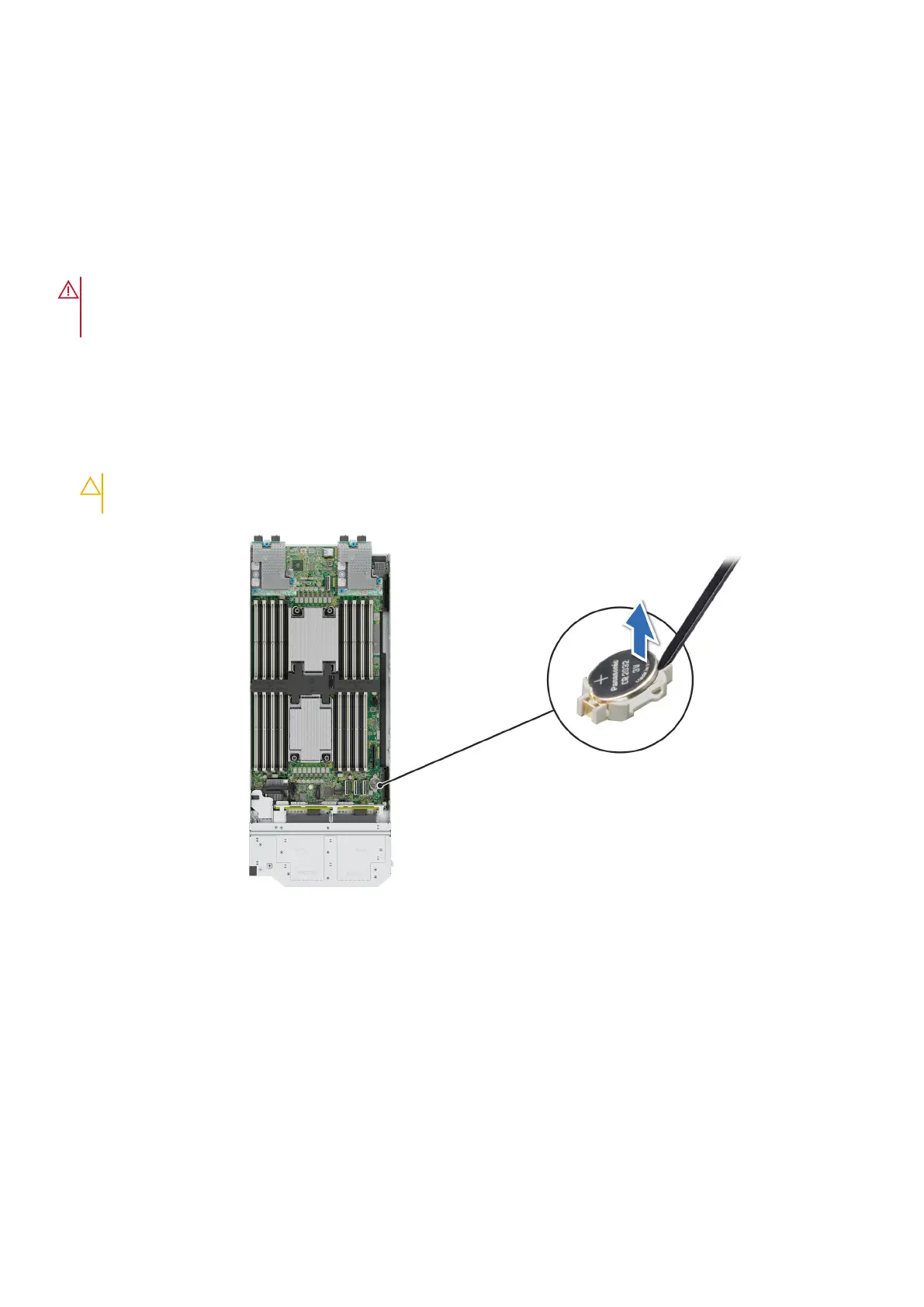
1. To remove the battery:
a. Use a plastic scribe to pry out the system battery.
CAUTION: To avoid damage to the battery connector, you must firmly support the connector while installing
or removing a battery.
Figure 115. Removing the system battery
2. To install a new system battery:
a. Hold the battery with the positive side facing up and slide it under the securing tabs.
b. Press the battery into the connector until it snaps into place.
134
Installing and removing system components







 To Next Page