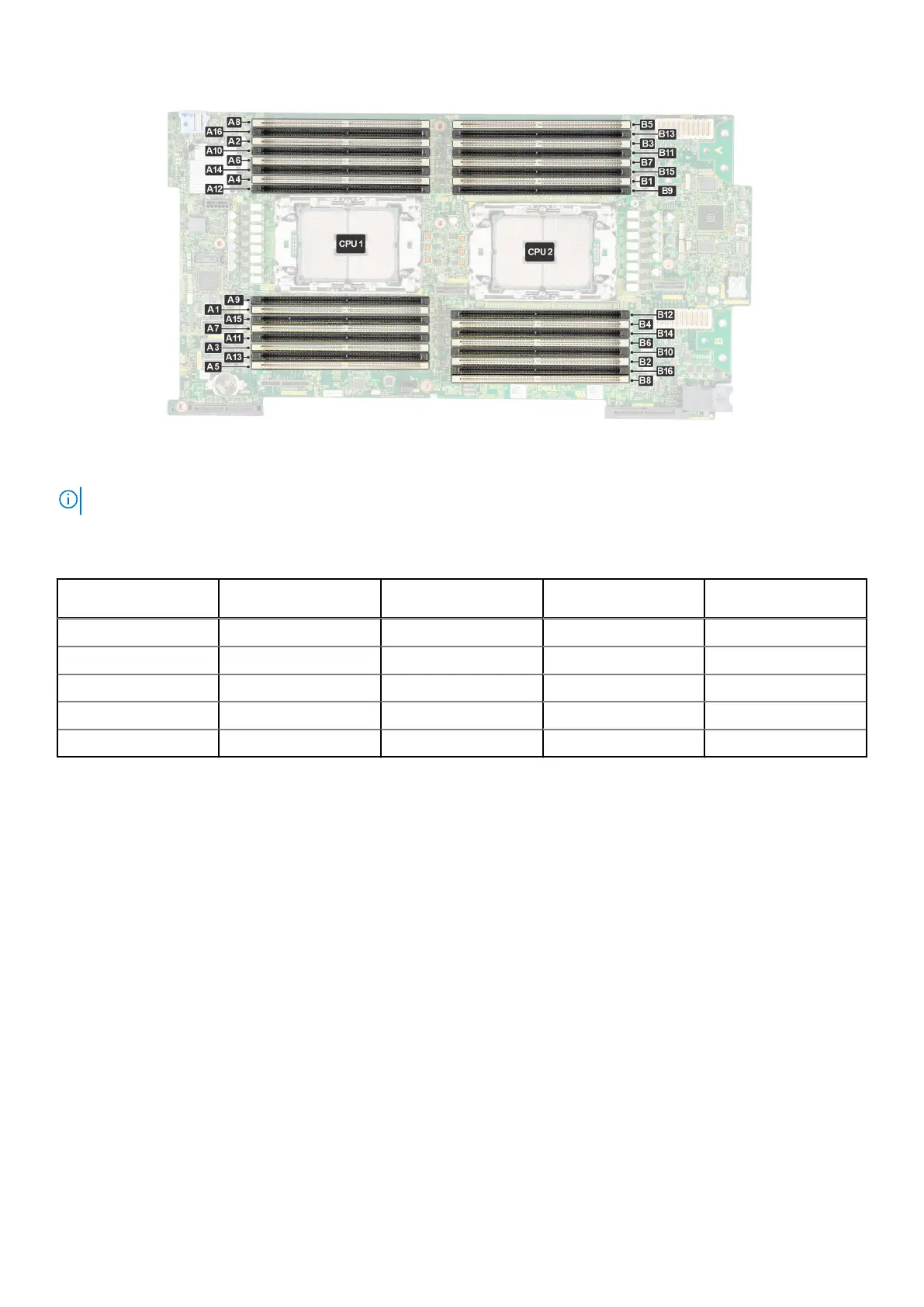
Figure 67. Memory sockets on the system board
NOTE: When High Performance CPU is installed, DIMM 9, 10,11,12 are not supported
The following table shows the memory populations and operating frequencies for the supported configurations:
Table 62. Supported memory matrix
DIMM Type DIMM Ranking Capacity Voltage Operating Frequency
(in MT/s)
RDIMM 1R 16 GB 1.1 V 4800
RDIMM 2R 32 GB 1.1 V 4800
RDIMM 2R 64GB 1.1 V 4800
RDIMM 4R 128 GB 1.1 V 4800
RDIMM 8R 256 GB 1.1 V 4800
Memory restriction
● Maximum DIMMs supported in MX760c is16 per CPU (total 32 DIMMs)
● Min config: one DIMM required per CPU.
● Mixing RDIMM with different capacities and types is not supported. Mixing RDIMMs of different speeds will results all
RDIMMs to run at the lowest speed
● ASHRAE A3/A4: Note: ASHRAE A3 is for 40C ambient support and A4 is for 45C ambient support.
●
ASHRE A3/A4: DDR5≥ 128GB is not supported. Note: ASHRAE A3 is for 40C ambient support and A4 is for 45C ambient
support
● Non-populated DIMM slots, should installed with solid DIMM blanks.
● CPU2 has a max DIMM count of 12 when using CPU2 HPR heatsink (DPN:79TTV). In configurations utilizing the HPR
heatsink, total max DIMM count for CPU1 and CPU2 is 24.
General memory module installation guidelines
To ensure optimal performance of your system, observe the following general guidelines when configuring your system memory.
If your system's memory configuration fails to observe these guidelines, your system might not boot, stop responding during
memory configuration, or operate with reduced memory.
The memory bus may operate at speeds of 4800 MT/s, or 4400 MT/s depending on the following factors:
● System profile selected (for example, Performance, Performance Per Watt Optimized (OS), or Custom [can be run at high
speed or lower])
● Maximum supported DIMM speed of the processors
94
Installing and removing system components












 To Next Page