36 About Your Computer
• Solid green: The battery is charging.
• Flashing green: The battery is almost fully charged.
• Off: The battery is adequately charged (or external power is not available
to charge battery.
If the computer is running on a battery, the light operates as follows:
• Off: The battery is adequately charged (or the computer is turned off).
• Flashing orange: The battery charge is low.
• Solid orange: The battery charge is critically low.
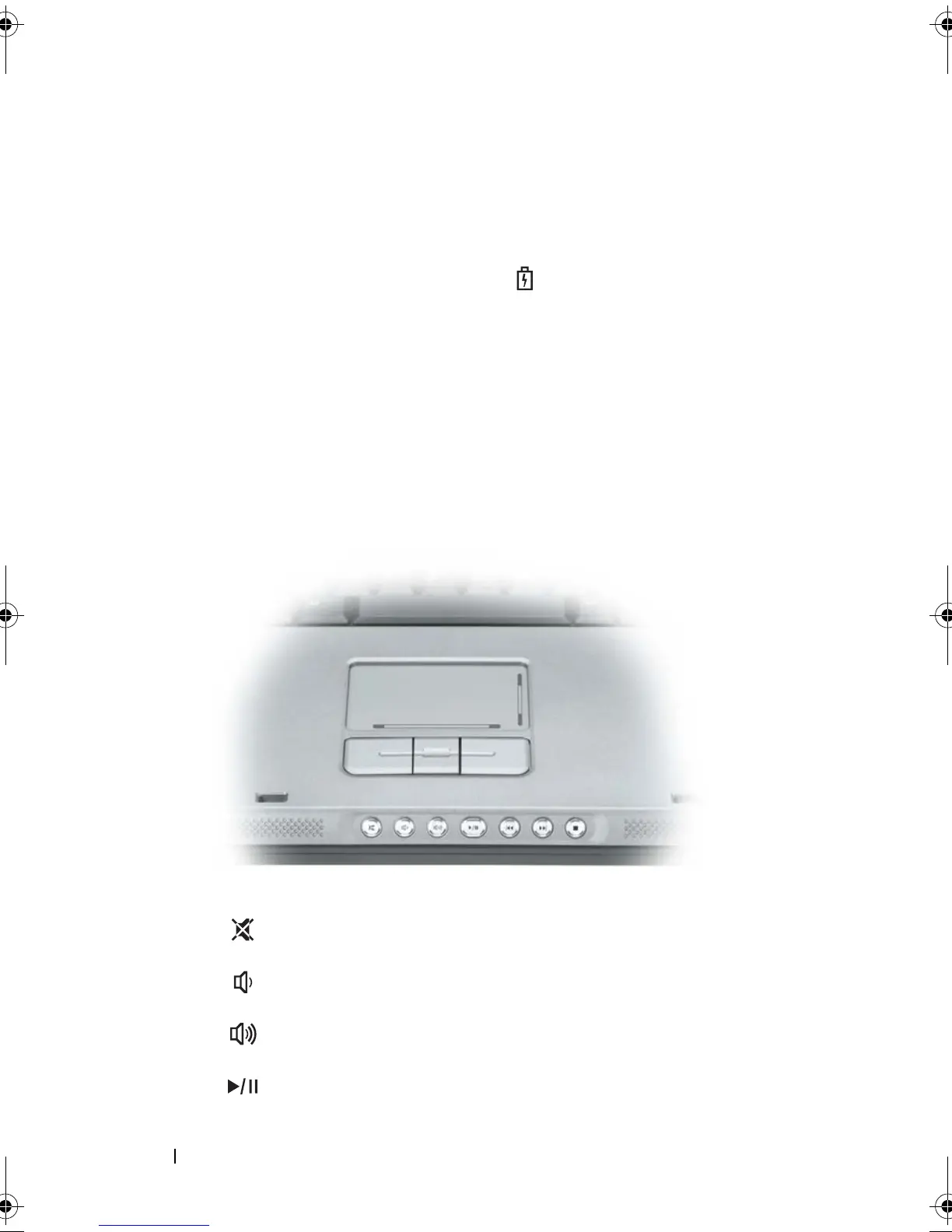
TOUCH PAD — Provides the functionality of a mouse. See "Touch Pad" on page 78.
TOUCH-PAD SCROLL ZONE — Provides the functionality of the scroll button on a
mouse. A vertical scroll zone is located on the right side of the touch pad. A horizontal
scroll zone is located on the bottom of the touch pad.
MEDIA CONTROL BUTTONS — Control CD, DVD, and Media Player playback.
Mute the sound.
Tu r n t h e v o l u m e d o w n .
Tu r n t h e v o l u m e u p .
Play or pause.
book.book Page 36 Tuesday, August 28, 2007 10:20 AM















 To Next Page