Figure 46: Select macro editor in setup menu
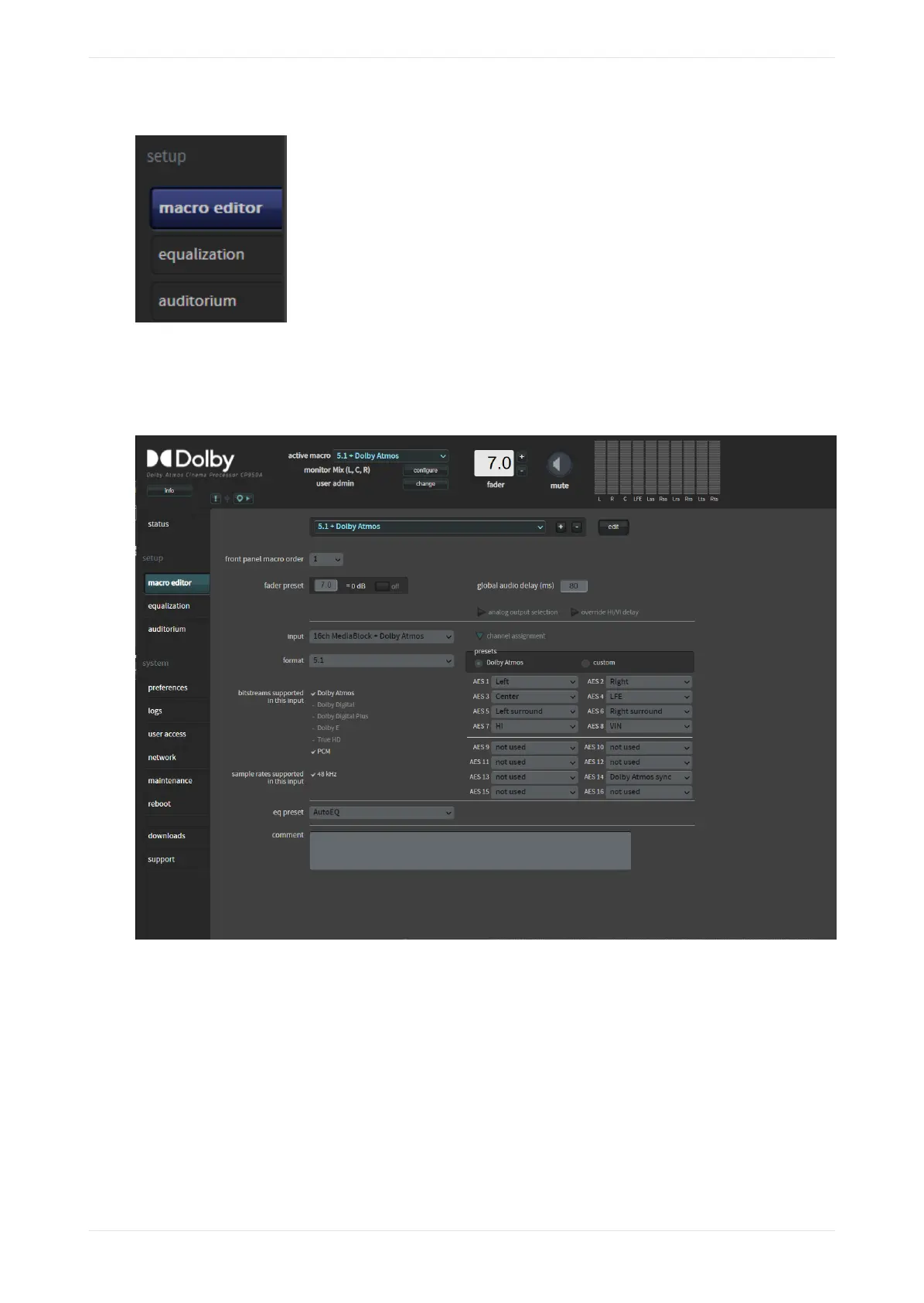
The macro editor screen appears, as shown in the following figure. In this screen, you can create or edit a
macro by clicking the plus (+) or edit buttons and entering the desired parameters. This example shows a
CP950A screen with the Dolby Atmos enablement installed.
Figure 47: Macro editor screen
When using the 8x AES IN connector, there are two macro input options and a third for Dolby Atmos:
1. When connecting to a digital cinema media block (IMS, integrated media block (IMB), or external) use the
16ch MediaBlock input option. This option processes audio correctly for such a device.
2. In cases where you are not using a digital cinema source or if the CP950 or 950A is receiving coded audio
on Advanced Encryption Standard (AES) pair 1/2, use the 16ch AES Digital input option for best results.
The following figure shows the parameters in the macro editor screen for a 16ch MediaBlock input source,
while the next figure shows parameters for a 16ch AES Digital input source. These examples show how the
parameters change for these two inputs. The available parameters can also change when selecting other
input sources.
Working with the web client user interface
Dolby Cinema Processor CP950 and Dolby Atmos Cinema Processor CP950A Manual 48
Issue 9 Part Number 8800298 19 January 2022









 To Next Page