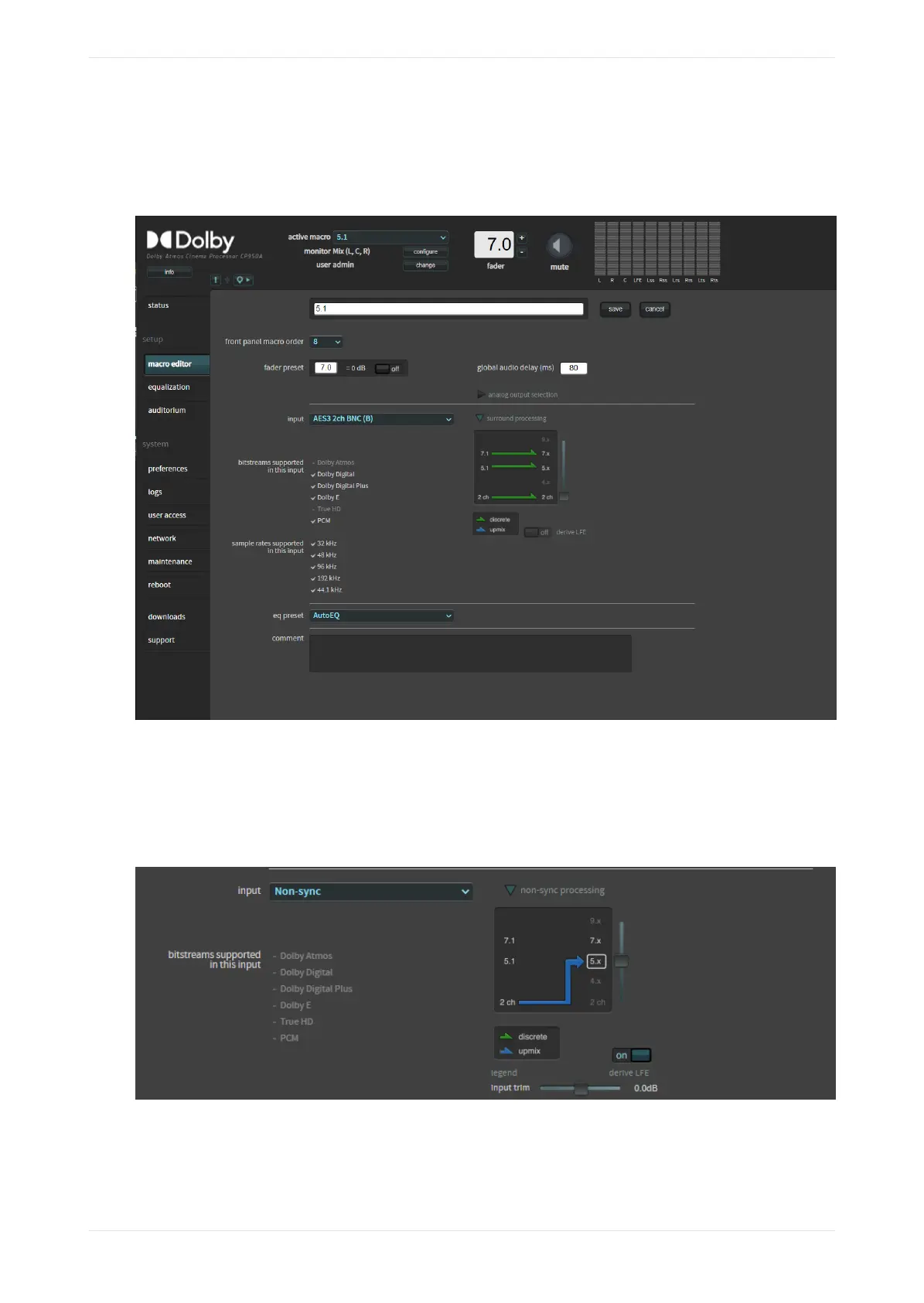
The following figure shows a 1x AES3 input. The surround processing section shows that when receiving a
two-channel input, 5.1 input, or 7.1 input, the system does not upmix. Green arrows define that no surround
processing is used.
Figure 50: Configure macro surround processing and upmixing
The following figure shows the parameters for the Non-sync input where the slider was moved up to process
a two-channel input into a 5.x signal. A blue arrow indicates that surround processing is used in this
situation. 5.1 and 7.1 audio are passed normally without surround processing in this macro. You can enable/
disable subwoofer signal processing by clicking the derive LFE button, which toggles the signal between 5.1
(enabled) and 5.0 (disabled). You cannot upmix digital cinema content by moving the slider.
Figure 51: Upmix non-sync input source
For the Microphone macro, you can specify that audio is transmitted from the center, surrounds, or from
CP950A overheads. You can also enable or disable phantom power (+48 V).
Working with the web client user interface
Dolby Cinema Processor CP950 and Dolby Atmos Cinema Processor CP950A Manual 50
Issue 9 Part Number 8800298 19 January 2022









 To Next Page