36 Instructions for use Babyleo TN500 SW 1.0n
Product description
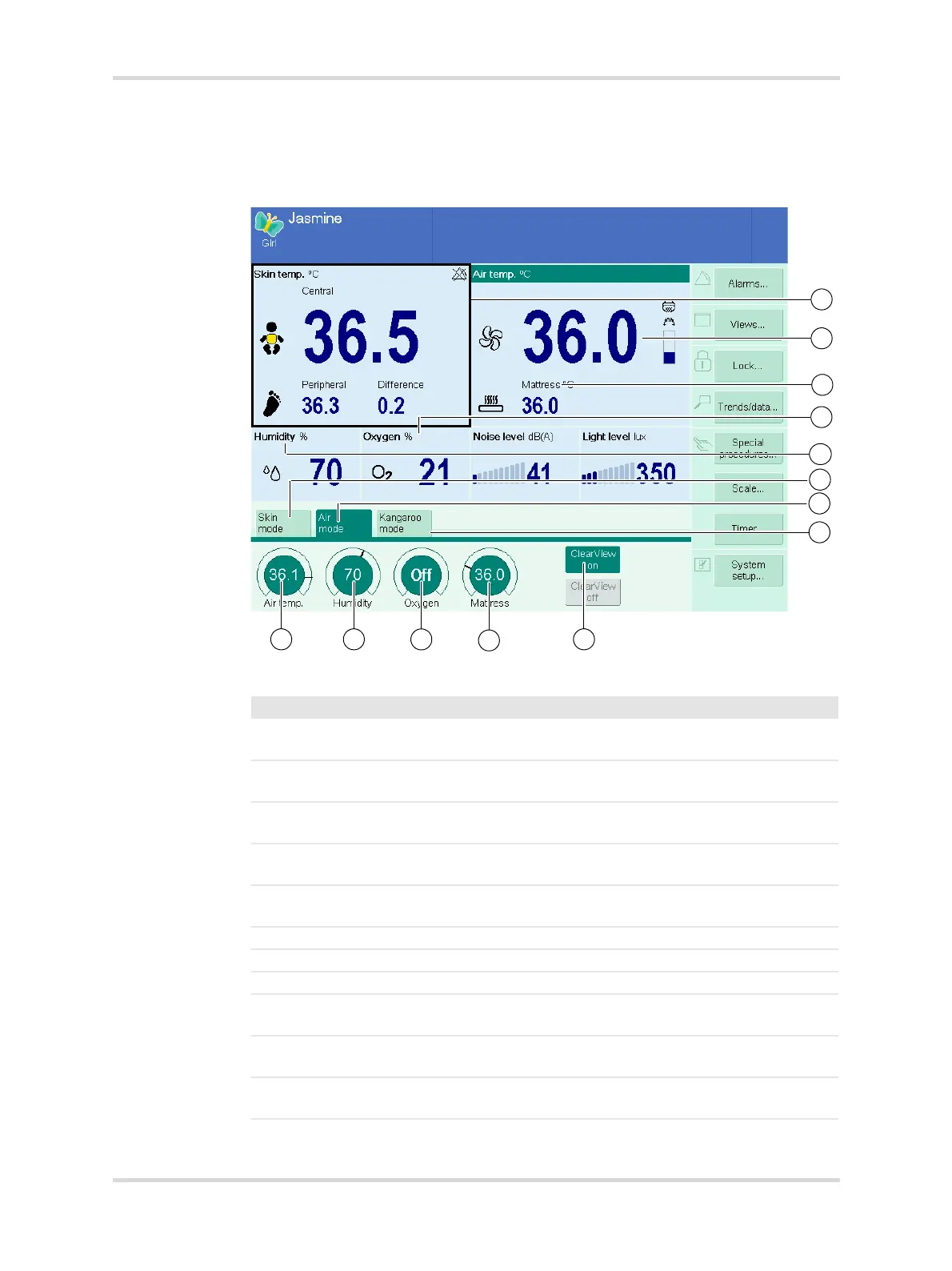
3.2.4 Standard view in incubator operation
The following screen view shows the setting options and display values in incubator
operation (hood closed).
Fig. 13 Standard view in incubator operation with air temperature mode activated
27240
No. Designation Description
1 Skin temp. Shows the current skin temperature measure-
ment.
2 Air temp. Shows the current air temperature measure-
ment in the patient compartment.
3 Mattress (option) Shows the current mattress core temperature
measurement.
4 Oxygen (option) Shows the current oxygen concentration mea-
surement in the patient compartment.
5 Humidity Shows the current humidity measurement in
the patient compartment.
6 Skin mode Selects skin temperature mode.
7 Air mode Selects air temperature mode.
8 Kangaroo mode Selects kangaroo mode.
9 ClearView on Reduces condensation on the inside of the
hood.
10 Mattress (option) Used for setting the mattress core tempera-
ture.
11 Oxygen (option) Used for setting the oxygen concentration in
the patient compartment.














 To Next Page