Player management (PLAYER Off / On)
This function is available for the ROAD (Fig. 9) display
mode only.
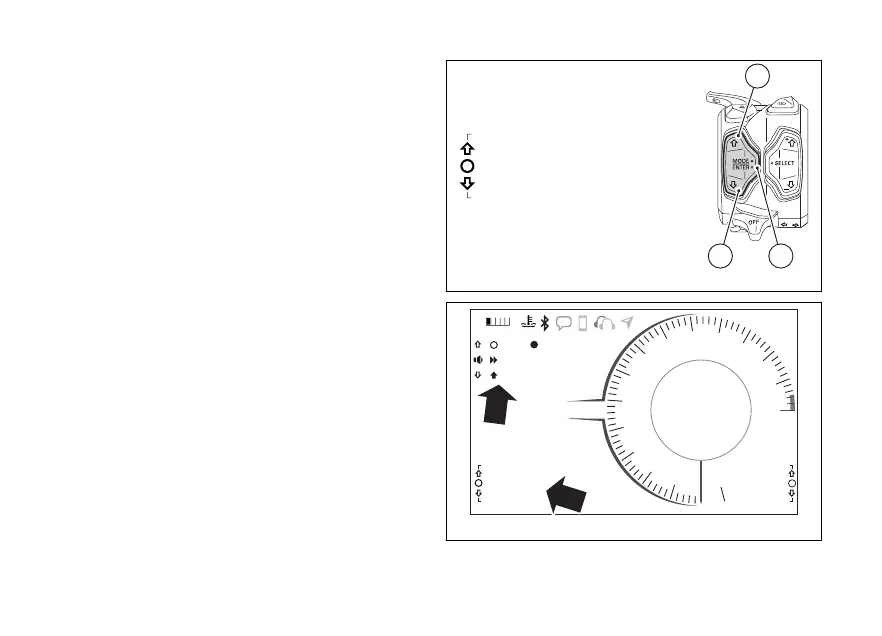
To select this function in the Function Menu, scroll the
functions available using buttons (1) and (2) to display
“PLAYER”.
This function allows managing (turning on and off) the
Player.
The PLAYER function is only available in the Function
Menu if the Bluetooth module is available and one
Smartphone is connected.
If Player is not active, the instrument panel displays
“PLAYER OFF”. To turn it on and open the Player
menu, press button (4) (please refer to
“Infotainment”, page for information on how to use
the Player).
If Player is active, the instrument panel displays
“PLAYER ON”. To open the Player menu, press
button (1) for 2 seconds (please refer to
“Infotainment”, page for information on how to use
the Player).
To turn Player off, press button (4).
Fig. 39
11:34
A.M.
SPORT
RPM X 1000
Gear
km/h
N
10
9
8
7
6
5
4
3
2
1
11
12
13
14
15
DTC 2
DQS OFF
DWC 8
0
SKIP
PAUSE
TRACK 01 - U2
PLAYER CONTROL
2
LAST CALLS
PLAYER ON
CONS. I. km/L
13.2
LO HI
Fig. 40
101


 To Next Page
 Loading...











