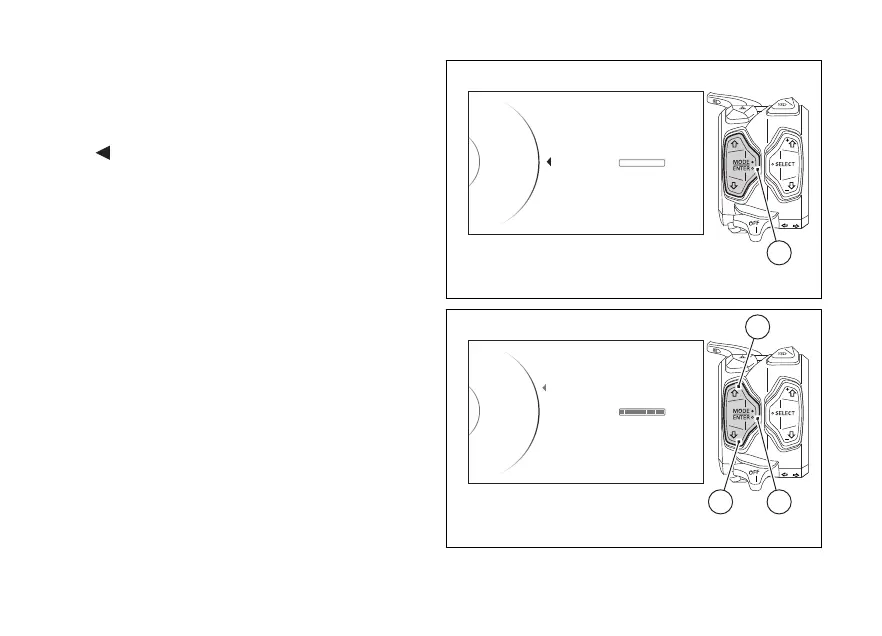
Select “Memory” indication to display and/or delete
data in DDA memory.
As you enter this function, the instrument panel
displays the following indications:
-
Back
- Erase (*).
The current DDA memory status is also displayed on
the right as a percentage:
- when bar is empty and reads Empty 0%, DDA
memory is not empty;
- when bar is partially coloured and a percentage is
specified, DDA memory is full by the indicated
percentage;
- when bar is completely coloured and reads Full
100%, DDA memory is completely full.
(*) The “Erase” indication is displayed only if DDA
memory is not empty.
To delete the memory, use button (1) or (2) to select
Erase and press button (4).
The instrument panel will show "Wait..." for as long as
the deletion is completed (depending on the quantity
of data to be deleted).
...
Back
Memory
DDA Memory
Empty
0%
4
Fig. 143
...
Erase
Memory
DDA Memory
Full
100%
Back
42
1
Fig. 144
184





 To Next Page