Phone
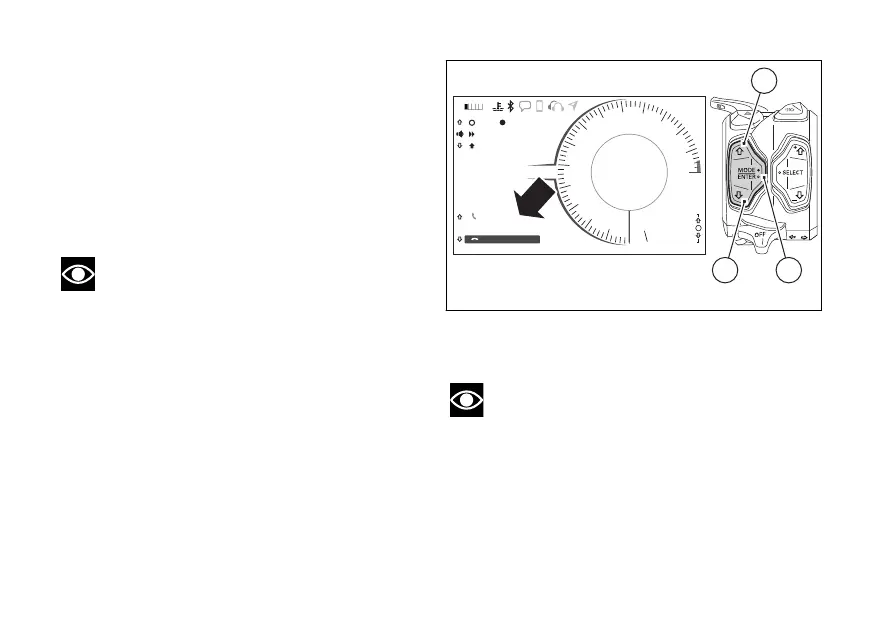
Use the PHONE function:
- to manage incoming calls by means of button (1),
button (2) and button (4);
- to recall the last calling number within 5 seconds
from call interruption (RECALL function);
- to recall any of the last 7 calling numbers from the
list under CALLS function (page 102).
Note
It is not possible to make a call by selecting the
name/number from the contact list through the
function buttons.
To answer the call, press button (1).
To reject the call, press button (2).
To end the call once accepted, press button (2).
If there is an incoming call while the Player is active,
the latter is paused throughout the phone call and will
resume operation when call is over.
During 5 seconds after hang-up, the rectangle
corresponding to the Recall function is activated to
allow the recall. After this 5 second time, the
rectangle of the Recall function is disabled.
To activate the Recall function within the 5 seconds,
press button (1).
Note
If a call is in progress and the instrument panel
shows the missed call symbol, current call view has
higher priority over the missed call.
11:34
A.M.
SPORT
RPM X 1000
Gear
km/h
N
10
9
8
7
6
5
4
3
2
1
11
12
13
14
15
DTC 2
DQS OFF
DWC 8
0
ACTIVE
END CALL
MARIO ROSSI
SKIP
PAUSE
TRACK 01 - U2
PLAYER CONTROL
2
>>>
LO HI
1
42
Fig. 151
192



 To Next Page