Getting Started
30 EchoNous Bladder & Vein User Guide
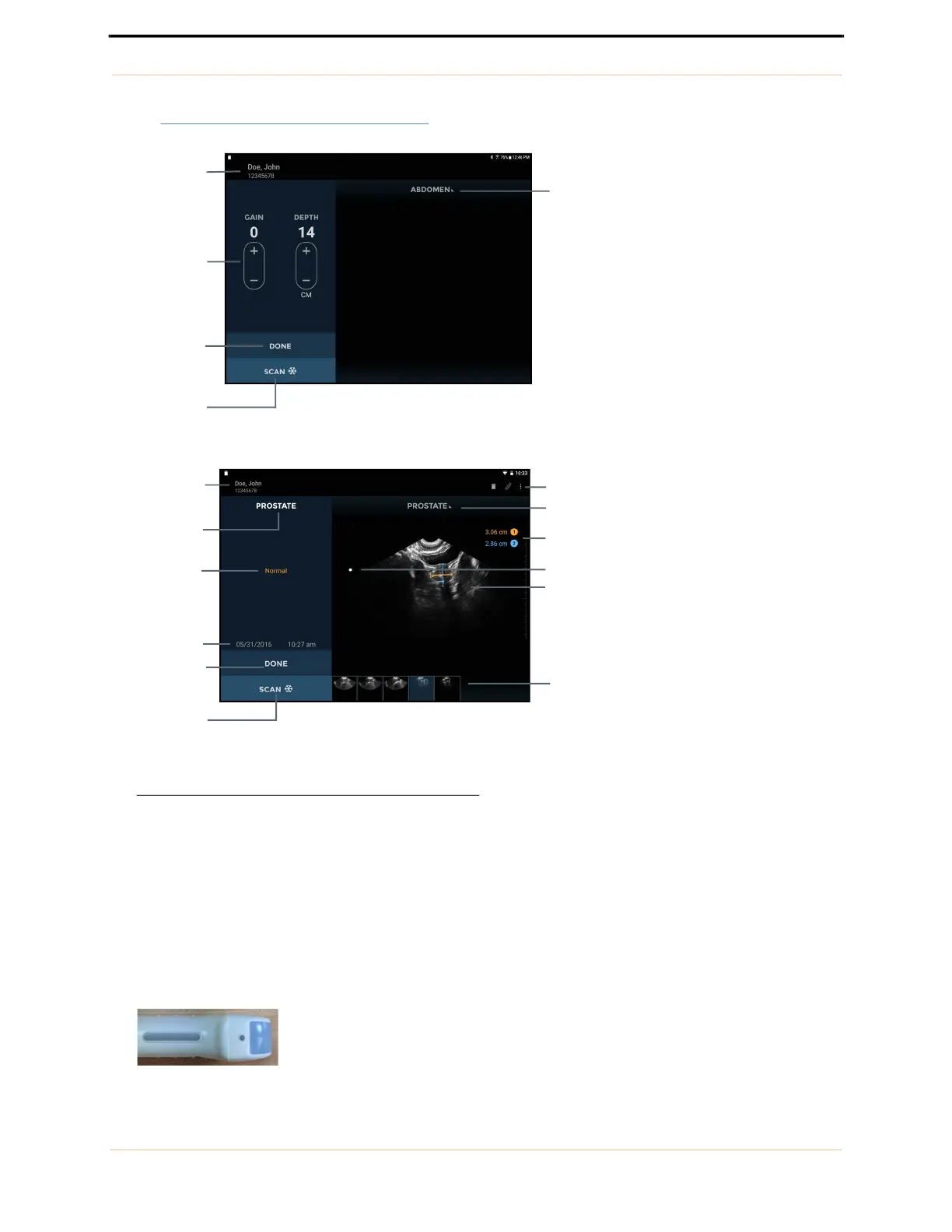
See FIGURE 8. Ultrasound imaging screens for ultrasound screen layouts.
FIGURE 8. Ultrasound imaging screens
The ultrasound imaging screen layouts contain the following areas:
• Patient Details – displays patient details for the current exam. Tap to change the patient associated with the
exam.
• Preset Used – displays the scan preset used for the current image.
• Image Text Annotation – displays the text annotation for the image.
• Image Date and Time – displays the date and time of the image.
• Gain and Depth Controls – adjust the gain (brightness) or the depth for the system.
• Orientation Mark – corresponds to the orientation marker on the probe.
Image Gain
(brightness)
and depth
Done (end
exam)
Scan/Stop
Patient
details
Preset used
Image text
annotation
Orientation mark
Image date
and time
Patient
details
Scan preset menu
Exam icons
Scan preset
menu
Measurement
area
Ultrasound image
Image
thumbnails
Done (end
exam)
Scan/Stop
Probe orientation marker



 To Next Page