EasyManua.ls Logo

Eclipse CD3200 - Rotary Mode and Shortcut Creation Process

Eclipse CD3200
177 pages
Print Icon
To Next Page IconTo Next Page
To Previous Page IconTo Previous Page
Loading...
Making
a
call
uSing
a
Bluetooth®
WIreless
technology
compatible
cellular
phone
I
Pour
placer
un
appel
par
telephone
cellulalre
Bluelooth®
a
lechnologle
a
commande
sans
fil
compatible
I
Hacer
una
Hamada
con
un
telefono
mavil
compahble
con
tecnologia
matambnca
Bfuetoath®
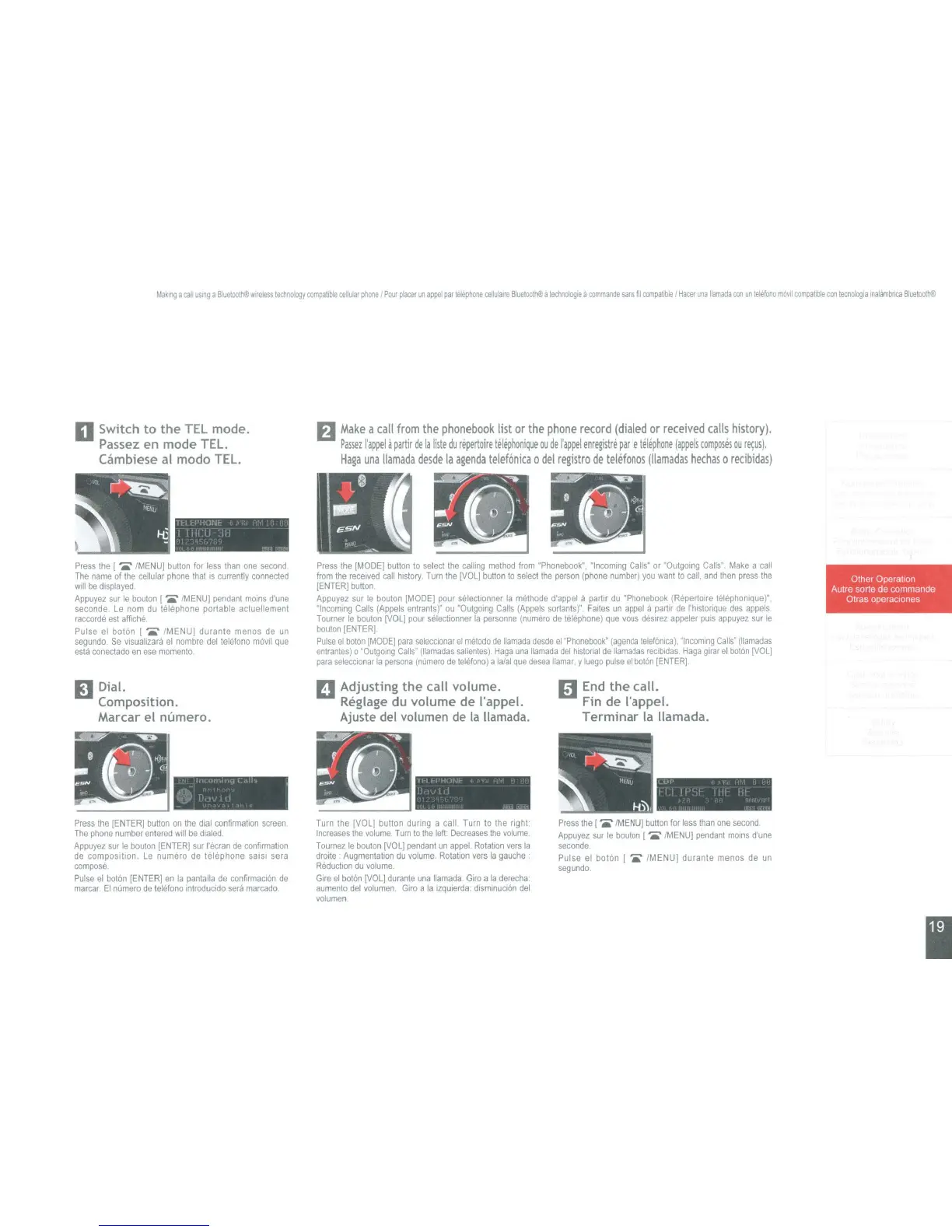
D Switch
to
the
TEL mode.
Passez
en mode TEL.
Cilmbiese al modo TEL.
fJ
Make
a
call
from
the
phonebook
list
or
the
phone
record
(dialed
or
received
calls
history).
Passez
I'appel
d
partir
de
la
liste
du
repertoire
telephonique
ou
de
I'appel
enr~stre
par
Ie
telephone
(appels
composes
ou
r~usi.
Haga
una
lIamada
desde
la
agenda
telef6nica
0
del
registro
de
telefonos
(liamadas
hechas
0
recibidas)
rt-l
~
":1
lW·
1 I III
II
In
·(At8~
...
~
....
oI
'~,
.,
.
~!5N
J
<'
:
....
Press
the
[
IMENU]
button
for
less
than
one
second
The
name
of
the
cellular
phone
that
is
currently
connected
wIll
be
displayed
Appuyez
sur
Ie
bouton
[
....
IMENU]
pendant
mOlns
d'une
seconde
Le
nom
du
telephone portable actuellement
raccorde
est
affiche
Pulse
el
boton ( ..... IMENU] durante menos
de
un
segundo
Se
\llsuahzara
el
nombre
del
telefono
movll
que
esta
conec1ado
en
ese
momento
Press
the
[MODEJ
button
to
select
the
calling
method
from
"Phonebook",
"Incommg
Calls"
or
"Outgoing
Calls"
Make
a
call
from
the
receIVed
call
histOry,
Turn
the
[VOL]
button
to
select
the
person
(phone
number)
you
want
10
call,
and
then
press
the
IENTER}
bulton
Appuyez
sur
Ie
bouton
IMODEI
pour
selecttonner
la
methode
d'appet
apartir
du
"Phonebook
(RepertOire
lelE'~phonlque)",
"Incoming
Calls
(Appels
entrants)"
ou
"OutgolOg
Calls
(Appels
sortants)"
Faltes
un
appel
a
partir
de
I'hlstonque
des
appels
Toumer
Ie
bouton
[VOL]
pour
selectionner
la
personne
(numero
de
telephone)
que
\lOUS
destrez
appeler
pUtS
appuyez
sur
Ie
boulon
[ENTER]
Pulse
el
bolon
[MODE}
para
seleccionar
el
metodo
de
lIamada
desde
el
"Phonebook"
(agenda
telefanica),
"Incoming
Calls'
(Ilamadas
entrantes)
0
'OutgolOg
Calls"
(Ilamadas
salientes).
Haga
una
lIamada
del
htstorial
de
Ilamadas
recibldas
Haga
glrar
el
bot6n
{VOL]
para
seleccionar
la
persona
(numero
de
telefono)
a
lalal
Que
desea
lIamar.
y
luego
pulse
el
baton
[ENTER].
Other Operatton
Autre sorle de commande
Otras operaClones
II
Dial.
Composition.
Marcar el numero.
II
Adjusting
the
call volume.
Reglage du volume de I'appel.
Ajuste del volumen
de
la
Ilamada.
1:1
End
the
call.
Fin de I'appel.
Terminar
la Ilamada.
"
1111""""'1
C,.
>
.;::., .
'{:,'d
II,
l'
I
II
1I1~1'11"/!f.
"
'j
] i
Press
the
[ENTER]
button
on
the
dtal
confirmation
screen
The
phone
number
entered
WIll
be
dialed
Appuyez
sur
Ie
bouton
[ENTERj
sur
I'ecran
de
confirmalton
de
composition
Le
numaro
de
telephone
sa
lSI
sera
compose
Pulse
el
boton
[ENTER]
en
la
pantal1a
de
confirmaclon
de
marcar
EI
numera
de
telefono
mtroducido
sera
marcado
Turn
the
[VOL]
button during a call
Turn
10
the
right·
Increases
the
volume
Tum
to
the
left.
Decreases
the
\lolume
Tournez
Ie
bouton
[VOL]
pendant
un
appel.
Rotation
vers
la
drolte
Augmentation
du
\lolume.
Rotation
\lers
la
gauche'
ReductlOn
du
\lolume.
Glre
el
boton
[VOL]
durante
una
lIamada
Giro
a
la
derecha:
aumenlo
del
\lolumen
Giro
a
la
izqUlerda.
dismmuci6n
del
\lolumen
Press
the
[ .....
{MENU]
button
for
less
than
one
second
Appuyez
sur
Ie
bouton
[ .....
IMENU}
pendant
moms
d'une
seconde.
Pulse
el
baton [
,.
IMENU} durante menos
de
un
segundo.
I

Table of Contents

Other manuals for Eclipse CD3200

Related product manuals