Register
a
Bluetooth®
wIreless
technology
compatible
audIo
device
,I
Enreglstrer
un
apparell
audio
Bluetooth®
compatible
a
technologle
a
commande
sans
fill
Registrar
un
dlSPOSltlVO
de
audio
compatible
con
tecnologia
malambnca
Bluetooth®
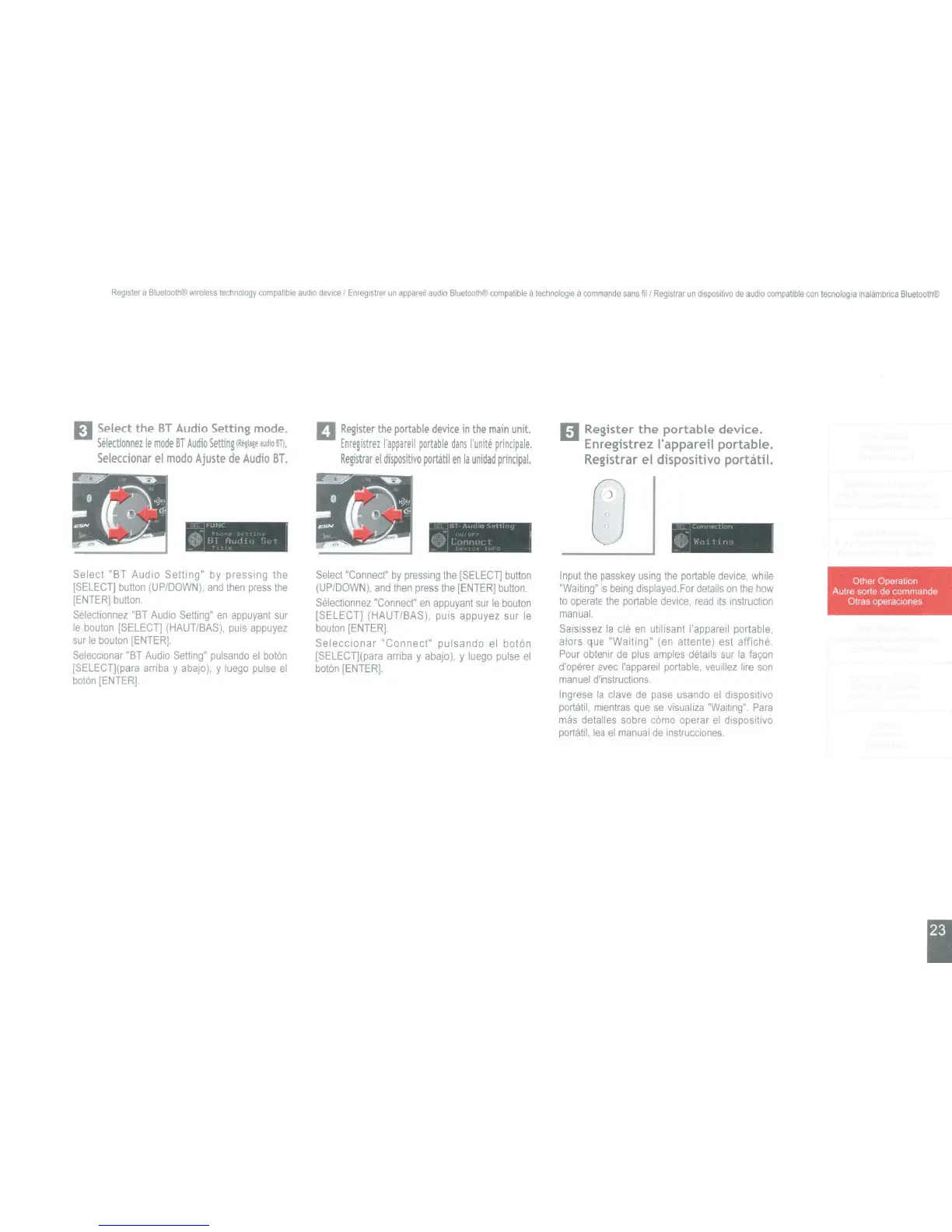
D Select the
BT
Audio
Setting mode.
Selectionnez
Ie
mode
BT
Audio
Setting
(Regl,!,
aiJdlo
STI.
Seleccionar
el
modo
Ajuste
de
Audio
BT.
D
Register
the
portable
device
in
the
main
unit.
Enregistrez
I'appareil
portable
dans
I'unite
principale.
Registrar
el
dispositivo
portatil
en
la
unidad
pnncipal.
g Register
the
portable
device.
Enregistrez I'appareil portable.
Registrar el dispositivo portatil.
_
"..II<
e
!il
(I
II
. t
'"
'''HI
0
~-I"
.
()
(
nt,
r 1
,
...
""
1
G'
w"
:11,'
Select "BT Audio Setting"
by
pressing the
[SELECT]
button
(UP/DOWN).
and
then
press
the
[ENTER]
button
Selecllonnez
"BT
Audio
Setting"
en
appuyant
sur
Ie
bouton
[SELECT)
(HAUT/BAS).
puis
appuyez
sur
Ie
bouton
[ENTER].
SeleCCIonar
"BT
Audio
Setting"
pulsando
el
boton
[SELECTj(para
arnba
y
abajo),
y
luego
pulse
el
boton
[ENTER]
Select
"Connect"
by
pressing
the
[SELECT]
button
(UP/DOWN).
and
then
press
the
[ENTER]
button.
Selectionnez
"Connect"
en
appuyant
sur
Ie
bouton
ISELECT] (HAUT/BAS). puis appuyez sur
Ie
bouton
[ENTER].
Seleccionar "Connect" pulsando
el
boton
[SELECT](para
arriba
y
abajo),
y
luego
pulse
el
boton
[ENTER].
Input
the
passkey
uSing
the
portable
device.
while
"Waiting"
is
being
displayed.
For
details
on
the
how
to
operate
the
portable
device.
read
ItS
instruction
manual
Salsissez
la
c1e
en
utilisant I'apparell portable,
alors que "Waiting" (en attente) est affiche
Pour
obtemr
de
plus
am
pies
details
sur
la
fa,on
d'operer
avec
I'appareil
portable.
veuiliez
lire
son
manuel
d'instrucllons.
Ingrese
la
clave
de
pase
usando
el
dISPOSlt,VO
portatil,
mlentras
que
se
vlsualiza
"Waiting"
Para
mas
detalles
sobre
como
operar
el
dlspositivo
porta
IiI.
lea
el
manual
de
InstrucClones.
I



 To Next Page