EasyManua.ls Logo

Eclipse CD3200 - How to operate the AUDIO CONTROL; Switching Audio Control Modes and Levels

Eclipse CD3200
177 pages
Print Icon
To Next Page IconTo Next Page
To Previous Page IconTo Previous Page
Loading...
Names
of
controls
and
parts
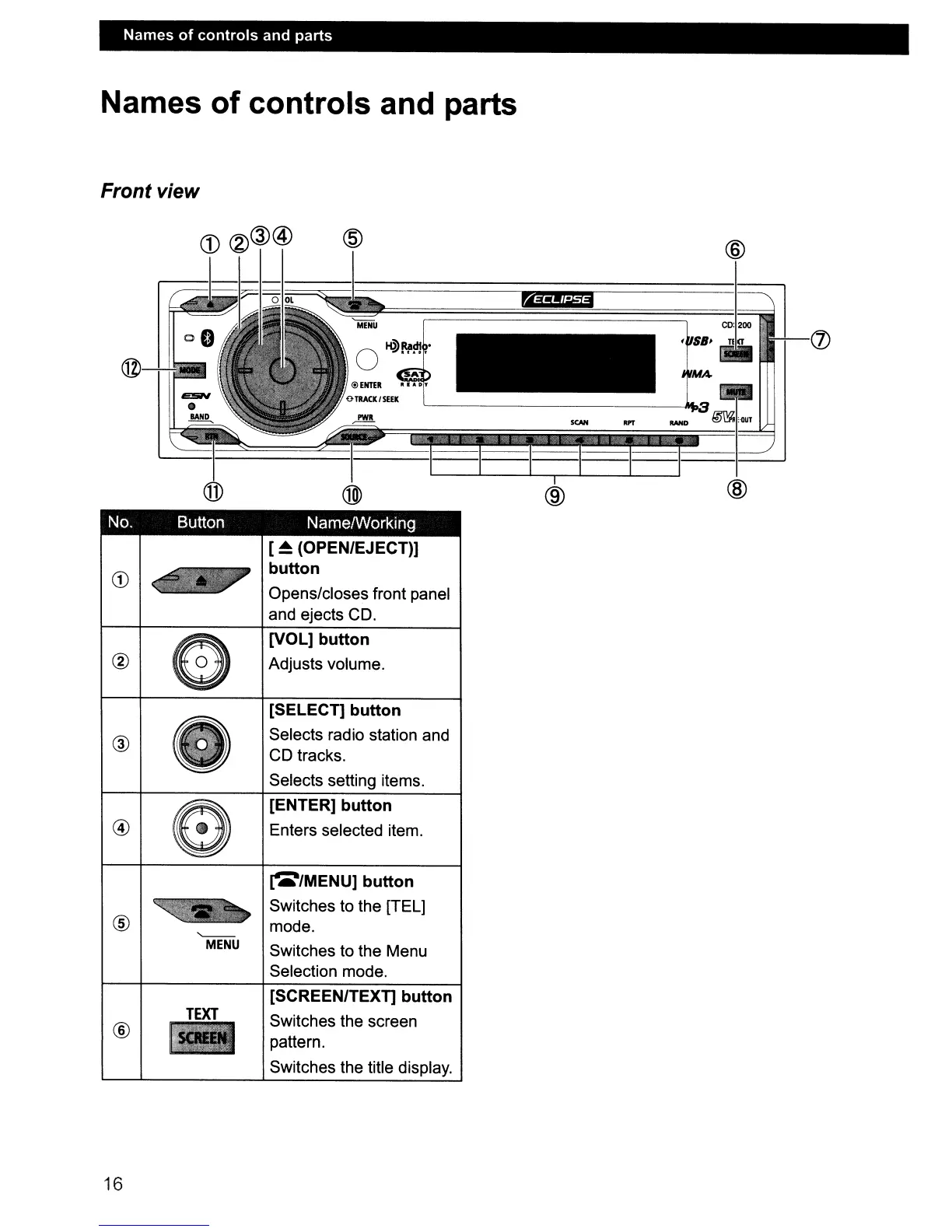
Names of controls and parts
Front view
@
.#i!liii
(J)
@
-i
~
SCAN
orr
@
@)
@
@
No. Button NamelWorking
[
~
(OPEN/EJECT))
CD
button
Opens/closes front panel
and ejects CD.
G
[VOL] button
®
Adjusts volume.
[SELECT] button
®
Selects radio station and
CD tracks.
Selects setting items.
a
[ENTER] button
@
Enters selected item.
~/MENU]
button
~
Switches to the [TEL]
@
mode.
'----
MENU
Switches to the Menu
Selection mode.
[SCREEN/TEXT] button
TEXT
Switches the screen
®
pattern.
Switches the title display.
16

Table of Contents

Other manuals for Eclipse CD3200

Related product manuals