56
Technical Publication Document NO: SYSTEM-007-ENG (Ver.1.1)
HF-525Plus Installation, Operation and Service Manual
(3) Finishing Cable and Setup the Console
■ Entering by Setup mode
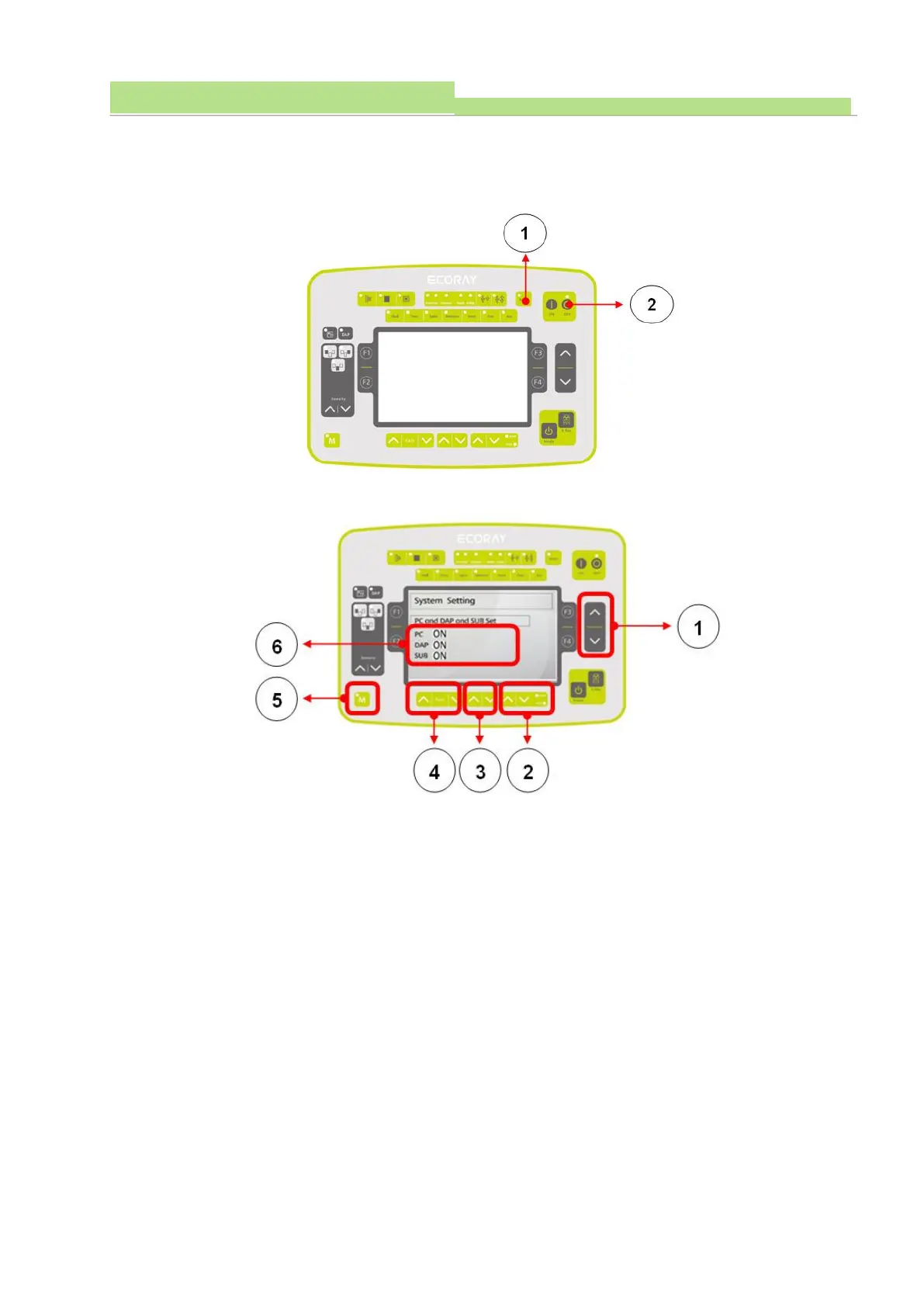
● X-Ray Console’s Reset Switch (Picture 1) and Power On Switch (Picture 2) are pushed
simultaneously and enter OP console.
■ “PC, DAP and SUB Set”’s Set Up (Function)
● Entering by System setting mode, and pushing “Data Changing Switch” (Picture 1), and entering by
“PC, DAP and SUB Set” (Picture 6).
● Pushing “KV Up & Down Switch” (Picture 4) to set up PC(Picture 6).
● Pushing “mA Up & Down Switch” (Picture 3) to set up DAP(Picture 6).
● Pushing “Sec Up & Down Switch” (Picture 2) to set up DAP(Picture 6).
● Changed Data can saved using Memory “M” Switch (Picture 5) and pushed until “Beep” ends.
(Buzzer occurs 10 seconds).



 To Next Page