8-52
6205s BATHYMETRIC AND SIDE SCAN SONAR 0020300_REV_E
5. If no data is present, cycle the power on the sonar head using the On/Off switch on the interface
box. Allow the sonar to be off for at least 10 seconds before turning it back on.
6. Once the sonar is reconnected, go back into the Remote Desktop application and check Chan 4
on COM 4 again, as in step 4 above.
7. If the port reports data, then proceed to normal operation. If not, continue to step 8.
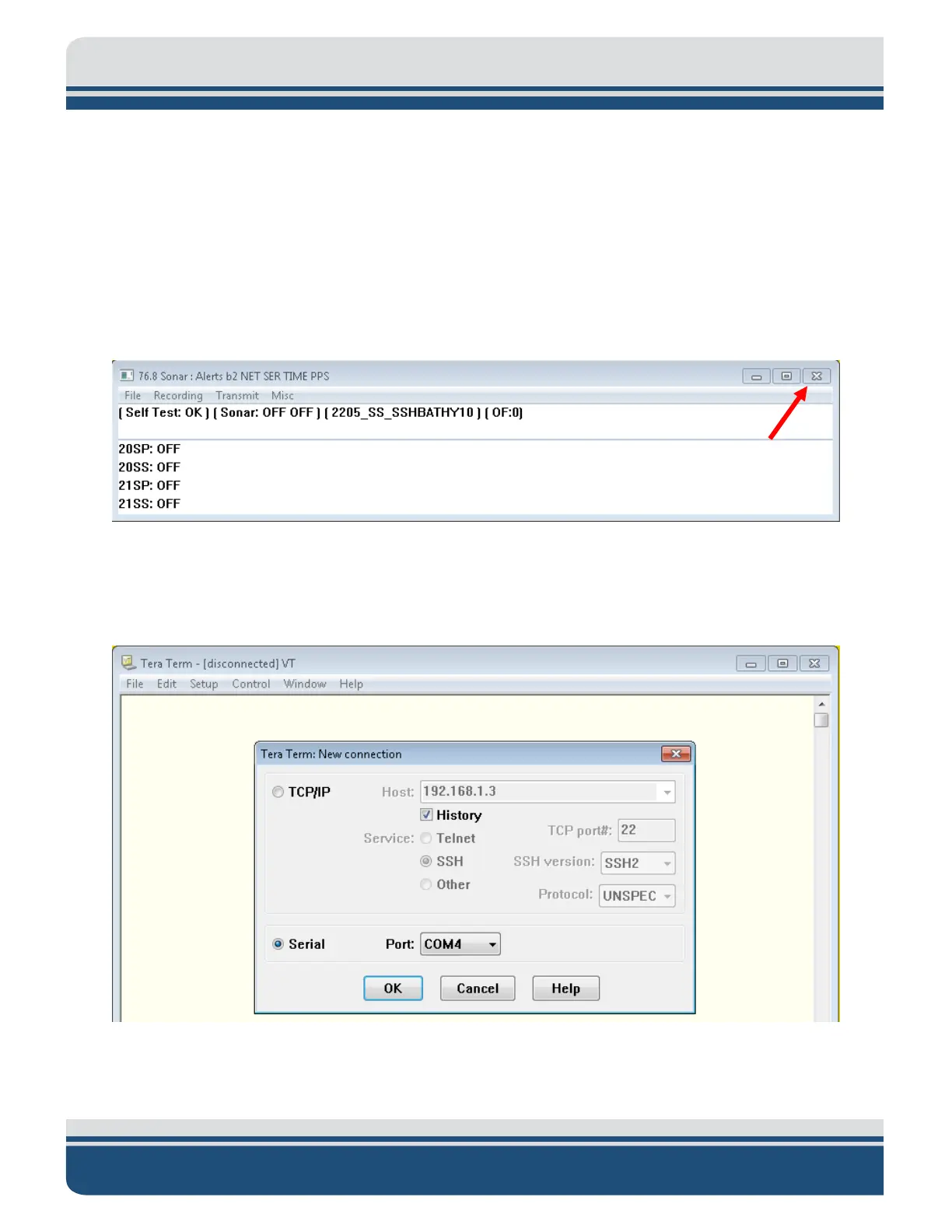
8. Closeout of Sonar.exe by clicking on the ‘X’ in the top right corner, as shown in F
IGURE 8-3, red arrow.
Figure 8-3: Closing the Sonar.exe Application
9. Double-click the “EdgeTech Shortcut” and navigate to Utilities/Teraterm folder. Launch ttermpro.exe.
10. Select Serial, choose COM4 from the dropdown menu, as shown in
FIGURE 8-4, and click OK.
Figure 8-4: Connecting to COM4 using TeraTerm



 To Next Page