8-64
6205s BATHYMETRIC AND SIDE SCAN SONAR 0020300_REV_E
always a good idea to close the remote desktop application when finished
with configurations.
8.3.2 Two Sensors
Two sensors, such as a dual-headed GPS (heading, position, and time source) and a motion reference unit
(roll, pitch, and heave), may be used to supply the necessary information. For this type of configuration,
only COM1 and COM2 will be used.
To configure the COM ports for the two sensors:
1. Follow steps 1 through 6, as stated previously under appendix sub-section,
ONE SENSOR.
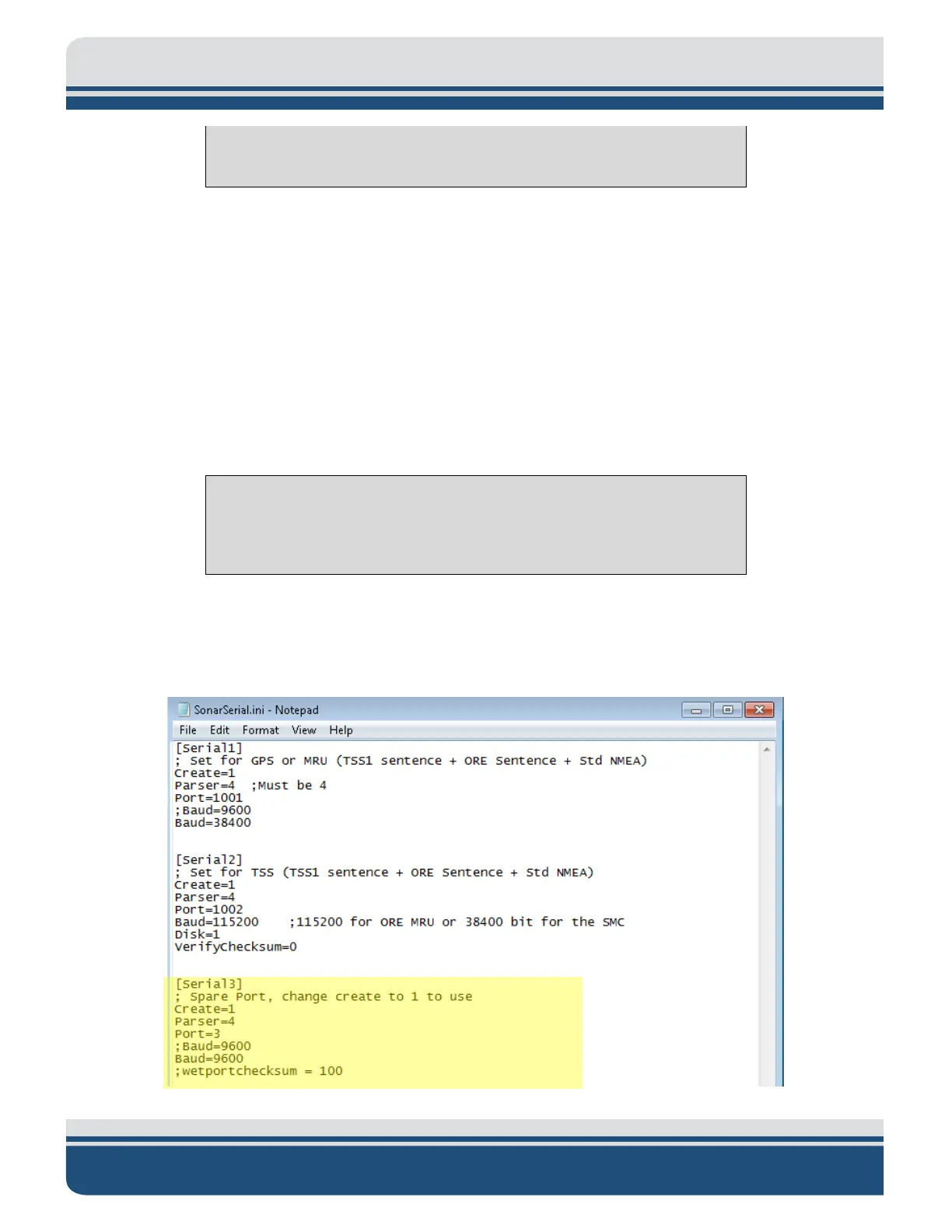
2. Under [Serial3] set Create = 0, select File > Save and close the file, as shown in
FIGURE 8-19.
CAUTION!
Do not touch anything else, or the system’s configuration files could be
seriously compromised, and functionality may suffer.
This will deactivate COM3. By deactivating this port, Sonar will report to Discover that only two
sensors are to be used on COM1 and COM 2 to parse the necessary sensor information. Therefore,
Discover will not throw up any errors if a sensor is not connected to COM3.
Figure 8-19: SonarSerial.ini File



 To Next Page