6
BASIC
OPERATIONS
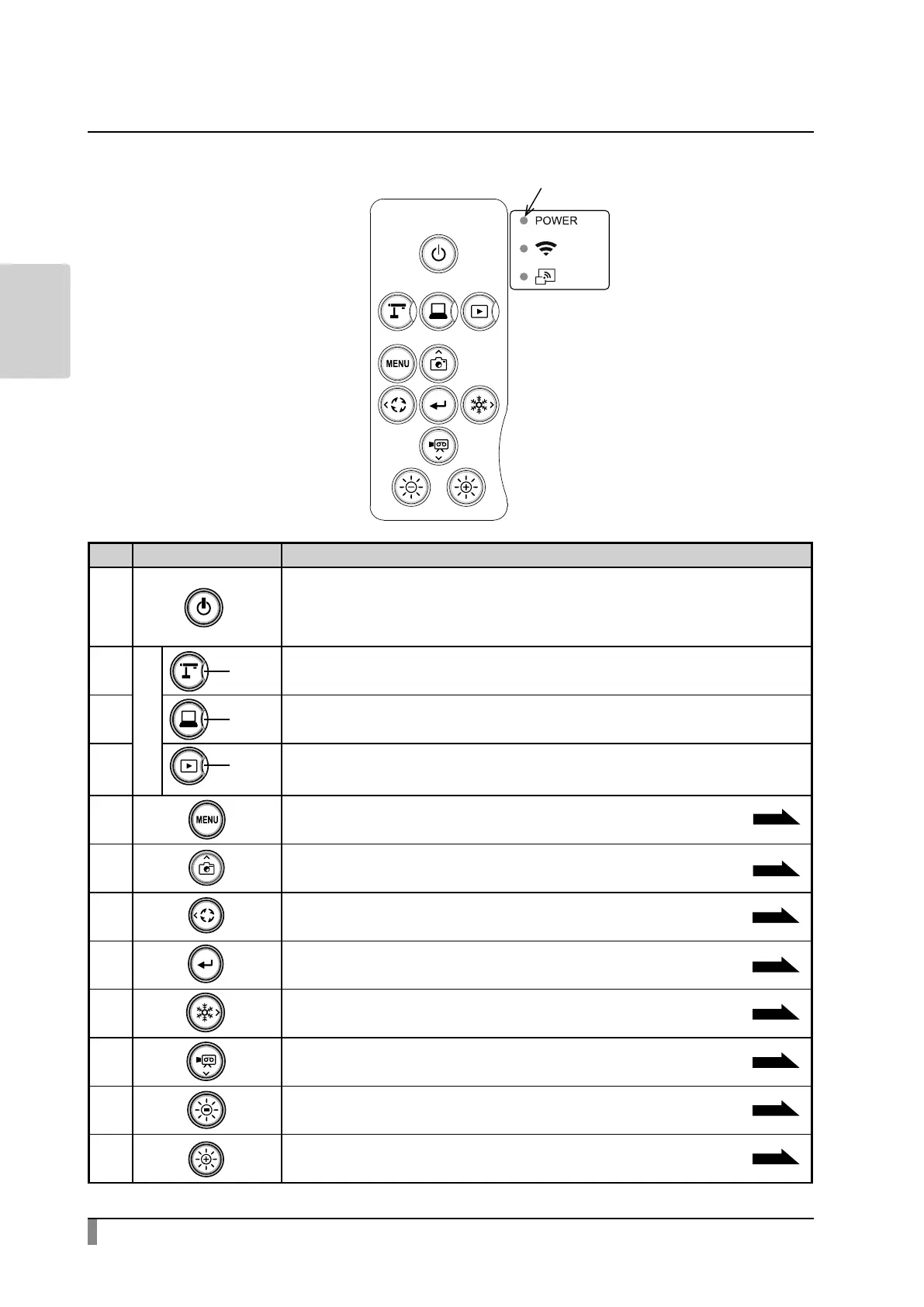
Operating panel
Mark Function
①
To turn on or o the power.
Power on: The Power LED turns blue.
Power o (standby status): The Power LED turns red.
②
Mode buttons
LED
To switch to the Camera mode.
The camera image will be displayed.
③ LED
To switch to the External input mode.
Images being input to the external input ports will be displayed.
④ LED
To switch to the Playback mode.
Images stored in the memory device (SD card/USB ash drive/internal storage) will be
displayed.
⑤
To switch to the Home screen.
P.25
⑥
To save a still image to the memory device
(SD card/USB ash drive/internal storage)
⑦
To rotate the image by 90 degrees.
⑧
To conrm the selected OSD menu item.
⑨
To pause the camera image.
⑩
To record the camera image as a video to the memory device
(SD card/USB ash drive/internal storage).
⑪
To darken the camera image.
⑫
To brighten the camera image.
Power LED
P.20
P.25
P.24
P.34
P.22
P.22
①
②
⑦
⑤
③
⑧
⑩
⑪ ⑫
⑥
④
⑨
P.34



 To Next Page