22
BASIC
OPERATIONS
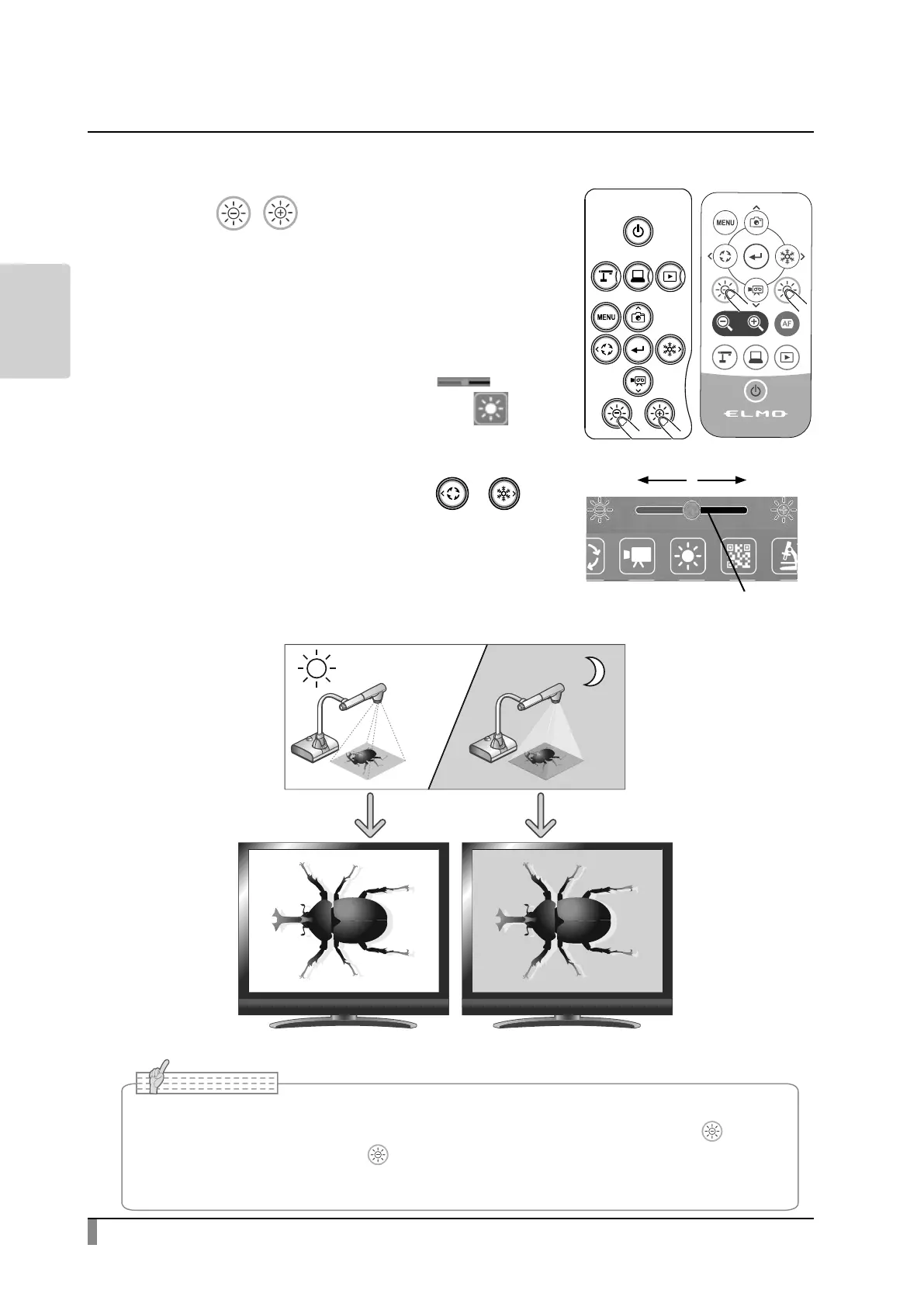
Adjusting the brightness
Use the [ / ] buttons on the operating
panel or the remote control to change the
level of brightness of the displayed image.
The brightness of the image will not change
automatically in response to the brightness of
the shooting environment.
The Brightness adjustment slider [ ] will
be displayed when the Brightness icon [ ] in
the Menu area is pressed. The brightness of the
image can also be adjusted by moving the slider
left and right. (Mouse operation or [ / ])
The Brightness adjustment slider will disappear
when outside area of the Brightness adjustment
slider is pressed.
※ Brightness adjustment slider:7 levels(-3~+3)
※ Default value:0
• In places where the subject is exposed to bright sunlight (e.g. near a window), or extremely
bright light, the brightness of the screen may not dim suciently, even if the [ ] button
on the operating panel or the [ ] button on the remote control is pressed. In such cases,
to adjust the amount of light, close the curtains or move the subject away from the light.
7KHEULJKWQHVVRIWKHLPDJHLVGLIIHUHQW
Brightness
adjustment slider
+
-
Note



 To Next Page