17
BASIC
OPERATIONS
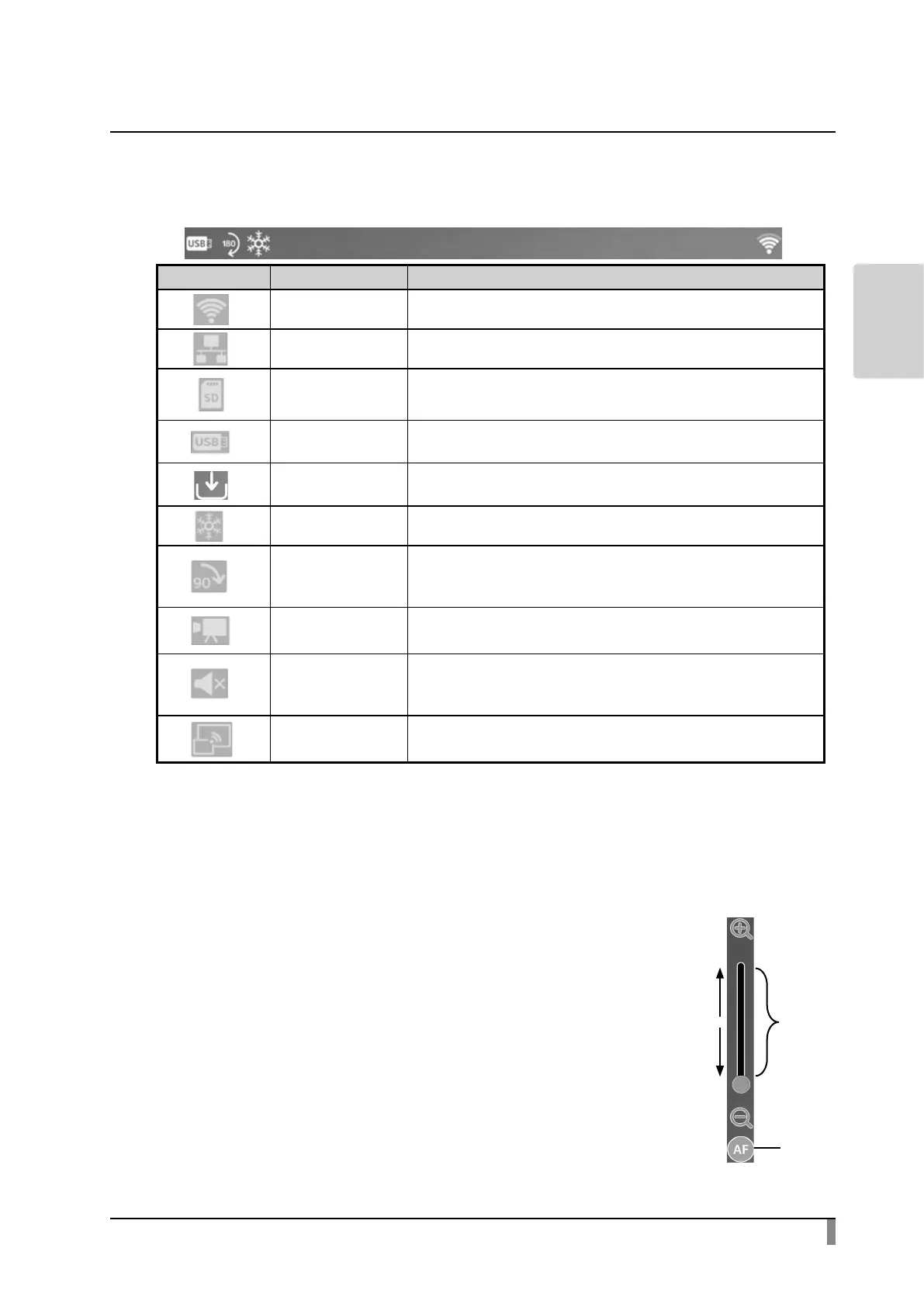
Status area
The status of the camera will be displayed with icons.
Icon Name Function
WiFi ※ 1 To display the WiFi status.
LAN ※ 1 This icon will be displayed when a LAN cable is connected.
SD card
※2
This icon will be displayed when the recording destination
is set to SD card.
USB ash drive
※2
This icon will be displayed when the recording destination
is set to USB ash drive.
Internal storage
※2
This icon will be displayed when the recording destination
is set to internal storage.
Freeze This icon will be displayed during freeze.
Image rotation
This icon will be displayed during image rotation.
(The icon changes according to the rotation angle.
90°→ 180°→ 270°)
Recording This icon will be displayed during recording.
Speaker mute
This icon will be displayed when the speaker is muted.
(This icon does not appear when the speaker mute setting
is o.)
Miracast This icon will be displayed during Miracast communication.
※ 1 Either WiFi icon or LAN icon will be displayed depending on the network
connection status.
※ 2 The currently set recording destination will be displayed.
(The priority order for the recording destination
: USB ash drive > SD card > internal storage)
Zoom area
The Zoom area will be displayed when zoom operation is
performed in the Document camera screen or when the
Menu area is displayed.
The Zoom slider and the AF button will be displayed.
※ The Zoom area does not appear during video playback
as no zoom operation can be performed during video
playback.
Zoom slider: Adjust the zoom by moving the round tab up
and down.
AF button: Press once. (One push)
※ The AF button will be displayed only when
the camera image is displayed.
Zoom
slider
Zoom
out
AF
button
Zoom
in



 To Next Page